1. What This Article Mainly Discusses
Never build a high tower on shifting sand. Business growth and the evolution of business forms both need solid, powerful IT systems to support them. Business content is transparent to the market, but IT systems cannot be built to perfection overnight. In the future, competition between companies will mainly come from competition between their IT systems, and the ability to respond quickly to business requirements will be the key to winning.
IT systems are also constantly evolving. Building an efficient, intelligent IT system is very costly. At first it only needs to be adequate, then pleasant to use, and finally it becomes a core competitive advantage.
Change is not what is frightening; a heavy historical burden is. For technical people, a new requirement is not much of a challenge — what is hard is swapping parts out while flying at high speed. It has to keep the existing functionality working, satisfy the new requirement, and replace the IT infrastructure all at the same time.
In the process of moving to containers and Kubernetes, how to distribute files directly to virtual machines (VMs) and run scripts on them is the focus of this article. Operating on virtual machines directly does not fit the cloud-native definition of immutable infrastructure, but legacy business scenarios require it, so as an IT platform provider we need to offer a solution. This article gives an answer.
2. Why a PaaS Platform Is Needed
Only when an IT operations team starts building a PaaS have they truly stood up.
In today’s environment, business models and forms are no longer trade secrets. The rapid movement of information and people leaves companies facing each other naked. Whatever business you have, I can have too; whatever feature I have, you can add too. The era of explosive short-term business growth is over; we are in an era of refined operations and data-driven decisions.
The new era places more demands on IT systems, and these demands cannot be met under the traditional model. The traditional model develops SaaS services for specific scenarios, encapsulates skills into fixed processes, cuts costs, increases efficiency, and controls risk. That was adequate early on, but as the business scales, operations staff fall into an endless cycle of overtime spent changing and adding features.
The purpose of a PaaS is to abstract certain common capabilities. Middle platforms are built the same way: stable domain implementations land on the platform and expose service interfaces to the outside, while the front end binds directly to the business to respond to rapid market change.
Only with a PaaS platform do IT skills have a direction in which to accumulate, can IT staff step back from repetitive, tedious tasks to think about the business, and only through assembly can they support the business quickly.
3. How to Implement File Distribution and Script Execution
3.1 Under a Traditional PaaS Platform
If you ask an operations person to distribute a file or run a script in bulk, Ansible lets them do it very quickly.
But as mentioned above, we want to free up hands and build a PaaS platform. Below is a traditional IT infrastructure architecture diagram:
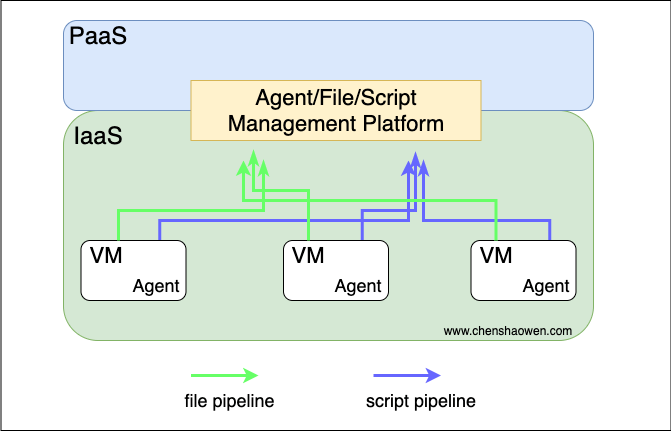
In the traditional IT process, every machine purchased has to be registered in the CMDB and then have an Agent installed to manage it. Through the file and script pipelines the Agent exposes, the upper-layer platform can provide file distribution and script execution.
But developing an Agent is very expensive. It takes countless business failures to polish an Agent that is highly concurrent, high-performance, highly available, highly stable, and highly secure. In some open-source solutions, the Agent, being the core of the company’s IT, is not open-sourced.
3.2 Under Kubernetes
In the cloud-native context, directly modifying the state of a VM at the IaaS layer is not allowed — this is called immutable infrastructure. In some practices the container’s SSHD is even disabled, so any SSH login makes the container exit immediately.
Under Kubernetes, distributing files directly to nodes and running scripts on them is discouraged.
The logic of immutable infrastructure (IaC) is to guarantee that state is reproducible and consistent with declarative semantics. Directly modifying infrastructure is a procedural operation on infrastructure that is already running; it carries a lot of uncertainty and cannot be described precisely.
Below is an IT infrastructure architecture diagram for the cloud-native world:
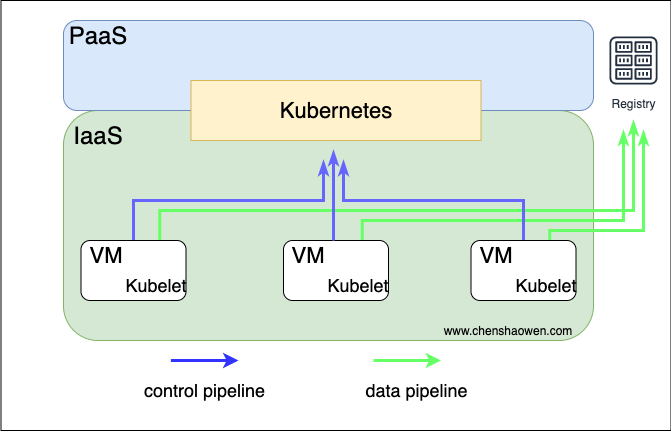
Kubernetes takes over the resources at the IaaS layer and controls how the whole system operates. Business services are mainly delivered through image registries, while log collection and monitoring for the business still rely on other open-source components.
4. Plan for Distributing Files and Running Scripts with Kubernetes
4.1 Preparation for the Exercise
Here is the checklist:
- A Kubernetes cluster where the kubectl command can be run
- The VMs to be distributed to have already been added as cluster nodes
- A Docker environment and a Docker Hub account
4.2 What the Exercise Covers
The exercise is divided into the following steps:
- Prepare the script and file to be run
- Build and push the images
- Create a Kubernetes Job to perform the distribution
4.3 Goals of the Exercise
The goals of the exercise are:
- Run a web service on the virtual machine that provides file downloads
- Distribute a file to the virtual machine and add it to the download service
5. Distributing Files and Running Scripts with Kubernetes
5.1 Cluster Description
| |
Due to a limited budget, no multi-node environment was set up here. But to stay close to a real scenario, when running the Job we use nodeSelector to pick specific nodes, so the distribution process does not run out of control.
5.2 Preparing the File to Distribute and the Script to Run
- File directory structure
- demo
- Dockerfile
- start.sh
All the image build commands below are run inside the demo directory.
- Contents of the script start.sh
| |
The Kubernetes cluster runs CentOS 7, which ships with a Python 2 interpreter. For simplicity, we use SimpleHTTPServer to provide the download service.
- Contents of the Dockerfile
| |
- The file to be distributed
The file can be a local file in the build environment, or any URL that links to a file. Here I chose a link to a PDF file:https://www.chenshaowen.com/static/file/ui-autotest.pdf
5.3 Building the Images
Kubernetes works with OCI images, so the file and script have to be wrapped up: package them into images and distribute them through an image registry.
- Package the file to be distributed into an image
| |
Push the image:
| |
- Package the script to be executed into an image
| |
Push the image:
| |
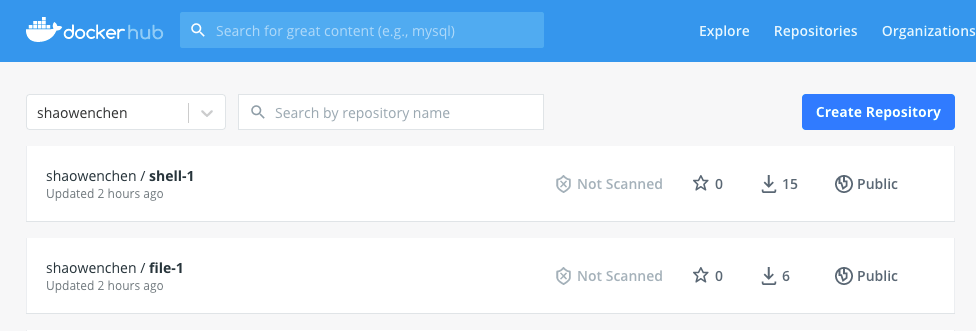
- View the images in Docker Hub
5.4 Kubernetes Node Preprocessing
Besides adding the nodes to be distributed to into the Kubernetes cluster, another important point is preprocessing the nodes.
Node preprocessing mainly means adding labels to nodes to mark them so that distribution can be accurate. In production, networks are usually partitioned, so two dimensions of marking are introduced: zone and ip.
- Label the node with zone and ip
zone represents the partition, marked here as a. ip represents the virtual machine’s IP address within that partition. In practice, this can be handled in bulk when installing the Kubernetes cluster.
| |
- View the applied labels
| |
5.5 Distributing the Script to a Specified Node and Running It
Here we mainly use hostpath to mount files from the container onto the host, then use nsenter to enter the host’s namespaces to perform the operation.
| |
Since the image is very small, the script runs quickly. Log in to the virtual machine and check whether the relevant service process exists:
| |
This shows that the SimpleHTTPServer service is running successfully on the virtual machine.
5.6 Distributing the File to a Specified Node
| |
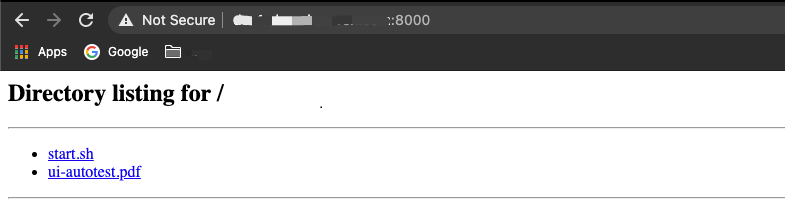
Visiting the page in a browser shows the download page it provides:
View the distributed file on the virtual machine:
| |
6. Summary
This article demonstrated, under Kubernetes, how to distribute files to and run scripts on virtual machines, offering a few ideas for designing a PaaS platform.
- Treat Kubelet as a traditional Agent. Kubelet manages Pods, while an Agent manages IaaS — there are commonalities between the two worth thinking about. In addition, a single Kubernetes cluster supports up to 5,000 nodes, which covers the vast majority of scenarios. Multiple clusters can support even more nodes.
- Distribution can support binaries from more sources. The example uses an https file, but a local file works too, and a file in S3 can be downloaded locally before packaging. Meanwhile, the final image is only a few MB larger than the original file.
- Script execution can be optimized further. When the Job finishes, the script’s execution ends too. In practice, you should add a managed service to the host. For simplicity of demonstration, that is not explored here.
- Directly using Pods with hostIPC/hostPID to replace service processes on traditional virtual machines is another option.
