The team I work on is responsible for SaaS development and carries almost all of the center’s SaaS needs. Among these there are long-term maintenance projects and short-term crunch demo projects, and everyone wears several hats. Of course, the development platform is also open to other people to use, and the whole platform has hundreds if not thousands of SaaS applications. These applications contain a large number of duplicated feature blocks and duplicated development work. As the development platform has been built out, some of this functionality has been distilled into platform components, and I hope another part of it can also be reused. On the one hand this reduces development work, and on the other it helps decouple and maintain functionality. Since the development framework the platform provides is Django, this article mainly discusses the principles and related matters of building a reusable Django APP.
1. Principles of Reusable Applications
There is a lot of work involved in designing, building, testing, and maintaining a web application. Many Python and Django projects share common problems. Reuse will save this duplicated work.
- Conventional structure. A Django App is itself just a Python package, one that is deliberately used within a Django project. A reusable Django App should have conventional submodules, such as the models, urls, and views modules. A conventional structure can significantly reduce the cost of use.
- Mutual isolation. To uniquely identify each app, the Django App name is a good choice as an ID. An app should clearly define its own URL prefix, database table names, and global constant and variable names, and apps must not depend on each other.
- README. Documentation is a must for every Django App. The documentation should cover the Django App’s file structure, implementation details, dependencies, possible risks, and even contact information.
2. The Project’s File Structure
A good directory structure not only helps developers archive code better, it also strengthens the awareness of building reusable Django Apps.
2.1 The Project’s Directory Structure
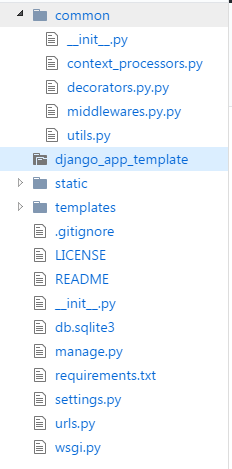
- The django_app_template directory.
The created django app. A project will be divided into many django apps, and each app has its own independent django_app_template directory. - The common directory.
Holds project-related common function libraries, such as context processors, decorators, middleware, utility functions, and so on. - The static directory.
Holds static files. Before deployment, use the collectstatic command to aggregate all static files together. - The templates directory.
Holds template files. - The settings.py file.
Configures project-related environment variables, directories, initialization settings, and so on. If there is a lot of configuration, you can also put the configuration in a separate config folder and set different settings.py files for different environments, for example config/settings_local.py. - The urls.py file.
The root URL configuration. An assembled django app needs its URL configuration added to this file. - The requirements.txt file.
The project’s dependency packages, including a copy of the requirements.txt from every django app.
2.2 The App’s Directory Structure
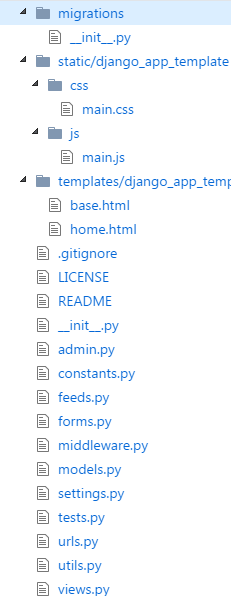
- The static directory.
Static files should be placed in a django_app_template subdirectory to avoid conflicts with other apps. - The templates directory.
Template files should be placed in a django_app_template subdirectory to avoid conflicts with other apps. - The admin.py file.
Used for displaying and customizing the admin page - The constants.py file.
Used to hold constants - The feeds.py file.
Used to output RSS - The forms.py file.
Used to validate data from the frontend - The middleware.py file.
The middleware used in the django app - The settings.py file.
The django app’s related configuration - The utils.py file.
The utility functions used in the django app - The README file.
Used to describe the django app’s related documentation - The requirements.txt file.
Used to record the django app’s related dependencies - The tests.py file.
Used to write the django app’s test cases.
3. How to Package Your Application
3.1 Preparing the Relevant Files
- Create the parent directory django-app-template. Copy the entire django_app_template into this directory, django-app-template/django_app_template.
- Create the django-app-template/README.rst file, documenting the configuration, installation, and usage process for the packaged application.
- Create the django-app-template/requirements.txt file, the dependency packages.
- Create the django-app-template/LICENSE file, the license agreement.
- Create the django-app-template/setup.py file.
If you need to include other files, you also need to configure the django-app-template/MANIFEST.in file
| |
3.2 Writing the Packaging Configuration
Write django-app-template/setup.py. For more detailed usage you can consult the setuptools manuals.
| |
3.3 Running the Packaging Command
Use python setup sdist to create a new package.
| |
3.4 Testing the Installation
Install
| |
Uninstall
| |
