1. Why Physical Build Machines Are Needed
In the article How to Add a Remote macOS Physical Machine for Jenkins Pipeline Builds, I described how to add a physical build machine in Jenkins. This was not a requirement I made up on a whim — at the time, real ToB commercial customers were actually asking for a solution.
For multi-platform developers, building Android, iOS, macOS, Arm, Windows, and X86 applications is a common requirement.
The good news is that GitHub Actions provides a macOS build environment, AWS provides macOS virtual machines, and Huawei provides ARM hosts. In the cloud-native context, the Kubernetes runtime is used more and more, and in the face of processor architectures and operating systems that Kubernetes does not support, continuous integration (CI) appears rather powerless. Continuous integration needs to support the physical build machine runtime.
The question this article hopes to discuss is how, under Kubernetes, to connect to a physical machine for CI builds. This article uses Tekton as an example; other engines handle the logic in a similar way.
2. How Tekton Interacts with Physical Machines
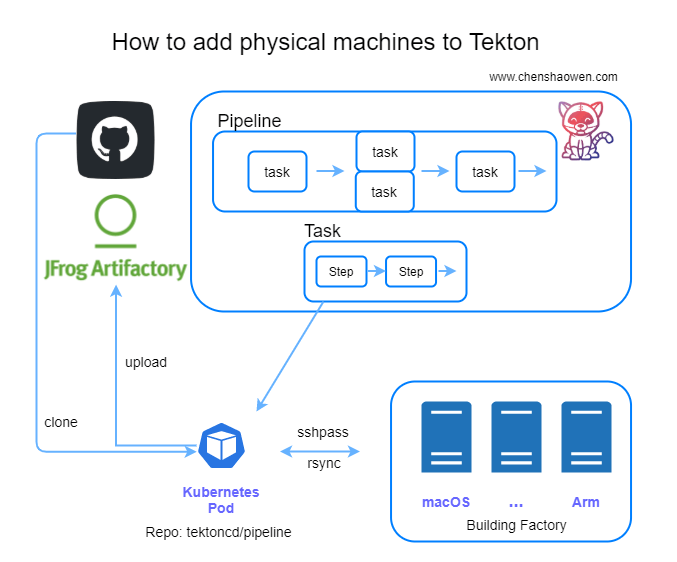
Managing physical machines or virtual machines with Kubernetes is actually a typical Operator scenario. We can define a CRD to describe the relevant fields, and write a Controller to handle the logic between the Pod and the build machine.
We can also write a Tekton Task wrapper, which is the approach this article uses. This also raises another question for me: whether Tekton can replace some Operator scenarios. I will give my thoughts in a follow-up article.
Here we are only doing prototype validation and will not pay much attention to productization details.
In Tekton, each pipeline consists of many Tasks, and Tasks can run in parallel. A Task contains many serial steps, corresponding to a Pod containing many containers.
The key here is to associate the Pod with the build machine. I chose to use rsync to synchronize files between the Pod and the build machine, and to use sshpass inside the Pod to execute build commands on the physical machine.
The main steps are as follows (the following commands are all executed inside the container):
- Clone the code
- Run rsync to synchronize the code to the build machine
- Run sshpass to execute the build command on the build machine
- Run rsync to synchronize the build artifacts from the build machine to the container
- Archive the build artifacts (in this example this step is omitted; we only verify that the build artifacts can be obtained)
As you can see, the whole process actually has nothing directly to do with Tekton; it is feasible for any environment with a direct connection between a container and a build machine. Below we use Tekton as an example for the demonstration.
3. Resource Preparation Checklist
- A Kubernetes cluster. Used to run Tekton; the latest Tekton 0.23 requires Kubernetes no lower than 1.17
- A physical machine or virtual machine. Used to build the application
3.1 Check the Kubernetes Version
1
2
3
4
| kubectl version
Client Version: version.Info{Major:"1", Minor:"19", GitVersion:"v1.19.7", GitCommit:"1dd5338295409edcfff11505e7bb246f0d325d15", GitTreeState:"clean", BuildDate:"2021-01-13T13:23:52Z", GoVersion:"go1.15.5", Compiler:"gc", Platform:"darwin/amd64"}
Server Version: version.Info{Major:"1", Minor:"20", GitVersion:"v1.20.2", GitCommit:"faecb196815e248d3ecfb03c680a4507229c2a56", GitTreeState:"clean", BuildDate:"2021-01-21T01:11:42Z", GoVersion:"go1.15.5", Compiler:"gc", Platform:"linux/amd64"}
|
3.2 Physical Machine Preparation
- The operating system is CentOS 7.6
1
2
3
| uname -a
Linux test 3.10.0-957.21.3.el7.x86_64 #1 SMP Tue Jun 18 16:35:19 UTC 2019 x86_64 x86_64 x86_64 GNU/Linux
|
- Pre-install the Golang compilation environment
The original plan was to choose a macOS build example, but a direct network environment could not be provided, so it was changed to a Golang build example.
1
2
3
| go version
go version go1.13 linux/amd64
|
4. Prepare the Tekton and Pipeline Resources
4.1 Deploy Tekton Pipeline
Tekton uses gcr.io images by default; for environments in China you can replace them with the gcr.azk8s.cn mirror.
1
| kubectl apply -f https://github.com/tektoncd/pipeline/releases/download/v0.23.0/release.notags.yaml
|
 1
 2
 3
 4
 5
 6
 7
 8
 9
10
11
12
13
14
15
16
17
18
19
20
| kubectl -n tekton-pipelines get all
NAME READY STATUS RESTARTS AGE
pod/tekton-pipelines-controller-86c487c965-p6s5t 1/1 Running 0 51s
pod/tekton-pipelines-webhook-7b775d9cd8-fzdrq 1/1 Running 0 51s
NAME TYPE CLUSTER-IP EXTERNAL-IP PORT(S) AGE
service/tekton-pipelines-controller ClusterIP 10.233.61.46 <none> 9090/TCP,8080/TCP 51s
service/tekton-pipelines-webhook ClusterIP 10.233.46.233 <none> 9090/TCP,8008/TCP,443/TCP,8080/TCP 51s
NAME READY UP-TO-DATE AVAILABLE AGE
deployment.apps/tekton-pipelines-controller 1/1 1 1 51s
deployment.apps/tekton-pipelines-webhook 1/1 1 1 51s
NAME DESIRED CURRENT READY AGE
replicaset.apps/tekton-pipelines-controller-86c487c965 1 1 1 51s
replicaset.apps/tekton-pipelines-webhook-7b775d9cd8 1 1 1 51s
NAME REFERENCE TARGETS MINPODS MAXPODS REPLICAS AGE
horizontalpodautoscaler.autoscaling/tekton-pipelines-webhook Deployment/tekton-pipelines-webhook <unknown>/100% 1 5 1 51s
|
4.2 Resource Planning
The required pipeline resource manifest:
- One task, used to clone the code
- One pv, used to share files between tasks
- One custom task, used to synchronize the code to the build machine and, after the build completes, synchronize it back
- One pipeline, used to describe the pipeline and orchestrate the tasks
- One pipelinerun, used to instantiate the pipeline and provide the parameters necessary for the build
4.2 Write the Task for Synchronizing Files and Executing Scripts
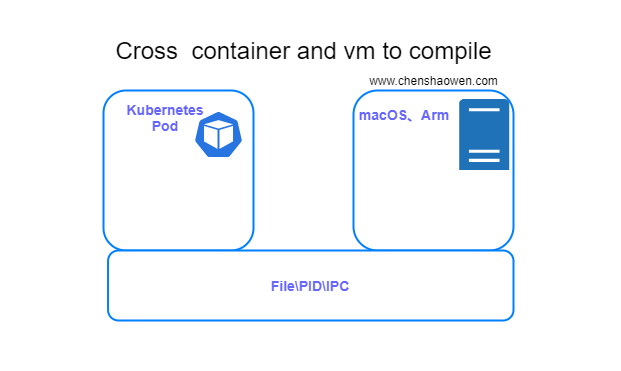
As shown in the figure above, the Task here is used to connect the files and processes between the container and the vm, achieving an effect similar to cross-compilation.
 1
 2
 3
 4
 5
 6
 7
 8
 9
10
11
12
13
14
15
16
17
18
19
20
21
22
23
24
25
26
27
28
29
30
31
32
33
34
35
36
37
38
39
40
41
| ---
apiVersion: tekton.dev/v1beta1
kind: Task
metadata:
name: remote-shell
labels:
app.kubernetes.io/version: "0.1"
annotations:
tekton.dev/pipelines.minVersion: "0.12.1"
tekton.dev/tags: git
tekton.dev/displayName: "remote shell"
spec:
description: >-
This task can be used to run shell in remote machine
workspaces:
- name: source
params:
- name: remote-ip
type: string
- name: remote-port
type: string
- name: remote-username
type: string
- name: remote-password
type: string
- name: remote-workspace
type: string
- name: remote-script
type: string
steps:
- name: remote-shell
image: shaowenchen/rsync-sshpass:v1
workingDir: $(workspaces.source.path)
script: |
sshpass -p "$(params.remote-password)" ssh -o StrictHostKeyChecking=no "$(params.remote-username)"@"$(params.remote-ip)" -p "$(params.remote-port)" "mkdir -p $(params.remote-workspace)"
rsync -ratlz --progress --rsh="sshpass -p $(params.remote-password) ssh -o StrictHostKeyChecking=no -l $(params.remote-username)" ./ "$(params.remote-ip)":"$(params.remote-workspace)"
sshpass -p "$(params.remote-password)" ssh -o StrictHostKeyChecking=no "$(params.remote-username)"@"$(params.remote-ip)" -p "$(params.remote-port)" "$(params.remote-script)"
rsync -ratlz --progress --rsh="sshpass -p $(params.remote-password) ssh -o StrictHostKeyChecking=no -l $(params.remote-username)" "$(params.remote-ip)":"$(params.remote-workspace)"/ .
|
For the approach, you can refer to the examples provided by Tekton. It is mainly divided into a few steps:
- Define the parameters
- Write the step flow
- Write the script
This is just a process of stringing together a script, except that with the help of a container image, the step of installing various tools is saved.
4.3 Prepare the Tekton pipeline description
Tekton has officially launched the Hub service for sharing Tasks; here we directly use https://hub.tekton.dev/tekton/task/git-clone
1
| kubectl apply -f https://raw.githubusercontent.com/tektoncd/catalog/main/task/git-clone/0.3/git-clone.yaml
|
- Build a toolbox image shaowenchen/rsync-sshpass:v1
The Dockerfile is:
 1
 2
 3
 4
 5
 6
 7
 8
 9
10
11
12
13
| ARG alpine_ver=3.13
FROM alpine:${alpine_ver}.5
RUN apk update \
&& apk upgrade \
&& apk add --no-cache \
rsync \
openssh-client \
openssh \
sshpass \
ca-certificates \
&& update-ca-certificates \
&& rm -rf /var/cache/apk/*
|
 1
 2
 3
 4
 5
 6
 7
 8
 9
10
11
12
13
14
15
16
17
18
19
20
21
22
23
24
25
26
27
28
29
30
31
32
33
34
35
36
37
38
39
40
41
42
43
44
45
46
47
48
49
50
51
52
53
54
55
56
| apiVersion: tekton.dev/v1beta1
kind: Pipeline
metadata:
name: remote-build-pipeline
spec:
params:
- name: repo-url
type: string
- name: branch-name
type: string
- name: remote-ip
type: string
- name: remote-port
type: string
- name: remote-username
type: string
- name: remote-password
type: string
- name: remote-workspace
type: string
- name: remote-script
type: string
workspaces:
- name: shared-data
tasks:
- name: fetch-repo
taskRef:
name: git-clone
workspaces:
- name: output
workspace: shared-data
params:
- name: url
value: $(params.repo-url)
- name: revision
value: $(params.branch-name)
- name: remote-build
taskRef:
name: remote-shell
runAfter: ["fetch-repo"]
workspaces:
- name: source
workspace: shared-data
params:
- name: remote-ip
value: $(params.remote-ip)
- name: remote-port
value: $(params.remote-port)
- name: remote-username
value: $(params.remote-username)
- name: remote-password
value: $(params.remote-password)
- name: remote-workspace
value: $(params.remote-workspace)
- name: remote-script
value: $(params.remote-script)
|
The pipeline contains two tasks: one task clones the code, and one task performs the remote build.
 1
 2
 3
 4
 5
 6
 7
 8
 9
10
11
12
13
14
15
16
17
18
19
20
21
22
23
24
25
26
27
28
29
30
31
32
33
34
35
36
37
38
| ---
apiVersion: tekton.dev/v1beta1
kind: PipelineRun
metadata:
name: remote-build-pipelinerun-1
spec:
pipelineRef:
name: remote-build-pipeline
workspaces:
- name: shared-data
volumeClaimTemplate:
spec:
accessModes:
- ReadWriteOnce
resources:
requests:
storage: 10Gi
params:
- name: repo-url
value: https://github.com/shaowenchen/terraform-provider-qingcloud.git
- name: branch-name
value: master
- name: subdirectory
value: terraform-provider-qingcloud-001
- name: remote-ip
value: 0.0.0.0
- name: remote-port
value: "22"
- name: remote-username
value: root
- name: remote-password
value: YourPassword
- name: remote-workspace
value: ~/workspaces/terraform-provider-qingcloud-001
- name: remote-script
value: |
cd ~/workspaces/terraform-provider-qingcloud-001
make
|
Here the code is cloned into the terraform-provider-qingcloud-001 directory of the pv, and synchronized to the ~/workspaces/terraform-provider-qingcloud-001 directory of the build machine. That is to say, the files in these two directories will ultimately stay consistent, while the built binary is generated on the build machine.
- View the Tekton resource definitions
After all the above resources are applied, you can view the related resources and pipeline status.
1
2
3
4
5
| kubectl get tasks.tekton.dev
NAME AGE
git-clone 18m
remote-shell 5m47s
|
1
2
3
4
| kubectl get pipelines.tekton.dev
NAME AGE
remote-build-pipeline 4m21s
|
1
2
3
4
| kubectl get pipelineruns.tekton.dev
NAME SUCCEEDED REASON STARTTIME COMPLETIONTIME
remote-build-pipelinerun-1 True Succeeded 6m15s 5m42s
|
In pipelineruns you can use describe to get the record of the entire pipeline execution, used for displaying execution steps and querying build logs. Below is an excerpt:
 1
 2
 3
 4
 5
 6
 7
 8
 9
10
11
12
13
14
15
16
17
18
19
20
21
22
23
24
25
26
27
28
29
| Task Runs:
remote-build-pipelinerun-1-fetch-repo-56ws8:
Pipeline Task Name: fetch-repo
Status:
Completion Time: 2021-04-27T13:22:08Z
Conditions:
Last Transition Time: 2021-04-27T13:22:08Z
Message: All Steps have completed executing
Reason: Succeeded
Status: True
Type: Succeeded
Pod Name: remote-build-pipelinerun-1-fetch-repo-56ws8-pod-mgx77
Start Time: 2021-04-27T13:21:54Z
Steps:
Container: step-clone
Image ID: docker-pullable://gcr.io/tekton-releases/github.com/tektoncd/pipeline/cmd/git-init@sha256:db18a9c1607c8cbbcd72f61d0c4d795b9ff528669deacd5f8a1672e4ef198ffd
Name: clone
Terminated:
Container ID: docker://e5258bc7b0770e0333a93395eda13514abbd293652c0c0494352407a3fbc1a7f
Exit Code: 0
Finished At: 2021-04-27T13:22:07Z
Message: [{"key":"commit","value":"d024b4deeb2f328098fed88eb702cb19dac8452f","type":"TaskRunResult"},{"key":"url","value":"https://github.com/shaowenchen/terraform-provider-qingcloud.git","type":"TaskRunResult"}]
Reason: Completed
Started At: 2021-04-27T13:22:04Z
Task Results:
Name: commit
Value: d024b4deeb2f328098fed88eb702cb19dac8452f
Name: url
Value: https://github.com/shaowenchen/terraform-provider-qingcloud.git
|
5. Functionality Verification
- View the related workloads
1
2
3
4
5
| kubectl get pod
NAME READY STATUS RESTARTS AGE
remote-build-pipelinerun-1-fetch-repo-56ws8-pod-mgx77 0/1 Completed 0 8m49s
remote-build-pipelinerun-1-remote-build-wxtms-pod-bcn6r 0/1 Completed 0 8m35s
|
- On the physical build machine, view the build directory
1
2
3
4
5
6
7
8
| pwd
/root/workspaces/terraform-provider-qingcloud-001
ls
CHANGELOG.md glide.yaml go.sum main.go qingcloud scripts terraform-provider-qingcloud website
dev.md go.mod LICENSE Makefile README.md terraform vendor
|
- View the build directory of the Kubernetes PV
1
2
3
4
| kubectl get pv
NAME CAPACITY ACCESS MODES RECLAIM POLICY STATUS CLAIM STORAGECLASS
pvc-860016bb-14b6-414a-9c5a-1a71d7290ba8 10Gi RWO Delete Bound default/pvc-e7ceb0582a openebs-hostpath 2m12s
|
Find the PV storage path
1
2
3
| kubectl describe pv pvc-860016bb-14b6-414a-9c5a-1a71d7290ba8 |grep Path
Path: /var/openebs/local/pvc-860016bb-14b6-414a-9c5a-1a71d7290ba8
|
View the PV directory file structure
1
2
3
4
| ls /var/openebs/local/pvc-860016bb-14b6-414a-9c5a-1a71d7290ba8
CHANGELOG.md glide.yaml go.sum main.go qingcloud scripts terraform-provider-qingcloud website
dev.md go.mod LICENSE Makefile README.md terraform vendor
|
In both directories, the build artifact terraform-provider-qingcloud exists, which meets expectations and shows that we have achieved our goal.
6. Summary
A traditional CICD engine is usually a C/S architecture. It needs an S side to parse the process and schedule the pipeline; it needs many C sides to execute high-load build tasks. The scalability of this approach is not linear, and under cloud native, when the business volume is large, it easily hits a bottleneck. Therefore, we need a more cloud-native build engine. Under the new engine we need to solve some old problems, and supporting physical machine builds is one of them.
This article mainly uses Tekton as an example to provide an approach to connecting physical machines for builds using rsync and sshpass. The key points are as follows:
- The purpose of using rsync\sshpass is mainly to bind the container and the physical machine together, with bidirectional file synchronization and interconnected process spaces.
- Not limited to Tekton; any engine can use this approach.
- This is only a solution verification; if it is to be put into production, issues such as caching, key security, data security, and tenant isolation still need to be considered.
7. Reference
