1. Authentication and Authorization Problems Brought by Heterogeneous Systems
Enterprise systems can be divided into the following types:
- Commercial software you purchase, such as JumpServer
- Open-source software, such as Kibana and Grafana
- Software developed in-house, such as an application management platform
One thing worth clarifying here: authentication and authorization are two different functions:
- Authentication — proving that you are you
- Authorization — you are an administrator, not an ordinary user
For the systems above, integrating authentication and authorization mainly faces the following problems:
- Customizing on your own is expensive, while community support responds slowly. Customizing open-source components requires a large investment of manpower, and customizing them directly is out of the question; submitting requirements to the community and waiting for a solution takes too long and does not address the immediate need
- Connecting in-house systems one by one to authentication and authorization is very costly. Every in-house system has to implement a similar set of logic: validating the login state and verifying permission rules
- Older systems are hard to integrate. For some old services the people who knew them have left; almost no one maintains them, yet someone still uses them, and they cannot be changed
For commercially purchased software, integration cost and security can be evaluated at procurement time, so it can often meet authentication and authorization needs.
In large enterprises, however, different departments habitually build a set of authentication and authorization systems they are familiar with, which splits systems between departments into one silo wall after another, so information cannot flow freely inside the company. This causes great inconvenience to employees, sharply reduces work efficiency, and weakens the company’s competitiveness in the market.
A unified authentication and authorization system is necessary. Delivering common functionality in the form of a service for everyone to use not only avoids duplicate development but also lets everyone enjoy higher-quality professional service.
2. Domain Strategy for Services
When validating the login state, you usually need to read the Cookie of the HTTP request. A Cookie’s scope is directly tied to the domain. So before discussing unified authentication and authorization, let us first look at the domain strategy for services.
2.1 Multiple Domains, Multiple Services
To isolate services from each other completely and reduce the blast radius of each change, a multiple-domain strategy is adopted. Examples:
harbor.oa.com
c.domain.com
www.chenshaowen.com
One domain per service reduces the blast radius of failures, but it also adds significant management cost, such as certificates and DNS configuration. Without a unified management plane, this added complexity inevitably increases the chance of human error and mistakes. Controlling complexity is a skill every excellent engineer must master.
A unified domain helps build a good brand image. Chaotic domain usage lowers users’ brand recognition, makes them mistake a fake for the real thing, and gives bad actors an opening. Multiple domains are also bad for SEO: they split the scores of services in search engines and lower rankings.
So do not have too many domains. Before enabling a new domain, think hard about whether you can do without it, and follow the principle of using as few as possible.
Under a multiple-domain strategy, we can only integrate with the unified login system in the form of third-party login. Each system applies for its own set of integration credentials and then connects on its own.
2.2 Single Domain, Multiple Locations
Using one domain with different Locations mapping to different services is the approach I recommend.
domain.com/grafana/
domain.com/oa/
domain.com/c/
domain.com/c-test/
It is easy for users to remember, and engineers no longer have to struggle with configuring Hosts — with multiple domains, each service needs its own Hosts entry, which is a real nuisance.
A unified entry point is easy to maintain. Multiple entry points and multiple management planes are signs of weak architecture and operations capability. No one rejects simplicity; being intuitive, concise, and WYSIWYG are goals we keep pursuing when designing systems.
Because a single domain is used, Cookies are shared between these systems. So you only need to write the login-state Cookie under that domain, and the user will also be in a logged-in state when using other systems. Those other systems do not need to implement login logic; they only need to validate the login state in the background and then perform authorization.
3. Integrating Authentication and Authorization via Layer 7 forward-auth
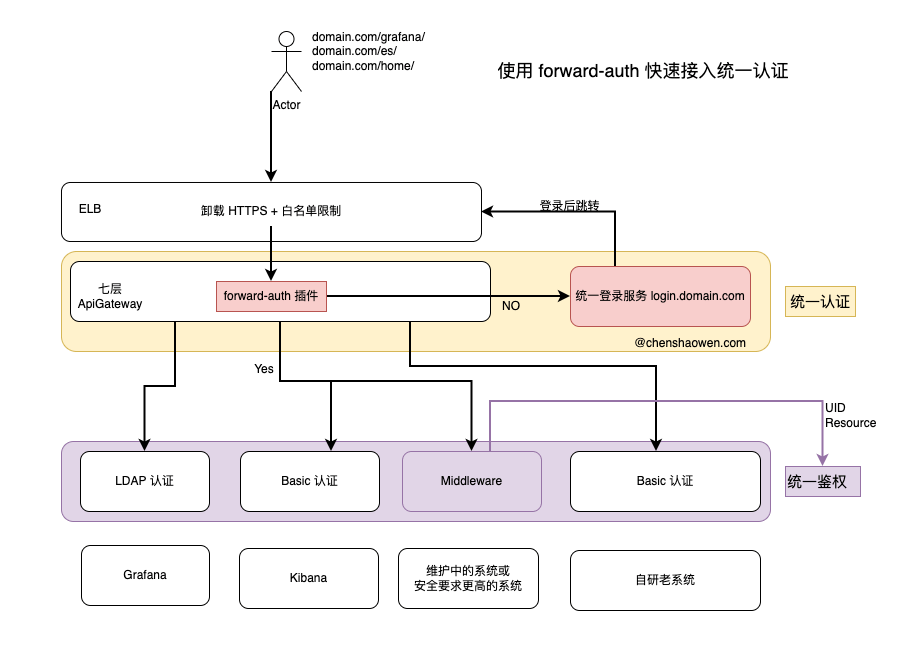
As shown above, whether the software is commercial, in-house, or open source, we can unify authentication and authorization through a Layer 7 gateway.
The access flow is as follows:
- The Layer 4 gateway offloads certificates. First, the ELB offloads the HTTPS certificate and takes over the user’s domain traffic in a unified way. Of course, if you want to restrict where access comes from, you can also apply an IP whitelist.
- The Layer 7 gateway routes. The Layer 7 gateway authenticates every HTTP request and extracts the field used for authentication — this field can be the JWT Token in the Header or the entire Cookie. Requests that do not pass the forward-auth check are rejected outright.
- Entry into the business system. At this point the user has been authenticated but still lacks authorization. For commercial or open-source software, you can perform a second authentication via LDAP or Basic and then obtain role permissions. For an in-house system, you can write authorization logic in middleware: get the user ID and call the unified authorization center to authorize.
The good news is that some gateways already provide this capability — for example the forward-auth plugin in Apisix and the forward-auth middleware in Traefik — so we can just use them directly. The following is the functionality forward-auth needs to implement:
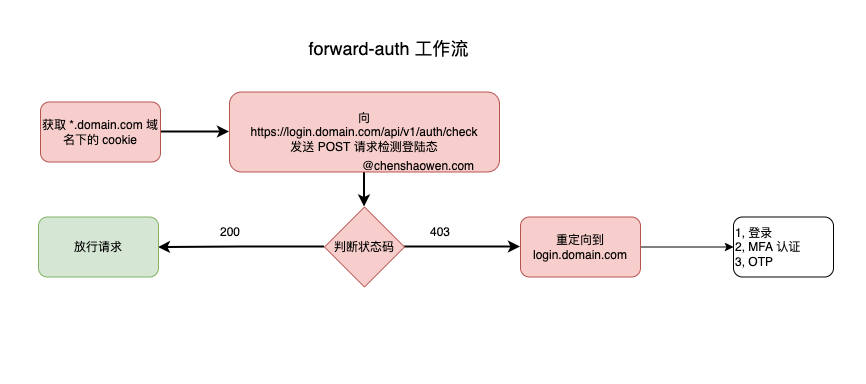
When traffic passes through the gateway, forward-auth needs to send a request to the specified authorization endpoint. If the response is 200, the traffic is allowed through; if the response is not 200, a redirect is issued that sends the traffic to the authentication page. Below is a snippet of forward-auth configuration in Apisix for your reference:
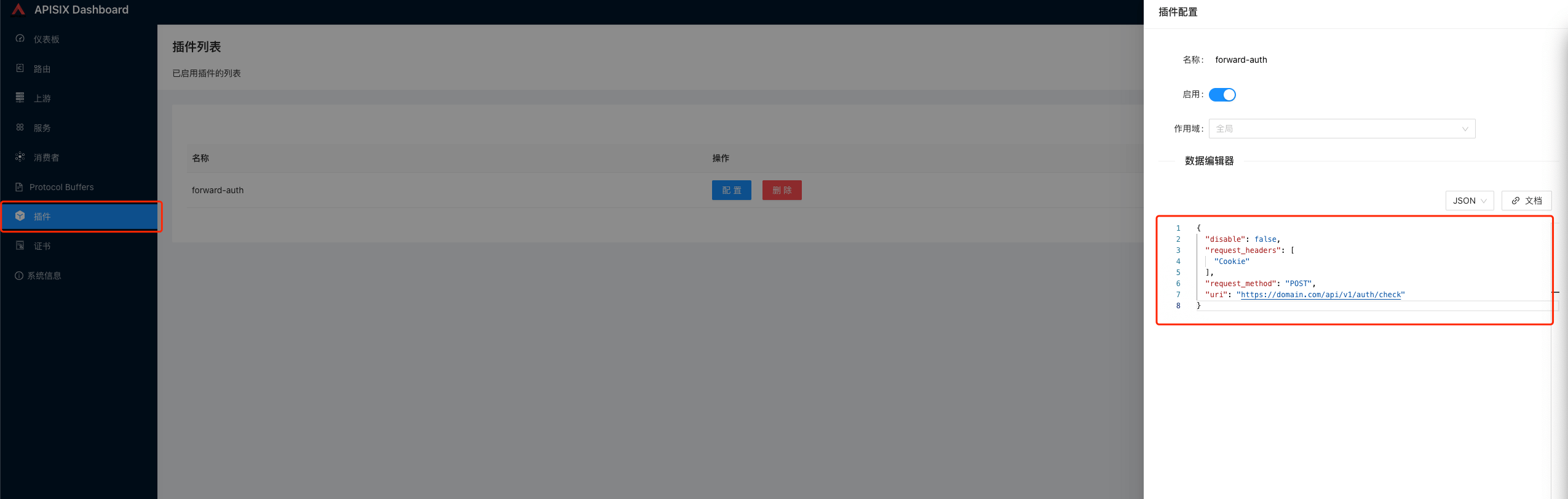
The forward-auth plugin in Apisix is written in lua and can be modified as needed. For example, to add authorization logic, you only need to pass the UID and the resource locator URI to the unified authorization center.
4. Integrating Authentication and Authorization via a Sidecar
With the approach above, we put authentication at the access layer with no modification to the business system at all. But this approach carries a risk: if you bypass the gateway, you bypass authentication.
forward-auth implemented on the gateway authenticates north-south traffic, that is, traffic from users accessing the business system directly. But it cannot control east-west traffic: other services can still access the protected service. Another approach is to use a Sidecar for authentication and authorization, as shown below:
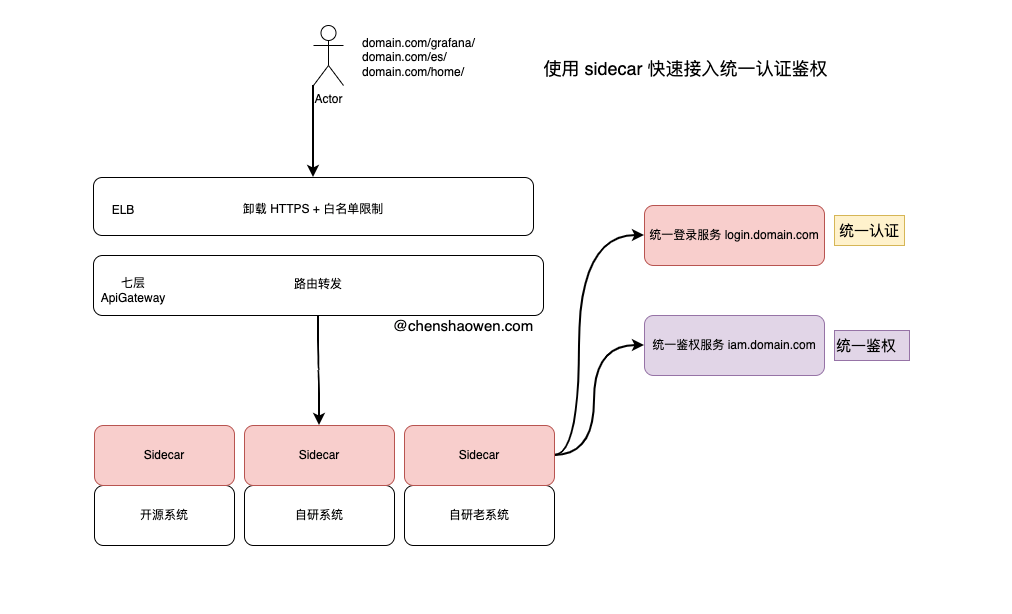
We need to develop a Sidecar that moves forward-auth down from the gateway layer, proxies all access traffic, and forwards it to the protected business after unified authentication and authorization.
This requires deploying a Sidecar on every protected system. The user’s request traffic should then be forwarded to the Sidecar rather than to the business itself.
5. Summary
This article is mainly about how to quickly integrate heterogeneous systems into a unified authentication and authorization system.
Authentication proves that you are you, while authorization proves that you have permission to do this. Assuming a unified authentication and authorization system already exists, here are two ideas for integrating quickly:
The first is to use forward-auth at the gateway layer, which is completely non-intrusive to the business, and complete authentication and authorization at the access layer. A second verification through backend Middleware can provide further security validation.
The second is to use a Sidecar to intercept the traffic of the protected business, authenticate and authorize it, and then forward the traffic. This approach involves a certain amount of development, but the Sidecar can be reused and is non-intrusive to business code. In fact, many of the functions implemented by Middleware can be done with a Sidecar, shifting the development cost to the operations and deployment layer. When the infrastructure is Kubernetes, we can further rely on the kube-apiserver’s admission control Webhook to inject it automatically, achieving zero-cost use forever after a single development effort.
