1. Self-signing a *.docker.io Domain Certificate
1.1 Creating a CA Certificate
- Generate the CA certificate private key
1
| openssl genrsa -out ca.key 4096
|
- Generate the CA certificate
1
2
3
4
| openssl req -x509 -new -nodes -sha512 -days 3650 \
-subj "/C=CN/ST=Beijing/L=Beijing/O=example/OU=Personal/CN=chenshaowen.com" \
-key ca.key \
-out ca.crt
|
1.2 Creating a *.docker.io Domain Certificate
1
| openssl genrsa -out docker.io.key 4096
|
- Generate the certificate signing request (CSR)
1
2
3
4
| openssl req -sha512 -new \
-subj "/C=CN/ST=Beijing/L=Beijing/O=example/OU=Personal/CN=*.docker.io" \
-key docker.io.key \
-out docker.io.csr
|
- Generate the x509 v3 extension
 1
 2
 3
 4
 5
 6
 7
 8
 9
10
11
| cat > v3.ext <<-EOF
authorityKeyIdentifier=keyid,issuer
basicConstraints=CA:FALSE
keyUsage = digitalSignature, nonRepudiation, keyEncipherment, dataEncipherment
extendedKeyUsage = serverAuth
subjectAltName = @alt_names
[alt_names]
DNS.1=docker.io
DNS.2=*.docker.io
EOF
|
- Generate the
*.docker.io domain certificate
1
2
3
4
5
| openssl x509 -req -sha512 -days 3650 \
-extfile v3.ext \
-CA ca.crt -CAkey ca.key -CAcreateserial \
-in docker.io.csr \
-out docker.io.crt
|
1.3 Viewing All the Generated Files
1
2
3
| ls
ca.crt ca.key ca.srl docker.io.cert docker.io.crt docker.io.csr docker.io.key v3.ext
|
2. Deploying the Registry and Configuring the HTTPS Certificate
2.1 Deploying an Nginx Proxy to Forward HTTPS Traffic
Here we configure an Nginx to terminate the HTTPS certificate, forwarding requests for the *.docker.io domain to the Registry.
Reference: https://github.com/shaowenchen/docker-compose/tree/main/nginx
You need the certificate files generated above: docker.io.crt, docker.io.key.
2.2 Deploying the Docker.io Proxy Registry
- Create a mirror directory
1
2
| mkdir mirror
cd mirror
|
- Edit the configuration file
 1
 2
 3
 4
 5
 6
 7
 8
 9
10
11
12
13
14
15
16
17
18
19
20
| version: 0.1
log:
fields:
service: registry
storage:
cache:
blobdescriptor: inmemory
filesystem:
rootdirectory: /var/lib/registry
http:
addr: :5000
headers:
X-Content-Type-Options: [nosniff]
health:
storagedriver:
enabled: true
interval: 10s
threshold: 3
proxy:
remoteurl: https://registry-1.docker.io
|
1
2
3
4
| docker run -d --security-opt apparmor=unconfined --security-opt seccomp=unconfined -p 5000:5000 --restart=always --name mirror \
-v `pwd`/config.yml:/etc/docker/registry/config.yml \
-v `pwd`/data:/var/lib/registry \
registry:2
|
2.3 Deploying the Private Repository’s Registry
- Create a harbor-mirror directory
1
2
| mkdir harbor-mirror
cd harbor-mirror
|
- Edit the configuration file
 1
 2
 3
 4
 5
 6
 7
 8
 9
10
11
12
13
14
15
16
17
18
19
20
21
22
| version: 0.1
log:
fields:
service: registry
storage:
cache:
blobdescriptor: inmemory
filesystem:
rootdirectory: /var/lib/registry
http:
addr: :5000
headers:
X-Content-Type-Options: [nosniff]
health:
storagedriver:
enabled: true
interval: 10s
threshold: 3
proxy:
remoteurl: https://private.chenshaowen.com
username: [username]
password: [password]
|
Here [username] and [password] need to be replaced with the private repository’s credentials.
1
2
3
4
| docker run -d --security-opt apparmor=unconfined --security-opt seccomp=unconfined -p 5002:5000 --restart=always --name harbor-mirror \
-v `pwd`/config.yml:/etc/docker/registry/config.yml \
-v `pwd`/data:/var/lib/registry \
registry:2
|
3. Adding the Certificate to Hosts That Access the Image Registry
Here we simply add ca.crt to the trusted certificate chain, so that any domain certificate issued by this CA is trusted. Of course, you can also add each self-signed certificate to the trust list one by one. Here we rename ca.crt so it is easier to identify and distinguish:
1
| cp ca.crt chenshaowen.com.ca.crt
|
3.1 Ubuntu Systems
1
2
| cp chenshaowen.com.ca.crt /usr/local/share/ca-certificates
update-ca-certificates
|
1
2
| rm -f /usr/local/share/ca-certificates/chenshaowen.com.ca.crt
update-ca-certificates
|
3.2 CentOS Systems
1
| cp chenshaowen.com.ca.crt /etc/pki/ca-trust/source/anchors/
|
1
| update-ca-trust extract
|
1
2
3
| rm /etc/pki/ca-trust/source/anchors/chenshaowen.com.ca.crt
update-ca-trust extract
|
3.3 Docker Must Be Restarted to Reload the Root Certificate
1
| systemctl restart docker
|
4. Test Verification
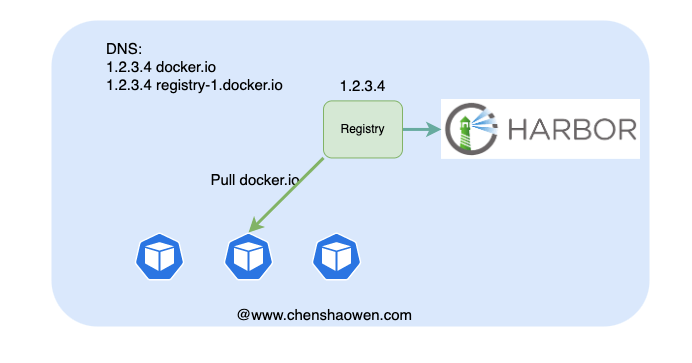
Let’s say the IP of the host running the Nginx proxy is 1.1.1.1. Then every host that accesses images needs to add a DNS resolution or configure /etc/hosts:
1
2
| 1.1.1.1 docker.io
1.1.1.1 registry-1.docker.io
|
And the test host should trust the ca.crt or docker.io.crt certificate.
4.1 Proxying docker.io Traffic
At this point, point the Nginx traffic at port 5000, which means accessing images on Docker Hub directly.
1
| docker pull jenkins/jenkins
|
The pull succeeds.
- Check the local cache files
1
2
3
| du -sh data/
169M data/
|
4.2 Proxying Private Image Repository Traffic
Modify the Nginx configuration to switch the backend traffic to port 5002 of the private image repository. Now the backend is wired to the private Harbor image repository.
- Pull a private image as a test
If you accessed the private image repository directly, the address would be private.chenshaowen.com/okscloud/test:develop , but here we can pull the image after simply dropping the domain prefix:
1
| docker pull okscloud/test:develop
|
The pull succeeds. At this point docker.io points to the Registry, and is ultimately proxied to private.chenshaowen.com.
1
2
3
| du -sh /diskb/harbor-mirror
676M /diskb/harbor-mirror
|
5. Summary
This article mainly validated an idea: hijacking Docker Hub image traffic on an intranet by changing the resolution of docker.io to point at a Registry proxy. The value of this kind of hijacking lies in:
- Auditing the intranet’s image dependencies on Docker Hub
- Better image acceleration, using something like Dragonfly
- Escaping the rate limiting and instability of accessing docker.io from within China
