A quick word on the project requirements: the team needed to publish documentation externally. The documents are written in Markdown and need to be published as HTML. At first we used an Nginx + Jekyll solution. As the documentation grew, the document system developed a strong need for search. I discussed this in another article, but among those approaches some produced unsatisfactory search results and others depended on additional services, which felt rather heavy. Hence the implementation described in this article.
1. Tool Introduction
- Whoosh is a full-text search component implemented in pure Python. Whoosh is not only feature-complete but also very fast.
- Haystack is a third-party Django app that provides full-text search. It can index and search the content of a Model. At the same time, Django-haystack supports four full-text search engine backends: Whoosh, Solr, Xapian, and Elasticsearch. In essence it is a full-text search framework, and you are free to choose and combine on use.
- Jieba is a Python Chinese word segmentation component with many features; this article uses its ChineseAnalyzer Chinese segmentation capability.
2. Design
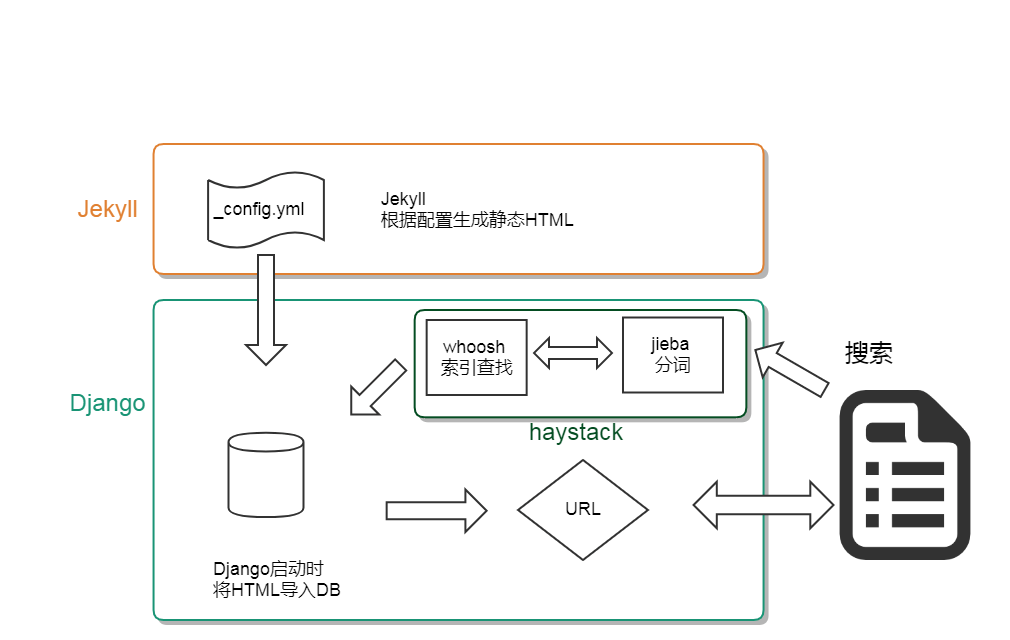
Approach
- Use Jekyll as the tool for converting Markdown to HTML, ultimately obtaining local WYSIWYG HTML documents
- Use the Python scraping tool BeautifulSoup to parse the static HTML and import it into the DB
- Use Jieba for word segmentation and Whoosh to build the query index
- Have Django match the .html URLs directly and fetch data from the database to serve the documents externally, which ensures the links from the Nginx + Jekyll approach remain valid.
3. Implementation
3.1 Creating the document app
In the project directory, create a Django app named: document. The document system has a two-level directory structure, where the first level is the category and the second level is the document.
For example:
- doc/type1/aaa.html
- doc/type2/bbb.html
document/models.py
| |
3.2 Reading the HTML
Here BeautifulSoup is used to do some simple filtering of the content in the HTML files. This is to strip out the text of the navigation section and improve search matching accuracy. The document content is wrapped in the markdown-body class, and the title is wrapped in the bk-title-style detail-title-right classes.
document/utils.py
| |
3.3 Installing and Configuring haystack
- Install the dependency packages
| |
- Configure the index
document/search_indexes.py, the file name must be search_indexes.py
| |
- Configure the search engine
Copy haystack/backends/whoosh_backend.py and rename it to document/whoosh_cn_backend. Change the tokenizer to jieba; the default tokenizer has poor support for Chinese.
You only need to replace the original import of StemmingAnalyzer with jieba’s ChineseAnalyzer.
| |
- settings.py configuration
| |
- Generate the index
| |
After running the command, a folder named whoosh_index is generated in the same directory as settings.py, containing the index information.
- Automatically update the index on change
Configure this in settings.py
| |
4. Using It in Django
4.1 Using the haystack default routes
- Configure urls.py
| |
- In the template directory, add the query-related field configuration and template
template/search/search.html, the template file
| |
template/search/indexes/document/document_text.txt, the query field configuration
Note the subdirectory indexes here; the folder name is a convention and must follow exactly this format. The first document is the Django app name, the second document is the Model table name, and the suffix is _text. In the text, you configure the fields to be indexed.
| |
4.2 Custom View API
haystack also provides query functions for retrieving the matching Model objects.
| |
