1. Downloading and Configuring the Runner
1.1 Downloading the Runner
The GitLab CI Runner is a program package written in Go; you can download it from the official site to your local machine.
| |
Add execute permission
| |
1.2 Adding a runner User
When running the Runner, run it under the runner:runner account.
| |
1.3 Changing the pip Source
| |
1.4 Creating the Working Directory
| |
2 Registering the Runner
You can find the token on the project’s settings/ci_cd page, or on the administrator’s /admin/runners page.
The token is the credential for registering a Runner. If the token comes from a project, this Runner belongs to that project, and you can configure it to allow other projects to use it as well. If the token comes from the administrator page, this Runner is visible to and usable by all projects.
The following uses a project Runner as an example:
2.1 Getting the token
On the project’s settings/ci_cd page
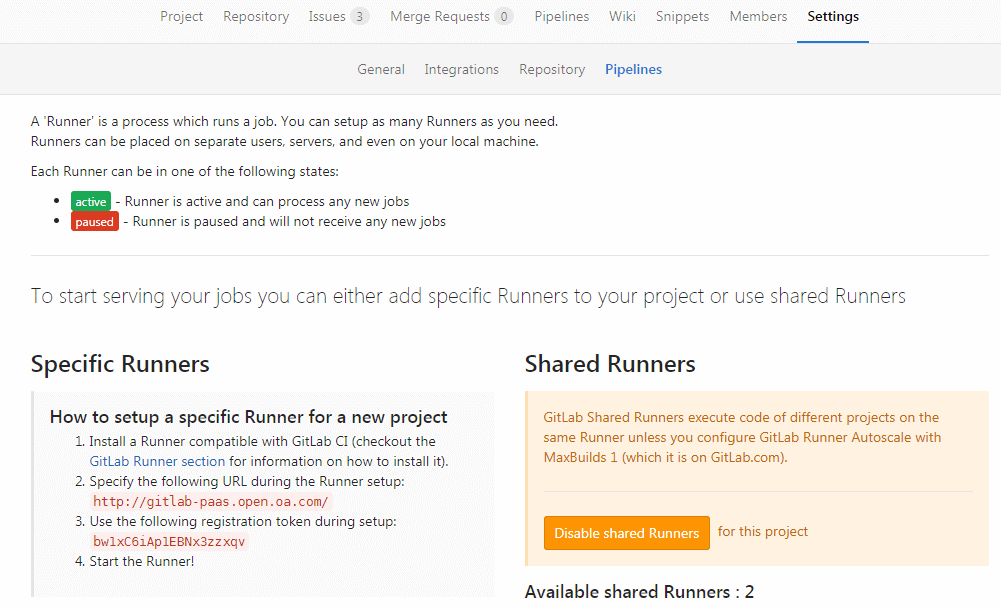
You need to get the two parameters blurred out in the figure:
- URL: http://gitlab.yourdomain.com/
- token: XXXXXXXXXXXXXXXXXXX
2.2 Registering the Runner
Run the command below and enter the relevant information as prompted.
| |
Please enter the gitlab-ci coordinator URL (e.g. https://gitlab.com/):
Enter the GitLab URL
| |
Please enter the gitlab-ci token for this runner:
Enter the token
| |
Please enter the gitlab-ci description for this runner:
Enter the Runner description
| |
Please enter the gitlab-ci tags for this runner (comma separated):
Enter the Runner’s tags:
| |
Whether to run untagged builds [true/false]:
Whether to run on builds that have no tag. When configuring gitlab-ci there will be many jobs, and each job can select a Runner via the tags attribute. Setting this to true here means that if a job has no tags configured, it will still run.
| |
Whether to lock the Runner to current project [true/false]:
Whether to lock the Runner to the current project
| |
Please enter the executor: parallels, ssh, virtualbox, docker-ssh+machine, kubernetes, docker, docker-ssh, shell, docker+machine:
Choose the executor; many executors are listed here
| |
Runner registered successfully. Feel free to start it, but if it's running already the config should be automatically reloaded!
3 Running the Runner
| |
Here, so as not to modify the yml configuration, we migrate from the previous Runner to the new Runner. We simply disable the shared Runner and use a Specific Runner. If you are willing to modify the yml, you can control which Runner executes via the tags parameter.
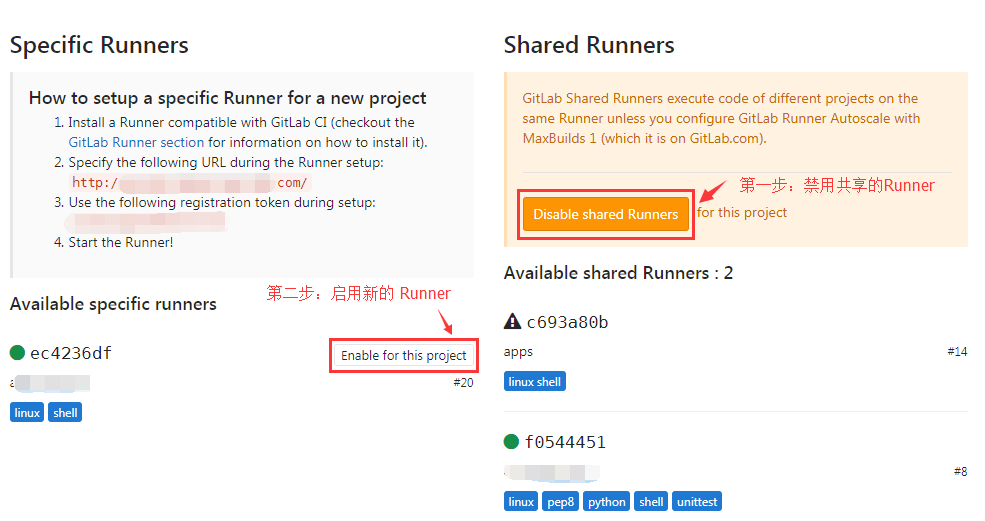
The rest is just configuring a suitable CI environment on the new Runner, such as node and npm.
Viewing the default startup configuration
| |
You can also manage the Runner via systemctl
| |
4. Some Issues
4.1 Unregistering the Runner
You first need to find the token in the config.toml file; note that this token is different from the one used at registration.
| |
| |
4.2 SVN Can’t convert string from ‘UTF-8’
Fixing the svn: Can’t convert string from ‘UTF-8’ to native encoding problem
| |
