1. Introduction to WebAssembly
Cross-platform: it can run on any platform that supports WebAssembly, including web browsers, servers, and mobile devices
High performance: it uses a compact binary format that can be loaded and parsed quickly in the browser, improving application performance
Security: it uses a sandbox model that isolates the code running inside it, protecting the system from malicious code
Portability: WebAssembly code can be generated from different programming languages by compilers, so existing code can easily be converted to the WebAssembly format
Extensibility: WebAssembly supports backward-compatible versioning and allows new instructions and features to be added in the future, giving it better extensibility
2. Real-World Cases
autocad https://web.autocad.com/
Online collaborative design tool figma https://www.figma.com/
Google Earth https://earth.google.com/web/
Web version of photoshop https://photoshop.adobe.com/
Web version of libreoffice https://lab.allotropia.de/wasm/
v86, a virtual machine implemented in WebAssembly https://github.com/copy/v86
Run Go online https://goscript.dev/
Run Python online https://pyscript.net/
For more cases of WebAssembly usage, see https://madewithwebassembly.com/
3. Common Non-Frontend WebAssembly Runtimes
A WebAssembly runtime is the execution environment for WebAssembly code; it is responsible for loading WebAssembly modules, creating WebAssembly instances, and executing WebAssembly code.
- Implemented in C/C++ - WasmEdge, wasm3
- Implemented in Rust - wasmer, wasmtime
- Implemented in Go - WaZero
Today’s mainstream browsers and recent versions of Nodejs all support wasm.
4. Installing WasmEdge
Since new versions of Docker support WasmEdge, I also chose WasmEdge locally as the WebAssembly runtime so that things stay consistent inside the container.
- Download the Wasmedge binary
Go to https://github.com/WasmEdge/WasmEdge/releases to download the binary for your platform.
| |
- Extract and install Wasmedge
| |
If you need to copy it to another directory, be careful to preserve the relative positions of the bin, include, and lib directories, otherwise you will get the following error:
| |
- Check the Wasmedge version
| |
5. Compiling WebAssembly Programs with TinyGo
5.1 Pros and Cons of Using TinyGo
- The benefits of using TinyGo
TinyGo is a subset of Go, and you can write WebAssembly programs in the Go language.
It can run directly on WasmEdge without a JavaScript environment.
The wasm file is small enough — a few tens of KB.
- The drawbacks of using TinyGo
Some libraries cannot be used with TinyGo, such as net/http; see https://tinygo.org/docs/reference/lang-support/stdlib/ for details.
TinyGo does not support all Go language features, such as Cgo; see https://tinygo.org/docs/reference/lang-support/ for details.
5.1 Hello, World!
- Create a main.go file
| |
- Compile the code
| |
- Run it with WasmEdge
| |
- Create a Dockerfile
| |
- Build the container image
| |
- Run the container image
| |
6. Compiling WebAssembly Programs with Go
6.1 Pros and Cons of Using Go
- The benefits of using Go
You can use the syscall/js package to interact with JavaScript.
You can use all of Go’s language features and packages.
In the future, once WebAssembly runtimes support GC, program size and performance may improve.
- The drawbacks of using Go
By default it requires a JavaScript environment.
The size is large — several MB, even tens of MB. Still, many legacy projects also compile to tens or hundreds of MB.
6.2 Hello, World!
- Create a main.go file
| |
- Compile the code
| |
- Run it with node
Note that nodejs must be 12 or above.
| |
- Create a Dockerfile
| |
- Build the container image
| |
- Run the container image
| |
6.3 Using syscall/js to Exchange Data Between Go and JavaScript
Go provides the syscall/js package, which can be used to interact with JavaScript.
- Calling a JavaScript function from Go
Use the Global() function provided by the syscall/js package to get the object of the host JavaScript environment.
| |
is equivalent to
| |
- Calling a Go function from JavaScript
| |
js.Global().Set registers the object into the JavaScript environment, so the myfunc function can be called directly from the browser frontend.
- Rewriting hello world to execute wasm on a browser page
| |
- Copy the wasm_exec.js and wasm_exec.html files
The Go compiler ships with a sample.
| |
wasm_exec.js is what loads and executes wasm in the browser, and wasm_exec.html is an example.
- Modify wasm_exec.html
To demonstrate the data interchange between Go and JavaScript, let’s modify the sample a little.
| |
The fetch here should be the compiled wasm file; the default is test.wasm, so change it to main.wasm as needed.
| |
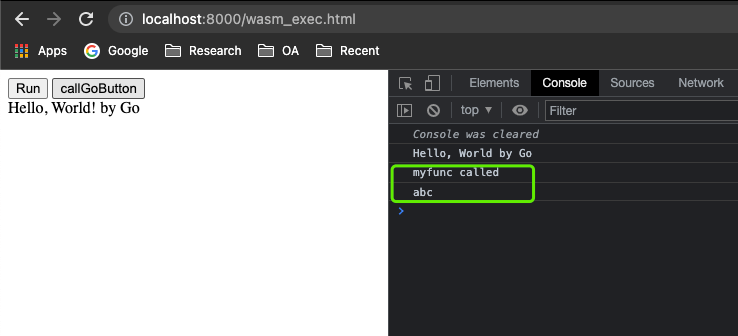
Here a button is added to call the Go function myfunc.
- See the result
Start a local http service
| |
Visit the http://localhost:8000/wasm_exec.html page
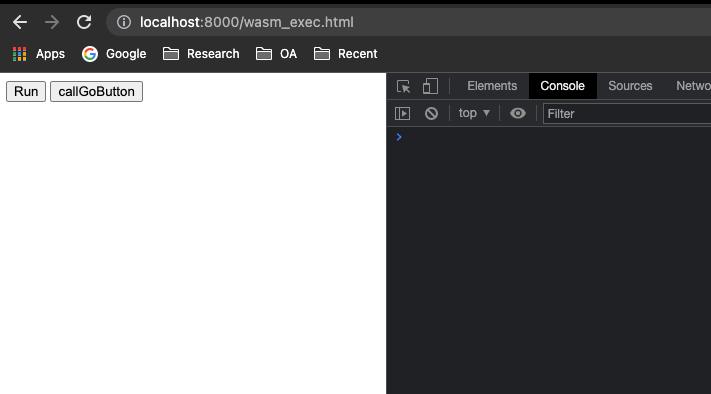
Click the Run button; Go calls the frontend object, prints text, and inserts text into the page.
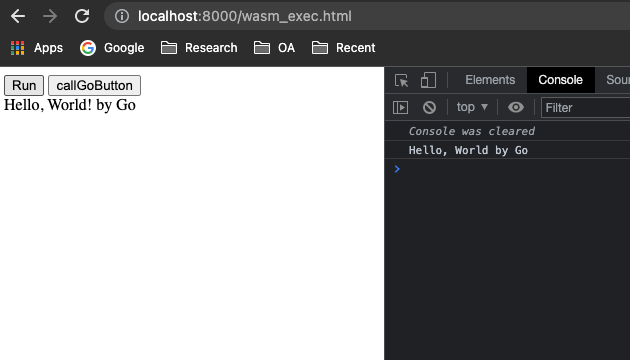
Click callGoButton; the frontend calls the Go function.
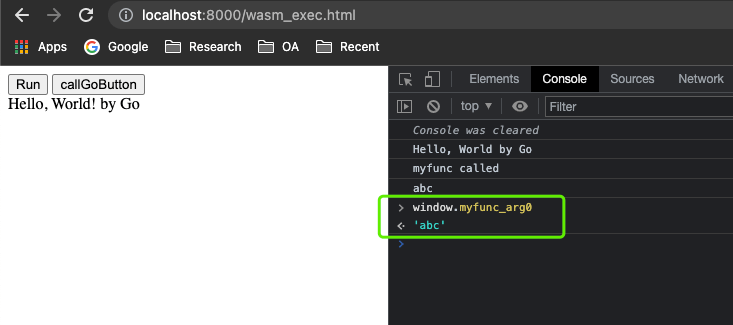
In the console, access windows.myfunc_arg0 to get the value that Go set on the frontend object.
7. Summary
This post is mainly an attempt at some ways to write WebAssembly in Go. Without extra configuration, the two quicker approaches at present are:
- Write it with TingyGo and run it directly on WasmEdge
- Write it with Go; it needs JS to load it and runs on Nodejs
In addition, it provides an example of writing WebAssembly in Go 1.19 that interacts with JavaScript functions and data.
The related code in this post is all at https://github.com/shaowenchen/demo/tree/master/wasm-hello-world .
