This page looks best with JavaScript enabled

Fluid Directly Mounting S3 and Performance Testing

 ·  ☕ 6 min read

1. Packaging the Fluid Runtime Image

  • Create the fluid_config_init.py script
 1
 2
 3
 4
 5
 6
 7
 8
 9
10
11
12
13
14
15
16
17
18
19
20
21
22
23
24
25
26
27
28
#!/usr/bin/env python

import json

rawStr = ""
with open("/etc/fluid/config.json", "r") as f:
    rawStr = f.readlines()

rawStr = rawStr[0]

script = """
#!/bin/sh
set -ex
MNT_FROM=$mountPoint
MNT_TO=$targetPath

trap "umount ${MNT_TO}" SIGTERM
mkdir -p ${MNT_TO}
mount -t lustre -o relatime,flock ${MNT_FROM} ${MNT_TO}
sleep inf
"""

obj = json.loads(rawStr)

with open("mount-lustre.sh", "w") as f:
    f.write('mountPoint="%s"\n' % obj["mounts"][0]["mountPoint"])
    f.write('targetPath="%s"\n' % obj["targetPath"])
    f.write(script)

Only the mount command needs adjusting.

  • Create the startup script entrypoint.sh
1
2
3
4
5
6
#!/usr/bin/env bash
set +x

python /fluid_config_init.py
chmod u+x /mount-lustre.sh
bash /mount-lustre.sh
  • Create a Dockerfile to package the image
1
2
3
4
5
FROM efrecon/s3fs:1.78
COPY ./fluid_config_init.py /
COPY ./entrypoint.sh /usr/local/bin/
RUN chmod +x /usr/local/bin/entrypoint.sh
ENTRYPOINT []

Build the image and push it

1
docker build -t shaowenchen/demo:fluid-s3 . --push

3. Connecting Lustre to Fluid

  • Create a Dataset
 1
 2
 3
 4
 5
 6
 7
 8
 9
10
kubectl apply -f - <<EOF
apiVersion: data.fluid.io/v1alpha1
kind: Dataset
metadata:
  name: lustre-demo
spec:
  mounts:
  - mountPoint: fs-x.fsx.us-west-2.amazonaws.com@tcp:/x
    name: lustre-demo
EOF

Note the mountPoint here: if you need to mount the subdirectory subdir, create it in advance. In production, multiple PVCs may share a single Lustre backend.

The format for mounting a subdirectory is: fs-x.fsx.us-west-2.amazonaws.com@tcp:/x/subdir

  • Create a Runtime
 1
 2
 3
 4
 5
 6
 7
 8
 9
10
11
12
13
14
kubectl apply -f - <<EOF
apiVersion: data.fluid.io/v1alpha1
kind: ThinRuntimeProfile
metadata:
  name: lustre
spec:
  fileSystemType: lustre
  fuse:
    image: shaowenchen/demo:fluid-lustre
    imageTag: latest
    imagePullPolicy: Always
    command:
      - "/usr/local/bin/entrypoint.sh"
EOF
1
2
3
4
5
6
7
8
kubectl apply -f - <<EOF
apiVersion: data.fluid.io/v1alpha1
kind: ThinRuntime
metadata:
  name: lustre-demo
spec:
  profileName: lustre
EOF
  • Create a Pod
 1
 2
 3
 4
 5
 6
 7
 8
 9
10
11
12
13
14
15
16
17
18
19
20
21
kubectl apply -f - <<EOF
apiVersion: v1
kind: Pod
metadata:
  name: lustre-demo
spec:
  containers:
    - name: lustre-demo
      image: shaowenchen/demo:ubuntu
      volumeMounts:
        - mountPath: /data
          name: lustre-demo
  volumes:
    - name: lustre-demo
      persistentVolumeClaim:
        claimName: lustre-demo
  tolerations:
    - key: "node-role.kubernetes.io/control-plane"
      operator: "Exists"
      effect: "NoSchedule"
EOF

4. Performance Testing

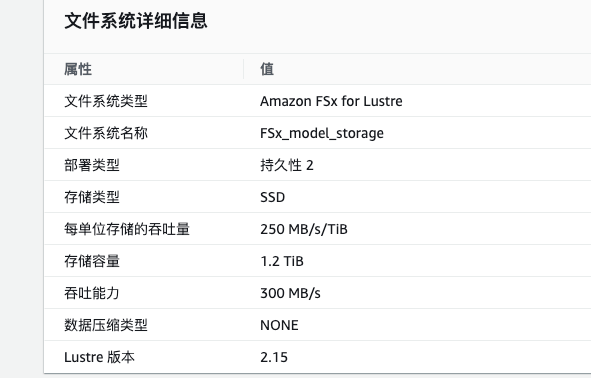
The figure below shows the FSx for Lustre specification we provisioned on AWS.
4.1 Sequential Read Test with a Direct Mount on the Host

  • Install lustre-client
1
2
3
wget -O - https://fsx-lustre-client-repo-public-keys.s3.amazonaws.com/fsx-ubuntu-public-key.asc | gpg --dearmor | sudo tee /usr/share/keyrings/fsx-ubuntu-public-key.gpg >/dev/null
bash -c 'echo "deb [signed-by=/usr/share/keyrings/fsx-ubuntu-public-key.gpg] https://fsx-lustre-client-repo.s3.amazonaws.com/ubuntu focal main" > /etc/apt/sources.list.d/fsxlustreclientrepo.list && apt-get update'
apt install -y linux-aws lustre-client-modules-$(uname -r)

Note that you need to run sudo reboot to restart the machine.

Reference documentation: https://docs.aws.amazon.com/zh_cn/fsx/latest/LustreGuide/install-lustre-client.html

  • Run the test
 1
 2
 3
 4
 5
 6
 7
 8
 9
10
11
12
13
14
15
16
17
18
19
20
21
22
23
24
25
26
27
28
29
30
31
fio -direct=1 -iodepth=32 -rw=read -ioengine=libaio -bs=4m -size=10g -numjobs=1 -runtime=1000 -group_reporting -filename=testfile --allow_mounted_write=1 -name=Sequ_Read_Testing

Sequ_Read_Testing: (g=0): rw=read, bs=(R) 4096KiB-4096KiB, (W) 4096KiB-4096KiB, (T) 4096KiB-4096KiB, ioengine=libaio, iodepth=32
fio-3.16
Starting 1 process
Jobs: 1 (f=1): [R(1)][96.7%][r=368MiB/s][r=92 IOPS][eta 00m:01s]
Sequ_Read_Testing: (groupid=0, jobs=1): err= 0: pid=74694: Thu May 16 18:40:31 2024
  read: IOPS=86, BW=347MiB/s (364MB/s)(10.0GiB/29479msec)
    slat (msec): min=7, max=260, avg=11.51, stdev=14.19
    clat (usec): min=17, max=2646.5k, avg=344495.25, stdev=192586.04
     lat (msec): min=11, max=2655, avg=356.01, stdev=197.77
    clat percentiles (msec):
     |  1.00th=[  284],  5.00th=[  305], 10.00th=[  309], 20.00th=[  313],
     | 30.00th=[  326], 40.00th=[  330], 50.00th=[  334], 60.00th=[  334],
     | 70.00th=[  338], 80.00th=[  338], 90.00th=[  342], 95.00th=[  347],
     | 99.00th=[  435], 99.50th=[ 2601], 99.90th=[ 2635], 99.95th=[ 2635],
     | 99.99th=[ 2635]
   bw (  KiB/s): min=303104, max=417792, per=100.00%, avg=384223.08, stdev=21823.92, samples=53
   iops        : min=   74, max=  102, avg=93.77, stdev= 5.35, samples=53
  lat (usec)   : 20=0.04%
  lat (msec)   : 20=0.04%, 50=0.12%, 100=0.16%, 250=0.55%, 500=98.16%
  lat (msec)   : 750=0.08%, 1000=0.04%, 2000=0.16%, >=2000=0.66%
  cpu          : usr=0.04%, sys=6.67%, ctx=2614, majf=0, minf=32779
  IO depths    : 1=0.1%, 2=0.1%, 4=0.2%, 8=0.3%, 16=0.6%, 32=98.8%, >=64=0.0%
     submit    : 0=0.0%, 4=100.0%, 8=0.0%, 16=0.0%, 32=0.0%, 64=0.0%, >=64=0.0%
     complete  : 0=0.0%, 4=100.0%, 8=0.0%, 16=0.0%, 32=0.1%, 64=0.0%, >=64=0.0%
     issued rwts: total=2560,0,0,0 short=0,0,0,0 dropped=0,0,0,0
     latency   : target=0, window=0, percentile=100.00%, depth=32

Run status group 0 (all jobs):
   READ: bw=347MiB/s (364MB/s), 347MiB/s-347MiB/s (364MB/s-364MB/s), io=10.0GiB (10.7GB), run=29479-29479msec

4.2 Sequential Read Test Inside a Pod

  • Enter the Pod
1
2
3
kubectl exec -it lustre-demo bash

cd /data
  • Run the test
 1
 2
 3
 4
 5
 6
 7
 8
 9
10
11
12
13
14
15
16
17
18
19
20
21
22
23
24
25
26
27
28
29
30
31
fio -direct=1 -iodepth=32 -rw=read -ioengine=libaio -bs=4m -size=10g -numjobs=1 -runtime=1000 -group_reporting -filename=testfile --allow_mounted_write=1 -name=Sequ_Read_Testing

Sequ_Read_TestingA: (g=0): rw=read, bs=(R) 4096KiB-4096KiB, (W) 4096KiB-4096KiB, (T) 4096KiB-4096KiB, ioengine=libaio, iodepth=32
fio-3.16
Starting 1 process
Jobs: 1 (f=1): [R(1)][100.0%][r=364MiB/s][r=91 IOPS][eta 00m:00s]
Sequ_Read_TestingA: (groupid=0, jobs=1): err= 0: pid=563: Thu May 16 18:11:28 2024
  read: IOPS=78, BW=315MiB/s (330MB/s)(10.0GiB/32490msec)
    slat (msec): min=7, max=261, avg=12.69, stdev=21.49
    clat (usec): min=3, max=5356.2k, avg=357490.74, stdev=319869.00
     lat (msec): min=10, max=5386, avg=370.18, stdev=334.81
    clat percentiles (msec):
     |  1.00th=[  288],  5.00th=[  309], 10.00th=[  313], 20.00th=[  317],
     | 30.00th=[  326], 40.00th=[  334], 50.00th=[  334], 60.00th=[  338],
     | 70.00th=[  342], 80.00th=[  347], 90.00th=[  347], 95.00th=[  351],
     | 99.00th=[  355], 99.50th=[ 3171], 99.90th=[ 5336], 99.95th=[ 5336],
     | 99.99th=[ 5336]
   bw (  KiB/s): min=98304, max=417792, per=100.00%, avg=376955.83, stdev=41482.14, samples=54
   iops        : min=   24, max=  102, avg=92.00, stdev=10.13, samples=54
  lat (usec)   : 4=0.04%
  lat (msec)   : 20=0.04%, 50=0.12%, 100=0.16%, 250=0.51%, 500=98.24%
  lat (msec)   : 750=0.04%, 1000=0.04%, 2000=0.16%, >=2000=0.66%
  cpu          : usr=0.05%, sys=6.02%, ctx=2757, majf=0, minf=32780
  IO depths    : 1=0.1%, 2=0.1%, 4=0.2%, 8=0.3%, 16=0.6%, 32=98.8%, >=64=0.0%
     submit    : 0=0.0%, 4=100.0%, 8=0.0%, 16=0.0%, 32=0.0%, 64=0.0%, >=64=0.0%
     complete  : 0=0.0%, 4=100.0%, 8=0.0%, 16=0.0%, 32=0.1%, 64=0.0%, >=64=0.0%
     issued rwts: total=2560,0,0,0 short=0,0,0,0 dropped=0,0,0,0
     latency   : target=0, window=0, percentile=100.00%, depth=32

Run status group 0 (all jobs):
   READ: bw=315MiB/s (330MB/s), 315MiB/s-315MiB/s (330MB/s-330MB/s), io=10.0GiB (10.7GB), run=32490-32490msec

In Fluid, the PVC performance of a ThinRuntime loses very little compared with a direct mount on the host. Note here that the blocksize and size heavily affect the test results. If you only read 1g of data, sequential read performance can reach 500+ MB/s; if the blocksize is 128k, sequential read performance drops to only 100+ MB/s. Therefore, adjustments must be made according to the use case in order to get an accurate assessment.

5. Summary

Recently, domestic model inference services needed to be deployed overseas, and we selected AWS FSx for Lustre as the storage backend. But to keep the way the business layer uses storage consistent, we needed to hook Lustre into Fluid.

After a domestic model is uploaded to S3, it is automatically synced to Lustre.

Early versions of Fluid already supported Lustre, but the Fluid community did not provide detailed documentation or a Demo example, so this post mainly records the practice of connecting Lustre using Fluid’s ThinRuntime.

Since we only use it to store inference models, and model data is usually large files, we only tested sequential read speed for performance. Under the specification we chose, the speed inside the PVC can reach 300+ MB/s.


微信公众号
WRITTEN BY
微信公众号