1. How Argo Events Works
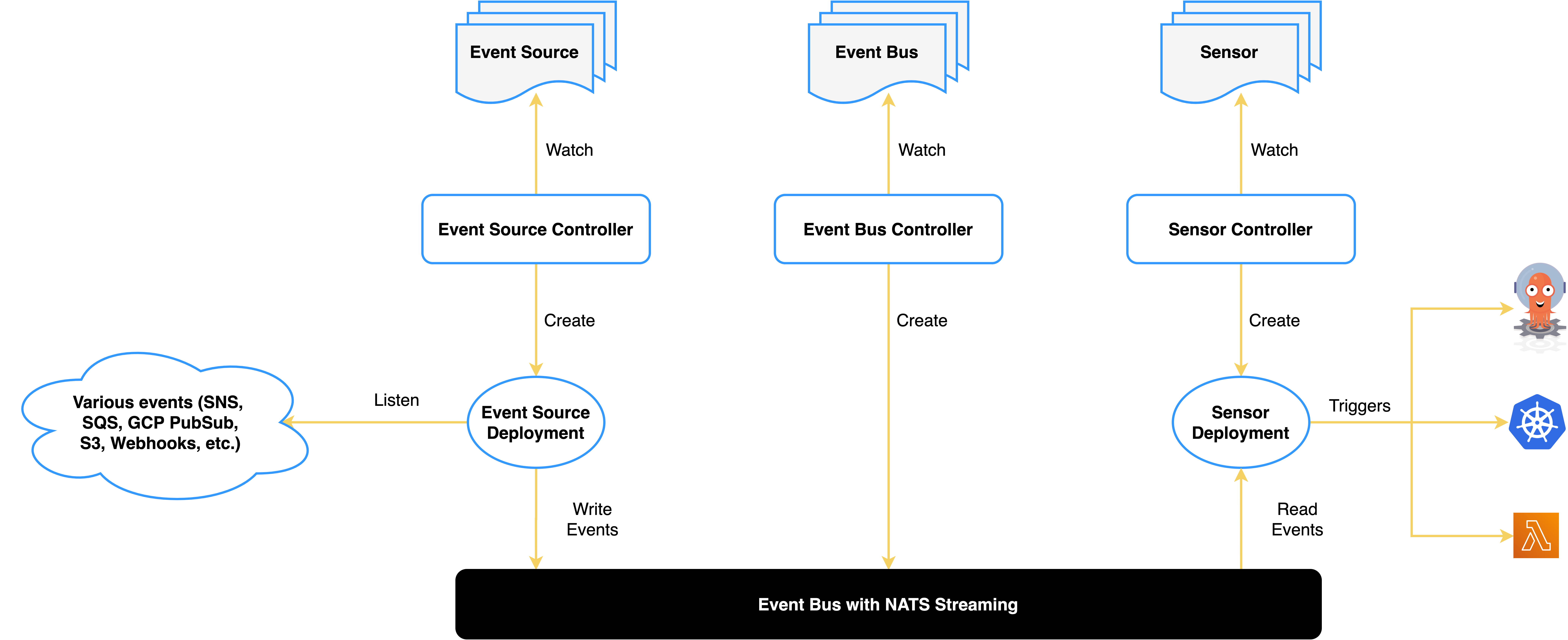
The diagram above is from the official Argo Events website. An event processing system has three important parts:
- Ingesting event sources, which corresponds to the Event Source
- Distributing events, which corresponds to the Event Sensor
- Consuming events, which corresponds to the Event Trigger
The event messages are stored in the EventBus, which uses NATS by default.
2. Creating ServiceAccounts for the Sensor and the Workflow
- Create operate-workflow-sa
operate-workflow-sa authorizes the Sensor to operate on Workflows.
 1
 2
 3
 4
 5
 6
 7
 8
 9
10
11
12
13
14
15
16
17
18
19
20
21
22
23
24
25
26
27
28
29
30
31
32
33
34
| kubectl apply -f - <<EOF
apiVersion: v1
kind: ServiceAccount
metadata:
namespace: argo-events
name: operate-workflow-sa
---
apiVersion: rbac.authorization.k8s.io/v1
kind: Role
metadata:
name: operate-workflow-role
namespace: argo-events
rules:
- apiGroups:
- argoproj.io
verbs:
- "*"
resources:
- workflows
---
apiVersion: rbac.authorization.k8s.io/v1
kind: RoleBinding
metadata:
name: operate-workflow-role-binding
namespace: argo-events
roleRef:
apiGroup: rbac.authorization.k8s.io
kind: Role
name: operate-workflow-role
subjects:
- kind: ServiceAccount
name: operate-workflow-sa
namespace: argo-events
EOF
|
workflow-pods-sa authorizes the Workflow to operate on Pods.
 1
 2
 3
 4
 5
 6
 7
 8
 9
10
11
12
13
14
15
16
17
18
19
20
21
22
23
24
25
26
27
28
29
30
31
32
33
34
| kubectl apply -f - <<EOF
apiVersion: v1
kind: ServiceAccount
metadata:
namespace: argo-events
name: workflow-pods-sa
---
apiVersion: rbac.authorization.k8s.io/v1
kind: Role
metadata:
namespace: argo-events
name: workflow-pods-role
rules:
- apiGroups:
- ""
verbs:
- "*"
resources:
- pods
---
apiVersion: rbac.authorization.k8s.io/v1
kind: RoleBinding
metadata:
namespace: argo-events
name: workflow-pods-role-binding
roleRef:
apiGroup: rbac.authorization.k8s.io
kind: Role
name: workflow-pods-role
subjects:
- kind: ServiceAccount
name: workflow-pods-sa
namespace: argo-events
EOF
|
It is worth noting that both operate-workflow-sa and workflow-pods-sa are namespace-scoped, so they must be authorized separately in each namespace.
3. Creating an eventbus to Store Events
 1
 2
 3
 4
 5
 6
 7
 8
 9
10
11
12
| kubectl apply -f - <<EOF
apiVersion: argoproj.io/v1alpha1
kind: EventBus
metadata:
name: default
namespace: argo-events
spec:
nats:
native:
replicas: 3
auth: token
EOF
|
1
2
3
4
5
| kubectl -n argo-events get pod | grep eventbus
eventbus-default-stan-0 2/2 Running 0 95s
eventbus-default-stan-1 2/2 Running 0 93s
eventbus-default-stan-2 2/2 Running 0 92s
|
4. Creating an API-Triggered Webhook
 1
 2
 3
 4
 5
 6
 7
 8
 9
10
11
12
13
14
15
16
17
18
| kubectl apply -f - <<EOF
apiVersion: argoproj.io/v1alpha1
kind: EventSource
metadata:
name: myproject-webhook
namespace: argo-events
spec:
eventBusName: default
service:
ports:
- port: 80
targetPort: 80
webhook:
myproject-start:
endpoint: /myproject/start
method: POST
port: "80"
url: ""
|
Here we create a POST endpoint on port 80 at the path /myproject/start for triggering events. If there are multiple API definitions, you can keep adding them under spec.webhook.
1
2
3
| kubectl -n argo-events get pod | grep myproject
myproject-webhook-eventsource-4ws29-697b776fb7-6n9dx 1/1 Running 0 26s
|
Argo Events creates a pod for each EventSource to receive events, and creates a Service as the entry point for triggering events.
1
2
3
| kubectl -n argo-events get svc | grep myproject
myproject-webhook-eventsource-svc ClusterIP 10.96.129.232 <none> 80/TCP 26s
|
To make testing easier in a moment, we switch the Service type to NodePort here.
1
| kubectl patch svc myproject-webhook-eventsource-svc -n argo-events -p '{"spec":{"type":"NodePort"}}'
|
1
2
3
| kubectl -n argo-events get svc | grep myproject
myproject-webhook-eventsource-svc NodePort 10.96.129.232 <none> 80:30001/TCP 14h
|
5. Creating a sensor to Process Events
 1
 2
 3
 4
 5
 6
 7
 8
 9
10
11
12
13
14
15
16
17
18
19
20
21
22
23
24
25
26
27
28
29
30
31
32
33
34
35
36
37
38
39
40
41
42
43
44
45
46
47
48
49
50
51
52
53
54
55
56
57
58
59
60
61
62
63
| kubectl apply -f - <<EOF
apiVersion: argoproj.io/v1alpha1
kind: Sensor
metadata:
name: myproject-start
namespace: argo-events
spec:
template:
serviceAccountName: operate-workflow-sa
dependencies:
- name: myproject-start
eventSourceName: myproject-webhook
eventName: myproject-start
triggers:
- template:
name: webhook-workflow-trigger
argoWorkflow:
group: argoproj.io
version: v1alpha1
resource: workflows
operation: submit
source:
resource:
apiVersion: argoproj.io/v1alpha1
kind: Workflow
metadata:
generateName: webhook-
spec:
serviceAccountName: workflow-pods-sa
ttlStrategy:
secondsAfterCompletion: 600
secondsAfterSuccess: 600
secondsAfterFailure: 600
entrypoint: whalesay
arguments:
parameters:
- name: message
- name: who
templates:
- name: whalesay
inputs:
parameters:
- name: message
value: "hello(input)"
- name: who
value: "world(input)"
container:
image: docker/whalesay:latest
command: [cowsay]
args:
[
"{{inputs.parameters.message}} {{inputs.parameters.who}}",
]
parameters:
- src:
dataTemplate: "{{ .Input.body.message }}"
dependencyName: myproject-start
dest: spec.arguments.parameters.0.value
- src:
dataTemplate: "{{ .Input.body.who }}"
dependencyName: myproject-start
dest: spec.arguments.parameters.1.value
EOF
|
At this point Argo Events also creates a Pod to process events.
1
2
3
| kubectl -n argo-events get pod | grep sensor
myproject-start-sensor-pzkf9-658cbd5c7d-xv9zf 1/1 Running 0 56s
|
There are a few settings here worth noting:
1
2
3
4
| dependencies:
- name: myproject-start
eventSourceName: myproject-webhook
eventName: myproject-start
|
This must be associated with the definition in the EventSource, which is how events are received.
If the operation is create, what you get in parameters is a complete event description with the data Base64-encoded. If the operation is submit, what you get in parameters is a payload you can use directly.
1
2
3
4
| ttlStrategy:
secondsAfterCompletion: 600
secondsAfterSuccess: 600
secondsAfterFailure: 600
|
After a Workflow finishes executing it is not deleted immediately; it is deleted according to the definition in ttlStrategy.
entrypoint specifies the entry point for Workflow execution. If it is not specified, it defaults to main, i.e. the value of spec.entrypoint.
1
2
3
4
5
6
7
8
9
| parameters:
- src:
dataTemplate: "{{ .Input.body.message }}"
dependencyName: myproject-start
dest: spec.arguments.parameters.0.value
- src:
dataTemplate: "{{ .Input.body.who }}"
dependencyName: myproject-start
dest: spec.arguments.parameters.1.value
|
dataTemplate specifies the event data to depend on, dest specifies the parameter in the Workflow, and dependencyName specifies the name of the event depended upon. Here it extracts the parameters from the API body and passes them to the Workflow parameters, overriding the default values.
6. Calling the API Webhook to Trigger an Event
- Call the API endpoint to trigger it
1
| curl -d '{"message":"hello", "who": "world"}' -H "Content-Type: application/json" -X POST http://localhost:30001/myproject/start -v
|
- Check the created Workflow
1
2
3
4
| kubectl -n argo-events get workflows
NAME STATUS AGE MESSAGE
webhook-5z7k5 Succeeded 119s
|
 1
 2
 3
 4
 5
 6
 7
 8
 9
10
11
12
13
14
15
| kubectl -n argo-events logs webhook-5z7k5 -f
_____________
< hello world >
-------------
\
\
\
## .
## ## ## ==
## ## ## ## ===
/""""""""""""""""___/ ===
~~~ {~~ ~~~~ ~~~ ~~~~ ~~ ~ / ===- ~~~
\______ o __/
\ \ __/
\____\______/
|
The trigger succeeded, as expected.
7. Creating Workflows with WorkflowTemplate
Putting the full definition inside the Workflow’s templates every time is very tedious, so Argo provides WorkflowTemplate for orchestrating Workflows.
- Create the WorkflowTemplates
 1
 2
 3
 4
 5
 6
 7
 8
 9
10
11
12
13
14
15
16
17
18
19
20
21
22
23
24
25
26
27
28
29
30
31
32
33
34
35
36
37
38
39
40
41
42
43
44
45
46
47
| kubectl apply -f - <<EOF
apiVersion: argoproj.io/v1alpha1
kind: WorkflowTemplate
metadata:
name: whalesay-template
namespace: argo-events
spec:
templates:
- name: whalesay
inputs:
parameters:
- name: message
container:
image: docker/whalesay
command: [cowsay]
args: ["{{inputs.parameters.message}}"]
---
apiVersion: argoproj.io/v1alpha1
kind: WorkflowTemplate
metadata:
name: congratulations-template
namespace: argo-events
spec:
templates:
- name: congratulations
container:
image: shaowenchen/demo:ubuntu
command: [sh, -c]
args: ["echo Congratulations!"]
---
apiVersion: argoproj.io/v1alpha1
kind: WorkflowTemplate
metadata:
name: random-status-template
namespace: argo-events
spec:
templates:
- name: random-status
script:
image: python:alpine3.6
command: [python]
source: |
import random
exit_code = 0 if random.choice([True, False]) else 1
import sys
sys.exit(exit_code)
EOF
|
Three WorkflowTemplates are defined here: whalesay-template prints the input parameters, congratulations-template prints a fixed string, and random-status-template produces a random status.
 1
 2
 3
 4
 5
 6
 7
 8
 9
10
11
12
13
14
15
16
17
18
19
20
21
22
23
24
| kubectl apply -f - <<EOF
apiVersion: argoproj.io/v1alpha1
kind: Workflow
metadata:
name: combined-workflow
namespace: argo-events
spec:
entrypoint: combined-template
serviceAccountName: workflow-pods-sa
templates:
- name: combined-template
steps:
- - name: whalesay
templateRef:
name: whalesay-template
template: whalesay
arguments:
parameters:
- name: message
value: hello world
- - name: congratulations
templateRef:
name: congratulations-template
template: congratulations
|
The Workflow now looks much simpler, because the concrete operations of each task are defined in the WorkflowTemplate; the Workflow only needs to specify the WorkflowTemplate names and parameters.
8. Orchestrating Complex Dependencies with DAG Workflow
An ordinary Workflow can only execute tasks in sequence, whereas a DAG Workflow can handle complex task dependencies and status dependencies to orchestrate tasks. Here is an example:
 1
 2
 3
 4
 5
 6
 7
 8
 9
10
11
12
13
14
15
16
17
18
19
20
21
22
23
24
25
26
27
28
29
30
31
32
33
34
35
36
37
38
39
40
41
42
43
44
45
46
47
| apiVersion: argoproj.io/v1alpha1
kind: Workflow
metadata:
name: status-workflow
namespace: argo-events
spec:
entrypoint: dag
serviceAccountName: workflow-pods-sa
templates:
- name: dag
dag:
tasks:
- name: whalesay
templateRef:
name: whalesay-template
template: whalesay
arguments:
parameters:
- name: message
value: hello world
- name: check-status
templateRef:
name: random-status-template
template: random-status
dependencies: [whalesay]
continueOn:
failed: true
- name: success-path
templateRef:
name: whalesay-template
template: whalesay
arguments:
parameters:
- name: message
value: success-path
dependencies: [check-status]
when: "{{tasks.check-status.status}} == 'Succeeded'"
- name: failure-path
templateRef:
name: whalesay-template
template: whalesay
arguments:
parameters:
- name: message
value: failure-path
dependencies: [check-status]
when: "{{tasks.check-status.status}} == 'Failed'"
|
A DAG Workflow is defined here:
- whalesay runs first
- check-status waits for whalesay to finish, then randomly produces a status
- If the status is success, success-path runs; otherwise failure-path runs
1
2
3
4
5
| kubectl get pod -n argo-events |grep status
status-workflow-random-status-2060967154 0/2 Error 0 40s
status-workflow-whalesay-261193263 0/2 Completed 0 60s
status-workflow-whalesay-437390993 0/2 Completed 0 30s
|
status-workflow-random-status-2060967154 produced a random error status, so failure-path runs.
- Check the Workflow status
1
2
3
4
| kubectl get workflow -n argo-events
NAME STATUS AGE MESSAGE
status-workflow Failed 56s
|
Because a task failed, the Workflow is marked as Failed.
9. Summary
Recently I needed to build a workflow for AI Infra together with Argo, so this post is mainly some notes from studying Argo Events\Workflow. The main contents are:
- An introduction to how Argo Events works
- An example of triggering a Workflow from a webhook
- An example of orchestrating a Workflow with WorkflowTemplate
- An example of orchestrating a DAG Workflow with WorkflowTemplate
Argo also has an object very similar to WorkflowTemplate called ClusterWorkflowTemplate, i.e. a cluster-level WorkflowTemplate, which can be reused in every namespace.
For a platform team, Argo mainly offers two capabilities:
- Rapid integration: event triggering based on EventSource - Sensor - Workflow, quickly stacking up API features with yaml
- Workflow orchestration: orchestrating Workflows based on ClusterWorkflowTemplate, providing higher-level orchestration capability
Here is a model of mine:
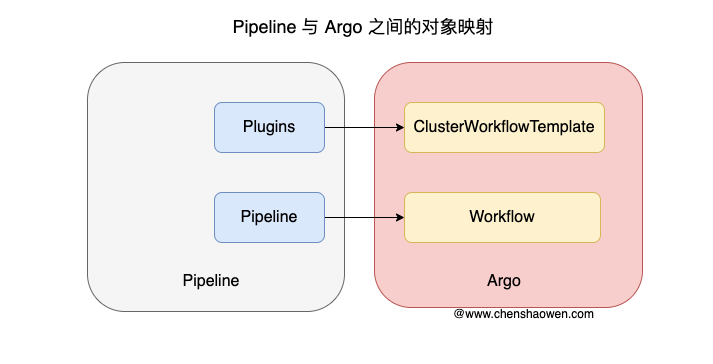
ClusterWorkflowTemplate corresponds to a Plugin, and Workflow corresponds to a Pipeline. Although a Workflow is executed immediately once created, business systems usually have their own databases, so we only need to park the Workflow in the database and hand it off to Argo at runtime to execute the pipeline.
