When developing with a separated front end and back end, some of the API endpoints provided to the front end use GET requests and some use POST requests. To keep the back end from throwing an error while reading values from
requestin views.py, you had to check the request method at the start of every view function. So I extracted a shared function into utils.py for the view functions to call. It was still tedious to use, and in the end I found therequire_http_methodsdecorator in the Django docs, which solves the problem easily. This article mainly introduces the basic concepts of decorators and how Django implements them.
1. Basic Concepts
- The decorator pattern
The decorator pattern allows you to dynamically extend an object with extra functionality without changing its original structure. The diagram below shows this property of decorators dynamically extending functionality.
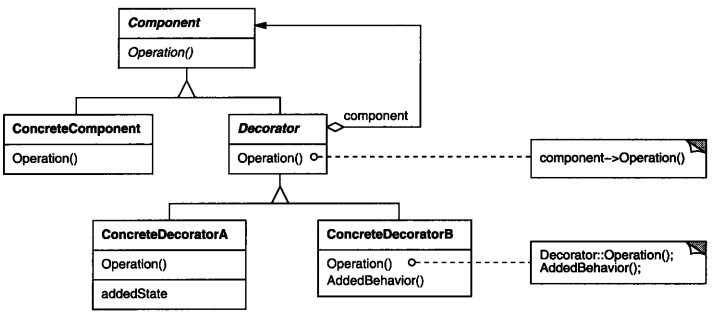
- Python decorators
A Python decorator is the Python implementation of the decorator pattern — in practice, a function wrapper. The Python interpreter executes the wrapper when it loads the function. The wrapper can modify the arguments the function receives and its return value.
2. Filtering on the Request Method
Without a decorator, you had to write a function is_post_method_return_true_or_err_resp that pulls the request method out of the request and checks it. When the check fails, it returns an HttpResponse object.
| |
To use it, you just call the checking function from utils inside the view function.
| |
3. Django Decorators
With the implementation above, every call had to check the return value and return an HttpResponse. Can this part be extracted too? Of course it can — Django provides the corresponding decorator.
| |
The @require_POST above is the syntactic sugar Python provides for using decorators. A single line of code equips the view function with POST-only behavior.
If you access it with a GET request, Django returns to the browser:
GET YOUR_URL 405 (METHOD NOT ALLOWED)
4. Writing a Decorator
To understand the principles and implementation of decorators a bit better, here we use Python to implement a my_require_http_methods decorator that takes a list of allowed request methods. If the request method is allowed, execution continues; otherwise it returns an error response.
4.1 A Simple Decorator
| |
Just add @is_post_method in front of the view function.
| |
The call sequence above is:
| |
The my_view function decorated by the decorator is passed in as an argument to call the is_post_method function. The my_function function executes first, and then the my_vew function.
4.2 A Decorator with Arguments
What if the functionality the decorator adds needs its own arguments? A decorator can be understood as a closure: it takes a function as an argument and returns a function bound to a variable. Using a closure, you define another higher-order function on the outside to pass the arguments through.
| |
Just add @required_method in front of the view function with the list of allowed methods as its argument.
| |
The call sequence above is:
| |
In the decorator function, method_list=['POST'] and func=my_view.
4.3 Restoring Metadata
| |
If you print the function name, you will find that a function wrapped by a decorator has its name attribute changed. And it is not just the name attribute — metadata such as the name, docstring, annotations, and argument signature are all lost.
To solve this, Django’s utils.functional package provides the wraps decorator to restore the metadata. The final code is:
| |
