1. Basic Website Performance Metrics
- Concurrency: the number of sessions the server handles per unit of time
- Throughput: the number of requests the server handles per unit of time
- Response time: the total elapsed time from when the user sends a request to when the response is fully received, made up of network transmission time, service processing time, and other parts
- Average response time: the average of the response times of all requests
2. Testing Tools
Performance testing has two levels: one is stress testing a single endpoint, and the other is stress testing in a production environment by simulating user operations. The former can be automated against CGIs with tools, while the latter usually requires tests customized to the business logic.
The main free stress testing tools include apache ab, webench, wrk, Gatling, sniper, hey, Siege, http_load, vegeta, t50, GoReplay, tcpcopy, gryphon, locust.io, and Jmeter. Several of them are described below.
2.1 ab
ab stands for: apache bench
Command format: ab [options] [http://]hostname[:port]/path
Main parameters:
| |
For example, generate 1000 requests at a concurrency of 50.
| |
2.2 http_load
Before testing with http_load, you need to write the URLs to be tested into a file and pass that file to http_load as an argument.
Command format: http_load [-checksum] [-throttle] [-proxy host:port] [-verbose] [-timeout secs] [-sip sip_file] -parallel N | -rate N [-jitter] -fetches N | -seconds N url_file
Main parameters:
```bash`
-parallel, number of concurrent connections
-fetches, total number of requests
For example, generate 1000 requests at a concurrency of 50.

```bash
# http_load -parallel 50 -fetches 1000 url.txt
2.3 webbench, siege
webbench does not support specifying a total number of visits; it supports concurrency and test duration, and does not directly support HTTPS testing.
Command format: webbench [option]… URL
Main parameters:
| |
For example, test continuously for 20 seconds at a concurrency of 50
| |
siege’s parameters and command format are similar to webbench’s.
| |
2.4 wrk
wrk uses some OS-specific high-performance I/O mechanisms, such as select, epoll, kqueue, etc., and can stress out a large amount of concurrency with very few threads.
Command format: wrk
Main parameters:
| |
For example, start 10 threads and run the test at a concurrency of 100 for 30 seconds.
| |
Compared with other tools, wrk can use Lua scripts to stress test more complex scenarios. For example, to test a POST request, you only need to prepare a Lua script.
post.lua
| |
Use the -s parameter
| |
3. Test Demo
The deployment architecture of the Django application uses an Nginx container as a reverse proxy; behind it, requests are forwarded to Django through uWSGI, and Django accesses services such as MySQL and Redis, then returns the response along the original path.
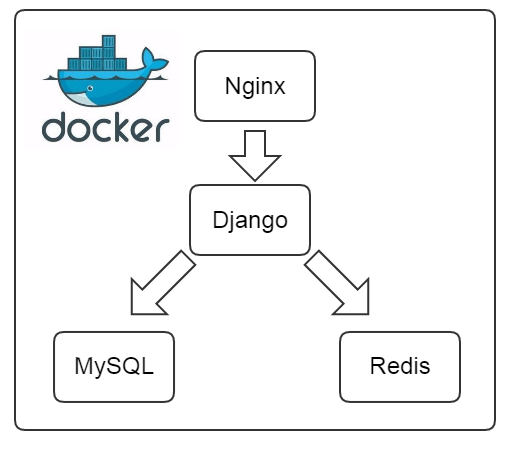
Hardware: a laptop with an Intel i5-5300 2.3GHz, 8GB of memory, and a SAMSUNG SSD
Software: CentOS 7.2, Nginx with 2 workers, uWSGI with 8 workers, no gevent.
Below is a simple single test run:
Without DB access:
| |
With DB access:
| |
Nginx forwarding static files:
| |
Django forwarding static files:
| |
