1. A Constrained Build Environment Cannot Meet Build Requirements
Tekton is a CICD engine based on a Kubernetes cluster, and it is more cloud-native than Jenkins. In plain terms, that means it is easier to develop plugins for, easier to scale, easier to observe, and more fun.
Because code can only be stored on the company intranet, the build cluster can only be deployed on the office intranet. This led to a lot of limitations:
- Hardware resources: no elastic scaling capability
- Network restrictions: accessing github.com, docker.io, and dl-cdn.alpinelinux.org is very slow
- Reliability restrictions: the data center’s stable environment cannot be guaranteed, and the hardware failure rate is high
- Operations restrictions: maintaining the system requires first connecting to the company intranet
But these are all CICD R&D matters that nobody pays attention to. I just had to bear it silently and find a way to solve it — who told me to be a wage earner.
Until the business R&D team, unable to take it any longer, started publicly complaining: “Why is the CDN upload task so slow? It never used to be like this.” That was because I had not joined the company back then; once I arrived, it had long since slowed down.
There was no way around it — the business R&D team are the users of the build system, and as a platform developer I could only think of another approach, so I looked into a cloud connection solution. For 10k RMB a month, you could connect to Huawei Cloud’s overseas VPN dedicated line, with a direct connection overseas.
But paying money is something the business side would never agree to. When it comes to programmers’ needs, why would they be willing to spend money?
2. A Cross-Region Kubernetes Build Cluster
Interestingly, the company I work for has offices in multiple regions. The intranets of the various regions are interconnected, but their egress networks are different. One of the regions has many overseas business lines, and its egress network quality is exceptionally good.
This kind of network environment happens to be perfect for building a cross-region Kubernetes cluster for builds. As shown below:
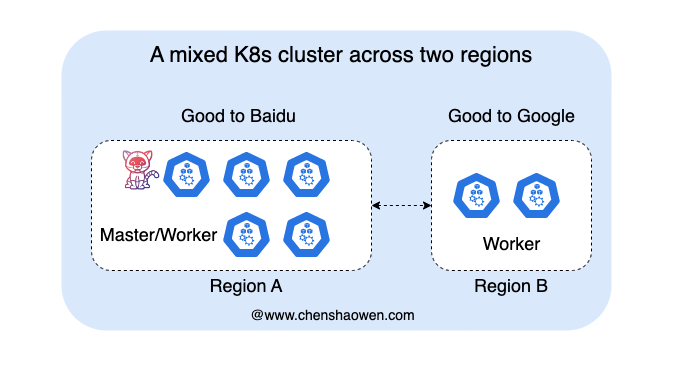
In the region with good overseas access quality, add several build nodes.
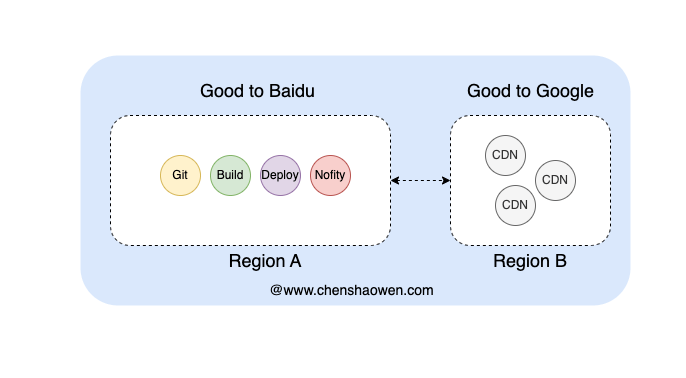
As shown in the figure above, we plan to schedule CICD tasks that access overseas resources onto the Good to Google nodes for execution. Therefore, we need a Kubernetes cluster scheduler that can customize scheduling policies based on different tasks.
3. Several Common Ways to Extend a Scheduler
- default-scheduler[1]
Directly hard-code modifications on top of the scheduler source code, then recompile kube-scheduler and replace the original kube-scheduler.
- custom scheduler
When creating a resource, you can set the spec.schedulerName field to specify which scheduler handles it. In this way, multiple schedulers coexist in one cluster, and each scheduler has a different scheduler name.
- scheduler extender[2]
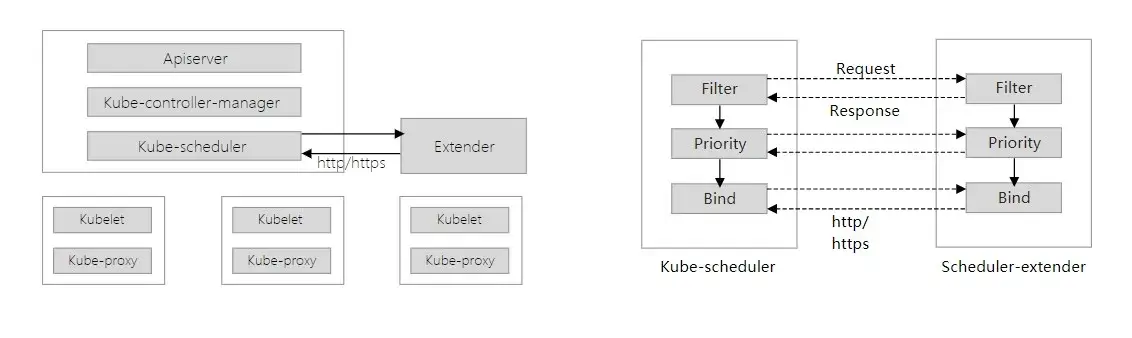
As shown in the figure above, the scheduler extender provides several extension points. When the kube-scheduler scheduling flow enters that extension stage, it sends an HTTP request to the scheduler extender to handle custom logic.
When deploying, you can use a Deployment to deploy the scheduler extender, and simply modify the kube-scheduler startup parameters to point at the scheduler extender’s address.
- scheduler framework
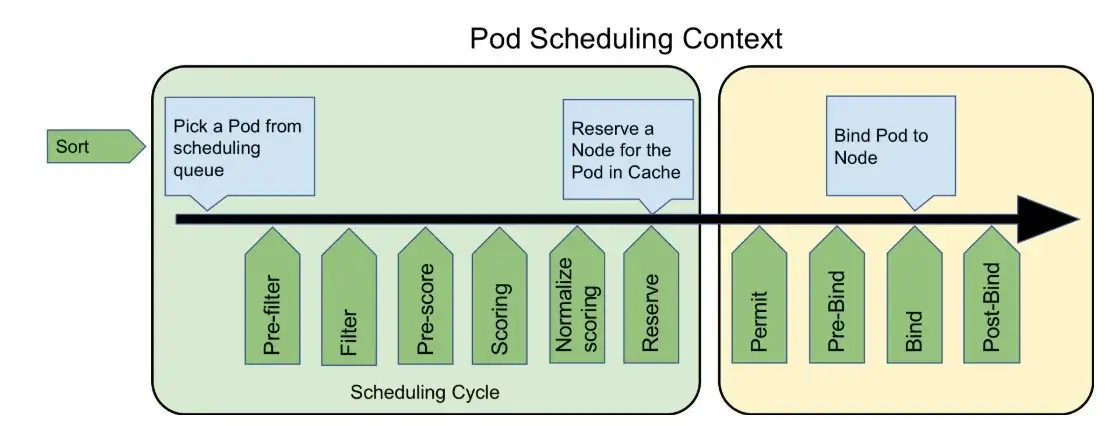
As shown in the figure above, the scheduler framework also provides several extension points; depending on the stage being handled, you implement the corresponding interface.
When deploying, you simply replace the kube-scheduler image and add a configuration file stating which plugins to enable.
4. A Custom Cluster Scheduler
Of the four approaches above, the first is too hardcore with its hard-coding, and the second suits multi-tenant scenarios. Both the third and fourth are based on extension points, but the third requires deploying an extra component, while the fourth directly replaces the kube-scheduler image.
The third approach needs to make HTTP requests during scheduling and create a cluster Client to maintain an Informer; the fourth should be more efficient, and it is newer with more of a future. There are plenty of detailed tutorials online, so here I mainly record the pitfalls I ran into.
4.1 How to Create a New Project
Open https://github.com/kubernetes-sigs/scheduler-plugins/ and switch to the tag corresponding to your cluster. The build cluster is Kubernetes 1.21, so choose v0.21.6.
This project has many plugins you can reference; you can use them directly, or modify and customize them according to your own needs.
Copy the replace section of the go.mod file and create your own Go project.
The purpose of doing this is:
- To keep the scheduler code’s dependency versions consistent with the cluster version; otherwise, spanning too many versions will cause parameter incompatibility issues
- To avoid dependency errors during compilation, which are very time-consuming to deal with
4.2 Quick Design
- How to direct namespaces and tasks to specific nodes
| |
Since this is global configuration, the configuration information is written directly into the annotation of a certain namespace, using it as a database.
Whether a task is a CDN task is identified through the Pod’s image. But not every project’s CDN task needs to go through an overseas node; there are also CDN tasks that upload domestically.
With the data above, the final effect should be: within the default namespace, allow Pods whose image contains the string cdn to be preferentially scheduled to node2; forbid Pods whose image does not contain the string cdn from being scheduled to node2; and forbid other namespaces from being scheduled to node2.
- Which extensions are needed
Filter and Score, these two extension points, are enough. If you are unsure which extensions to use, you can directly look at the Plugin interface definitions to check the interface parameters and return values.
Filter needs to forbid Pods from non-specified namespaces from being scheduled to the specified node, while letting through the scheduling of special Pods from the specified namespace.
Score needs to preferentially schedule special Pods from the specified namespace to the specified node.
4.3 Writing main.go and the Plugin-Related Code
- main
| |
main starts up using the default-scheduler code, then registers its own plugin; you can register multiple.
- Define the plugin ImageNode
| |
This format is fixed; var _ = framework.FilterPlugin(&ImageNode{}) is there to ensure ImageNode must implement the FilterPlugin interface, otherwise it will not compile. Here you need to implement the FilterPlugin and ScorePlugin interfaces.
- Implement the FilterPlugin interface
| |
There is a special piece of logic here: let DaemonSet Pods through, otherwise DaemonSet Pods would be unable to run on the marked nodes.
- Implement the ScorePlugin interface
| |
Score is simply scoring the nodes; the higher the score, the higher the scheduling priority. The handling here is rather crude, because the requests of CICD tasks are all small, and default-scheduler’s scoring is inherently inaccurate, so it just hands out random scores.
To avoid CDN tasks always being scheduled to the same marked node, a certain amount of fluctuation is introduced, randomly subtracting a certain amount from the nodes’ scores.
4.4 Debugging and Deployment
This is where a beginner spends the most time when getting hands-on. Reading one or two documents makes it easy to understand, but in actual practice you often run into all sorts of problems.
- Create a local file scheduler-plugin.yaml
| |
apiVersion needs to be adjusted according to the cluster version. kubeconfig points to the local kubeconfig file. Both filter and score need the ImageNode plugin enabled.
- Start kube-scheduler
| |
The startup parameters may differ across cluster versions; you need to check them on the cluster. Adding --v=5 lets you see more detailed logs.
- Build the image
The Dockerfile is as follows
| |
Run the build command
| |
- Deploy [on every Master node]
Create the file /etc/kubernetes/scheduler-plugin.yaml
| |
At this point the kubeconfig should point to the cluster’s kubeconfig file.
Edit /etc/kubernetes/manifests/kube-scheduler.yaml and add the following content
| |
--config=/etc/kubernetes/scheduler-plugin.yaml specifies the configuration file, and volumeMounts and volumes are used to mount the configuration file.
Note that kube-scheduler is a static pod, so you need to edit the file to actually restart it. Using kubectl -n kube-system delete pod kube-scheduler-master1 only restarts the container and will not use the latest image.
5. Summary
This article optimizes a Tekton-based CICD system from the perspective of Kubernetes cluster scheduling, scheduling specified tasks onto specified nodes to make better use of existing network resources.
The main content is as follows:
- Given the business requirements, we planned to use nodes in multiple regions for builds, so we needed a custom scheduler
- We surveyed four common schedulers and ultimately chose the scheduler framework extension approach
- Using the scheduler framework approach, we implemented a simple scheduler plugin
- Local debugging and deployment
But there is still much more that can be customized here, for example:
- Choosing different nodes based on task priority
- Choosing different nodes based on host load
- Choosing different nodes based on task resource requirements
- …
This further expands the room for customization and optimization available to a CICD system.
