To respond quickly to user needs and meet the requirements of marketing campaigns, internet products usually have a very high release frequency. Adopting agile development shortens the delivery cycle and speeds up product iteration, but it also brings challenges to a project’s file management. Frontend engineering faces users directly, bears the brunt, and deserves the most attention. With frequently updated images, styles, and interactions, and different versions of files, how do you ensure users get a predictable result? This article starts from exactly this question and discusses the relevant solutions.
1. Caching Methods
Frontend caching falls into two types:
- Strong caching: when loading static resources, the browser checks the Expires and Cache-Control fields in the HTTP Response Header. If within the validity period, the browser cache is used.
- Conditional caching: if strong caching is not hit, the browser verifies with the server whether conditional caching is hit. Conditional caching actually marks Last-Modified and ETag on the static resource’s Header, and by comparing these values on the browser side and the server side for the static resource, determines whether it is the same file. If they match, it returns 304 Not Modified, indicating a conditional cache hit. Otherwise, the browser loads the static file from the server.
Server caching is mainly CDN caching:
CDN, i.e. Content Delivery Network, adds a layer of architecture on top of the existing network, distributing static files in advance to the network nodes with the best access for users. When a user accesses a static resource through a browser, the static resource domain name is resolved via DNS, which returns the IP address of the best node to access based on the user’s geographic location. After obtaining the IP address, the browser then requests the static resource.
2. Forced Cache Refresh Methods
Forcing a cache refresh means: when the cache is valid, using certain technical means to force the browser not to use the cache, but to request the static resource from the server.
There are mainly two ways:
- Rename the static resource, e.g. app.js updated to app.a232nas9.js
- Add a changing parameter to the static resource link, e.g. app.js updated to app.js?v=20171017
In large web projects, the first approach — renaming static resources — is preferred to achieve forced refresh of static resources. This is because with the second approach, when releasing, the static resource files need to be replaced. When files are replaced, the CDN cannot complete the update instantly. When only part of the static resources have finished updating, if a user accesses at that moment, it will cause some unpredictable errors.
Below are several ways to implement static file version management in Django:
2.1 Managing the Version via a Variable in settings
1,Create a new context_processors.py file under yourapp
context_processors.py
| |
2,Modify the settings.py file, adding the following content:
| |
3、Modify how static resources are referenced in html
Static resource renaming approach
| |
Static resource link with a changing parameter approach
| |
Before each release, by modifying the value of the VERSION variable in settings.py, you can achieve the purpose of updating the frontend version. Since static files share a single VERSION identifier, if only one static file is updated, the other static files carrying the VERSION identifier will also be updated.
2.2 Using ManifestStaticFilesStorage
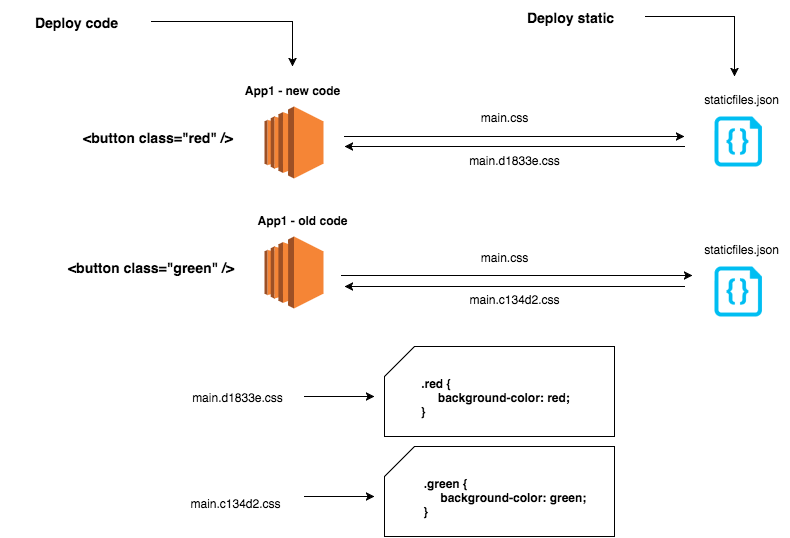
Django provides the ManifestStaticFilesStorage class, which allows Django to read static file mappings from the staticfiles.json file. staticfiles.json stores a mapping such as returning app.s23324a.css when app.css is accessed.
1,settings.py configuration
| |
By inheriting from the ManifestStaticFilesStorage class and overriding the corresponding functions, you can also customize the static file names.
2,Modify how static resources are referenced in html
| |
3,Collect static files
| |
This way a staticfiles.json file will be generated under the static directory.
When accessing a web page, the static files will be given a hash version value.
| |
2.3 Using CachedStaticFilesStorage
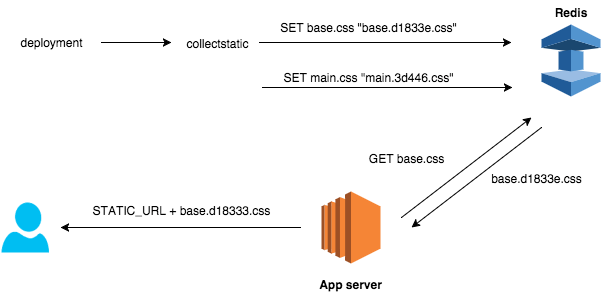
Django provides the CachedStaticFilesStorage class, which allows Django to read static file mappings from the cache. Unlike ManifestStaticFilesStorage, CachedStaticFilesStorage does not need to create a mapping file, but instead stores the mapping relationship via the cache.
1,settings.py configuration
| |
By inheriting from the ManifestStaticFilesStorage class and overriding the corresponding functions, you can also customize the static file names.
2,Configure the cache
| |
2,Modify how static resources are referenced in html
| |
3,Collect static files
| |
This way a staticfiles.json file will be generated under the static directory.
