1. Generate a Cluster ID
1
| cat /dev/urandom | tr -dc 'a-zA-Z0-9' | fold -w 16 | head -n 1
|
The examples below use CLUSTER_ID=fKbIga9RHP79OIx1.
2. On the First Node
- Configure environment variables
 1
 2
 3
 4
 5
 6
 7
 8
 9
10
| export CONTAINER_CLI=nerdctl
export IMAGE=foundationdb/foundationdb:7.1.26
export CLUSTER_ID=fKbIga9RHP79OIx1
export FDB_INSTANCE_NAME=fdb_server
export FDB_CLUSTER_FIRST_IP=$(hostname -I | awk '{print $1}')
export FDB_PUBLIC_IP=$(hostname -I | awk '{print $1}')
export FDB_PORT=4500
export FDB_DIR=/data/ops/fdb/$FDB_INSTANCE_NAME
|
1
2
3
| $CONTAINER_CLI rm -f $FDB_INSTANCE_NAME
mv $FDB_DIR $FDB_DIR.$(date +%Y%m%d%H%M%S).bak
mkdir -p $FDB_DIR
|
1
2
3
| mkdir -p $FDB_DIR
echo "${FDB_INSTANCE_NAME}:${CLUSTER_ID}@${FDB_CLUSTER_FIRST_IP}:4500" > $FDB_DIR/fdb.cluster
cat $FDB_DIR/fdb.cluster
|
 1
 2
 3
 4
 5
 6
 7
 8
 9
10
11
12
13
14
15
16
17
18
| mkdir -p $FDB_DIR/data $FDB_DIR/logs
$CONTAINER_CLI run -d \
--name $FDB_INSTANCE_NAME \
--restart always \
--security-opt apparmor=unconfined \
--security-opt seccomp=unconfined \
--network host \
--ulimit memlock=-1 \
--ulimit stack=67108864 \
--ulimit nofile=1048576:1048576 \
--memory-swappiness=0 \
-h $(hostname) \
-v $FDB_DIR/fdb.cluster:/var/fdb/fdb.cluster \
-v $FDB_DIR/data:/var/fdb/data \
-v $FDB_DIR/logs:/var/fdb/logs \
--entrypoint "" \
$IMAGE \
fdbserver --listen-address 0.0.0.0:$FDB_PORT --public-address $FDB_PUBLIC_IP:$FDB_PORT
|
1
| $CONTAINER_CLI exec -it $FDB_INSTANCE_NAME fdbcli --exec "configure new ssd single"
|
Initialize the cluster in single mode first, otherwise it will hang because there are not enough replicas.
1
| $CONTAINER_CLI exec -it $FDB_INSTANCE_NAME fdbcli --exec "status"
|
 1
 2
 3
 4
 5
 6
 7
 8
 9
10
| Configuration:
Redundancy mode - single
Storage engine - ssd-2
Coordinators - 1
Usable Regions - 1
Cluster:
FoundationDB processes - 1
Zones - 1
Machines - 1
|
3. Other Nodes
Every other node needs to join the cluster created on the first node.
1
2
3
| $CONTAINER_CLI rm -f $FDB_INSTANCE_NAME
mv $FDB_DIR $FDB_DIR.$(date +%Y%m%d%H%M%S).bak
mkdir -p $FDB_DIR
|
- Configure environment variables
 1
 2
 3
 4
 5
 6
 7
 8
 9
10
11
12
| export CONTAINER_CLI=nerdctl
export IMAGE=foundationdb/foundationdb:7.1.26
export FDB_DIR=/data/ops/fdb/$FDB_INSTANCE_NAME
export CLUSTER_ID=fKbIga9RHP79OIx1
export FDB_INSTANCE_NAME=fdb_server
export FDB_PUBLIC_IP=$(hostname -I | awk '{print $1}')
export FDB_PORT=4500
export FDB_CLUSTER_FIRST_IP="10.0.0.1"
export FDB_CLUSTER_FIRST_PORT=4500
|
- Write the first node’s cluster file
1
2
| mkdir -p $FDB_DIR
echo "$FDB_INSTANCE_NAME:$CLUSTER_ID@$FDB_CLUSTER_FIRST_IP:$FDB_CLUSTER_FIRST_PORT" > $FDB_DIR/fdb.cluster
|
 1
 2
 3
 4
 5
 6
 7
 8
 9
10
11
12
13
14
15
16
17
| $CONTAINER_CLI run -d \
--name $FDB_INSTANCE_NAME \
--restart always \
--security-opt apparmor=unconfined \
--security-opt seccomp=unconfined \
--network host \
--ulimit memlock=-1 \
--ulimit stack=67108864 \
--ulimit nofile=1048576:1048576 \
--memory-swappiness=0 \
-h $(hostname) \
-v $FDB_DIR/fdb.cluster:/var/fdb/fdb.cluster:ro \
-v $FDB_DIR/data:/var/fdb/data \
-v $FDB_DIR/logs:/var/fdb/logs \
--entrypoint "" \
$IMAGE \
fdbserver --listen-address 0.0.0.0:$FDB_PORT --public-address $FDB_PUBLIC_IP:$FDB_PORT
|
1
| $CONTAINER_CLI exec -it $FDB_INSTANCE_NAME fdbcli --exec "status"
|
Once all nodes have been added, you should see:
 1
 2
 3
 4
 5
 6
 7
 8
 9
10
| Configuration:
Redundancy mode - single
Storage engine - ssd-2
Coordinators - 1
Usable Regions - 1
Cluster:
FoundationDB processes - 5
Zones - 5
Machines - 5
|
At this point there should be 5 server nodes.
4. Change the Replica Count to triple
In single mode the data has a single replica, which is not a recommended production configuration; you need to switch to triple mode to improve data reliability.
- Change the data redundancy mode
1
| $CONTAINER_CLI exec -it $FDB_INSTANCE_NAME fdbcli --exec "configure ssd triple"
|
1
| $CONTAINER_CLI exec -it $FDB_INSTANCE_NAME fdbcli --exec "status"
|
 1
 2
 3
 4
 5
 6
 7
 8
 9
10
| Configuration:
Redundancy mode - triple
Storage engine - ssd-2
Coordinators - 1
Usable Regions - 1
Cluster:
FoundationDB processes - 5
Zones - 5
Machines - 5
|
At this point the number of Coordinators is still 1, which is not a production-ready state.
5. Update the cluster File on All Nodes
Add every node to the cluster file.
1
| echo "$FDB_INSTANCE_NAME:$CLUSTER_ID@10.0.0.1:4500,10.0.0.2:4500,10.0.0.3:4500,10.0.0.4:4500,10.0.0.5:4500" > $FDB_DIR/fdb.cluster
|
1
| $CONTAINER_CLI restart $FDB_INSTANCE_NAME
|
6. Check Cluster Status
1
| $CONTAINER_CLI exec -it $FDB_INSTANCE_NAME fdbcli --exec "status"
|
 1
 2
 3
 4
 5
 6
 7
 8
 9
10
11
| Configuration:
Redundancy mode - triple
Storage engine - ssd-2
Coordinators - 5
Usable Regions - 1
Cluster:
FoundationDB processes - 5
Zones - 5
Machines - 5
Fault Tolerance - 2 machines
|
At this point the number of Coordinators should be 5, and the cluster can tolerate the failure of 2 machines.
7. Start the Backup Agent
- Create the backup directory
1
| mkdir -p $FDB_DIR/backup
|
 1
 2
 3
 4
 5
 6
 7
 8
 9
10
11
| $CONTAINER_CLI run -d \
--name fdb_backup_agent \
--restart always \
--security-opt apparmor=unconfined \
--security-opt seccomp=unconfined \
--network host \
-v $FDB_DIR/fdb.cluster:/var/fdb/fdb.cluster:ro \
-v $FDB_DIR/backup:/var/fdb/backup \
--entrypoint "" \
$IMAGE \
backup_agent --cluster_file /var/fdb/fdb.cluster
|
8. Back Up Data
- Create the backup container
1
2
3
4
5
| $CONTAINER_CLI run -it --rm \
-v $FDB_DIR/fdb.cluster:/var/fdb/fdb.cluster:ro \
-v $FDB_DIR/backup:/var/fdb/backup \
--entrypoint "" \
$IMAGE bash
|
1
| fdbbackup start -d file:///var/fdb/backup
|
9. Restore Data
- Enter the restore container
1
2
3
4
5
| $CONTAINER_CLI run -it --rm \
-v $FDB_DIR/fdb.cluster:/var/fdb/fdb.cluster:ro \
-v $FDB_DIR/backup:/var/fdb/backup \
--entrypoint "" \
$IMAGE bash
|
1
| fdbcli --exec "writemode on; clearrange '' \xFF"
|
1
2
3
| fdbrestore start \
-r file:///var/fdb/backup/backup-2026-02-10-06-09-38.111134 \
--dest-cluster-file /var/fdb/fdb.cluster
|
Each backup directory is one copy of the data.
1
| fdbrestore status --dest-cluster-file /var/fdb/fdb.cluster
|
Once the restore status shows State: completed, the restore is finished.
1
| fdbcli --exec "getrange '' \xFF"
|
10. Monitor Cluster Status
1
| $CONTAINER_CLI exec -it $FDB_INSTANCE_NAME fdbcli --exec "status"
|
1
| $CONTAINER_CLI exec -it $FDB_INSTANCE_NAME fdbcli --exec "describe"
|
11. Cluster Monitoring
- Set environment variables
1
2
3
4
5
| export CONTAINER_CLI=nerdctl
export IMAGE=aikoven/foundationdb-exporter
export FDB_INSTANCE_NAME=fdb_server
export FDB_DIR=/data/ops/fdb/$FDB_INSTANCE_NAME
|
- Start the monitoring container
1
2
3
4
5
6
7
8
9
| $CONTAINER_CLI run -d \
--name fdb-exporter \
--restart always \
--security-opt apparmor=unconfined \
--security-opt seccomp=unconfined \
-v $FDB_DIR/fdb.cluster:/etc/foundationdb/fdb.cluster:ro \
-p 9444:9444 \
$IMAGE \
exporter
|
- View the monitoring metrics
1
| curl http://localhost:9444/metrics
|
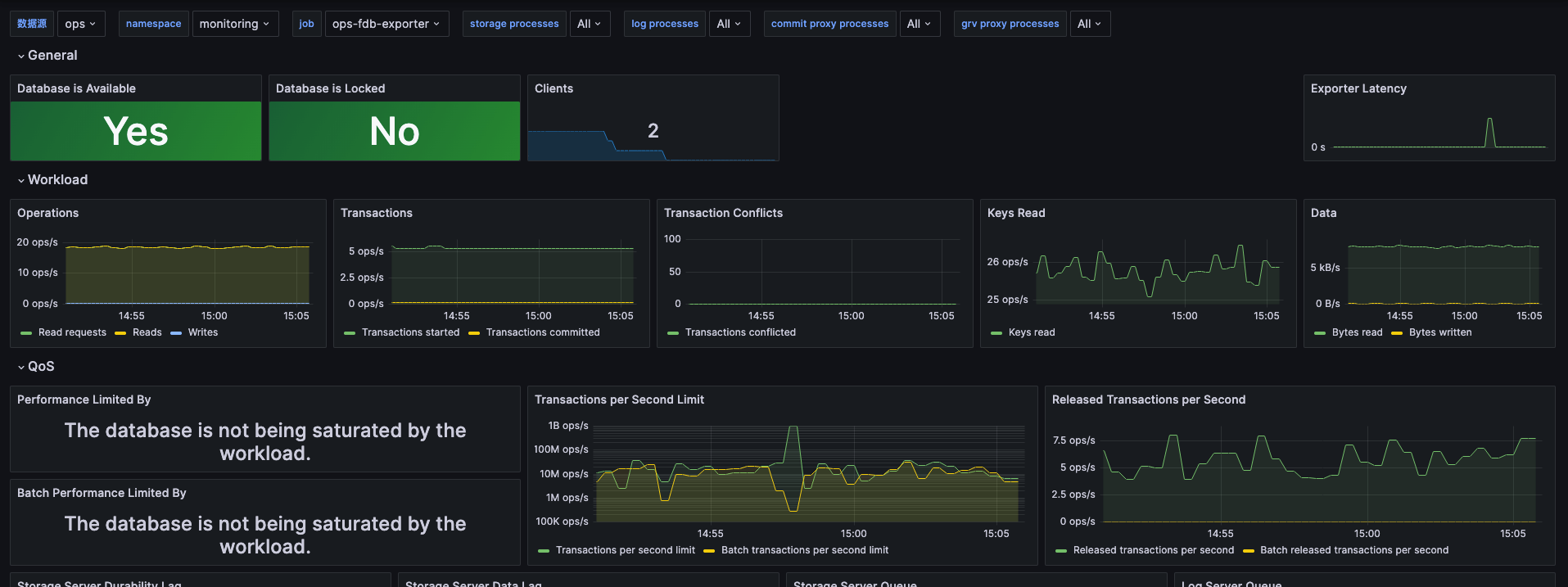
For the meaning of the metrics, see https://github.com/aikoven/foundationdb-exporter
After configuring the scrape, import the dashboard at https://github.com/aikoven/foundationdb-exporter/blob/master/grafana/foundationdb.json, adjust it slightly, and you will see the following dashboard: