1. What Is EnvoyFilter
EnvoyFilter is a CRD resource in Istio that allows users to modify Envoy’s configuration to satisfy their customization needs for different scenarios.
| |
When using Istio, you will usually end up using at least a few EnvoyFilters.
The features EnvoyFilter provides are built on Envoy’s existing built-in functionality and extension mechanisms, and mainly include:
- Modify network requests and responses
- Rate limiting and circuit breaking
- Retries
- Modify routing rules
- Add extra monitoring metrics
- Access allowlist/denylist control
- Run Lua scripts
- …
It covers most Layer 4 and Layer 7 requirements. If it cannot, you can move up to WasmPlugin; I previously wrote Developing an Istio WasmPlugin with tinygo
for reference.
2. EnvoyFilter Caveats
An incorrect configuration can undermine the stability of the entire mesh, so EnvoyFilter must be used with great care.
The scope in which an EnvoyFilter takes effect:
- Global: an EnvoyFilter in the root namespace. The root namespace is defined in the configuration file, default
rootNamespace: istio-system - Named namespace: an EnvoyFilter created in a specific namespace
EnvoyFilter priority:
- Configuration in the root namespace > configuration in other namespaces
EnvoyFilter application order:
- Applied in order of creation time
3. EnvoyFilter Configuration Fields
Let’s start with an example: Gzip-compressing the Response that passes through the Istio Gateway.
| |
A brief note on the key fields
- applyTo
The filter layer it applies to; here it points to the HTTP filter layer
- workloadSelector
Specifies the Pods it takes effect on; if workloadSelector is not set, it applies to the entire namespace.
- match.context
There are four possible values: ANY (global), SIDECAR_INBOUND (sidecar inbound), SIDECAR_OUTBOUND (sidecar outbound), GATEWAY (gateway).
- listener.filterChain.filter
Specifies the filter in the filter chain; here it points to Envoy’s HTTP filter.
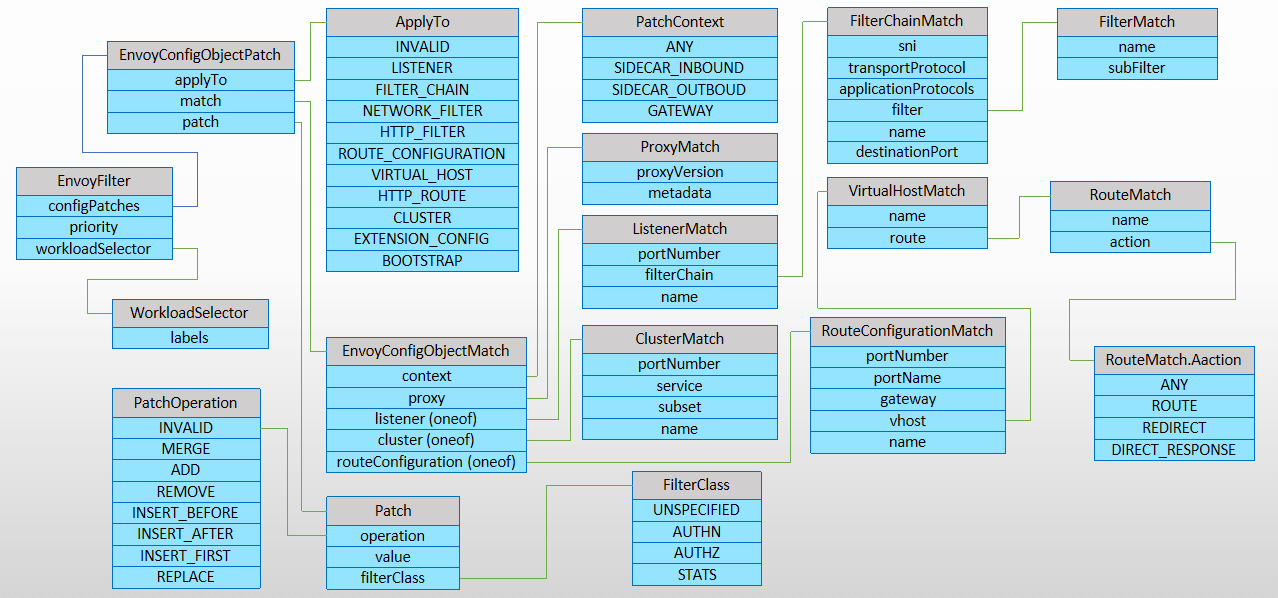
The relevant fields can be seen in the figure below:
4. EnvoyFilter-Related Metrics Monitoring
In a Sidecar or Gateway, some metrics are exposed locally, and Prometheus can be configured to scrape them.
If you need to access the relevant metrics, you can use the following endpoint:
| |
At this point, however, the metrics you need may not be there, because Istio enables only a small subset of Envoy’s metrics to avoid overburdening the scraping side. To enable more metrics, you can do so by modifying the related configuration.
4.1 Three Rule Matching Modes
Istio provides three rules for filtering metrics:
- inclusionRegexps, enable metrics matched by regular expression
- inclusionPrefixes, enable metrics matched by prefix
- inclusionSuffixes, enable metrics matched by suffix
4.2 Two Configuration Levels
- Global level
Modify the mesh field in the istio ConfigMap
| |
| |
This enables all HTTP-related metrics; restart the Istio Gateway for it to take effect. In the test environment, the data scraped by Metrics jumped from 90MB to 140 MB right away.
- Pod level
| |
This applies only to pods with the sidecar injected.
5. Summary
This article mainly introduced the basic concepts and usage of EnvoyFilter, along with EnvoyFilter-related metrics monitoring.
