1. Origins
Originally, two CoreOS employees, in order to make deploying etcd clusters easier, bound corresponding logical operations to the create, delete, and update events of the etcdCluster object, using Kubernetes to automate etcd cluster management.
A few months later, at a KubeCon conference, they shared this approach, which they called Operator, and it received a strong response from the community. Afterwards, a large number of projects announced support for running and managing themselves the Operator way.
But Kubernetes core developers from Google did not agree with Operator. Their reasoning was that Operator breaks Kubernetes’ original design, drifting outside the Controller Manager and going uncontrolled.
Just as the core developers were about to give up on Operator, the CTO of CoreOS issued a call to the community to collect projects using this approach. Because so many projects were using it, Kubernetes ultimately accepted Operator.
2. Principles
Operator is simply CRD + Controller. The CRD defines the user’s resource; the Controller watches the create, delete, and update events of CRD object instances, then executes the corresponding business logic.
Every resource in Kubernetes is a collection of API objects. Besides the built-in resource types, users can also define custom resource types to extend the Kubernetes API. Custom resources can likewise be operated on directly using the API or kubectl.
Operator depends only on Kubernetes’ declarative API and the capabilities of the Controller to achieve a customized association between user resources and concrete operations.
2.1 CRD
The basic resource types in Kubernetes include Pod, Service, Job, Deployment, and so on, and their expressive power is limited. Kubernetes provides a built-in type, CRD (CustomResourceDefinition), for custom resources.
Below is an example of defining a resource and creating an object:
- Create a new resource type
resourcedefinition.yaml:
| |
Run the command:
| |
Kubernetes will create a new RESTful API at the /apis/stable.example.com/v1/namespaces/*/crontabs/... endpoint.
- Create a custom object:
my-crontab.yaml
| |
Run the command:
| |
- View the object:
| |
2.2 Controller
Below is the implementation logic of the Controller:
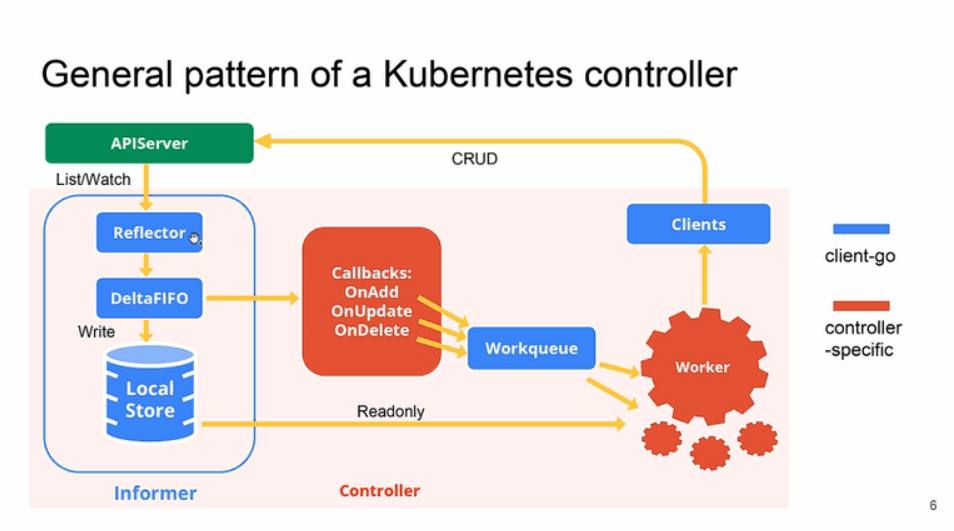
A Controller has one or more Informers to track a given resource. The Informer maintains communication with the apiserver; once it detects that a resource has changed, it immediately invokes the Callbacks and places the object data into the Workqueue.
The Workqueue serves as the task queue for Workers. A Worker first compares the difference between the state of the resource object in the Workqueue and the expected state, then sends execution requests to the apiserver through client-go until the expected state is reached.
3. Uses
The original intent of the Operator project is for developers to solidify operational capabilities in code, making operations easier. The core lies in implementing and encapsulating domain capabilities.
For the deployment and management of stateless applications, Kubernetes is a natural fit. Stateful applications, however, often have topological relationships and binding dependencies on certain external resources. Although Kubernetes has the built-in StatefulSet stateful object, it requires developers to add a great deal of domain logic to the startup command, which increases the difficulty of use.
The emergence of Operator proposed a set of effective implementation conventions for the dynamic description of applications.
Operator lowers the barrier to using distributed applications to the minimum. No matter how complex a distributed application is, as long as it provides an Operator for users, then only two commands are needed to get it done, taking kafka as an example:
| |
The purpose of Operator is to manage stateful distributed applications, such as databases, caches, monitoring, and so on.
4. How to Develop an Operator
4.1 KubeBuilder
Use client-go as the Kubernetes client, and use KubeBuilder to generate skeleton code.
KubeBuilder encapsulates and abstracts controller-runtime and controller-tools, and is used to quickly build Operators. By generating an Operator scaffold with KubeBuilder, developers do not need to worry about details such as apiserver communication and request queuing, and only need to focus on implementing the business logic.
The KubeBuilder workflow is as follows:
- Create a new project directory
- Create one or more resource API CRDs, then add fields to the resource
- Implement the reconcile loop in the controller, and watch additional resources
- Run tests in the cluster (automatically installing the CRD and automatically starting the controller)
- Update the bootstrap integration tests to test the new fields and business logic
- Build and publish the container using the user-provided Dockerfile
4.2 Operator Framework
Operator Framework is the Operator development framework provided by CoreOS. It mainly consists of two parts:
- Operator SDK, used to develop Operators
- Operator Lifecycle Manager OLM, to install, update, and manage Operators
Operator SDK provides the following workflow for developing an Operator:
- Use the SDK to create a new Operator project
- Define a new resource API by adding a custom resource (CRD)
- Specify the resources to watch using the SDK API
- Define the Operator’s reconcile logic
- Use Operator SDK to build and generate the Operator deployment manifest file
