1. Compiler Preparation
Prepare the Python source code
From the official Python website, download the source code for the Python version you need to compile. The one chosen here is the latest Python 2 release,Python-2.7.14.tar.xz, click here to go there.Prepare a compiler
On Windows, the project files built into the Python 2.7 source code can be opened with Visual Studio 2008 or 2010. VS 2013 can of course compile it as well — when importing the project, just choose to upgrade the VC++ compiler and libraries. The one used here isVS2013_RTM_PRO_CHS, click to download.
2. Directory Structure of the Source Code
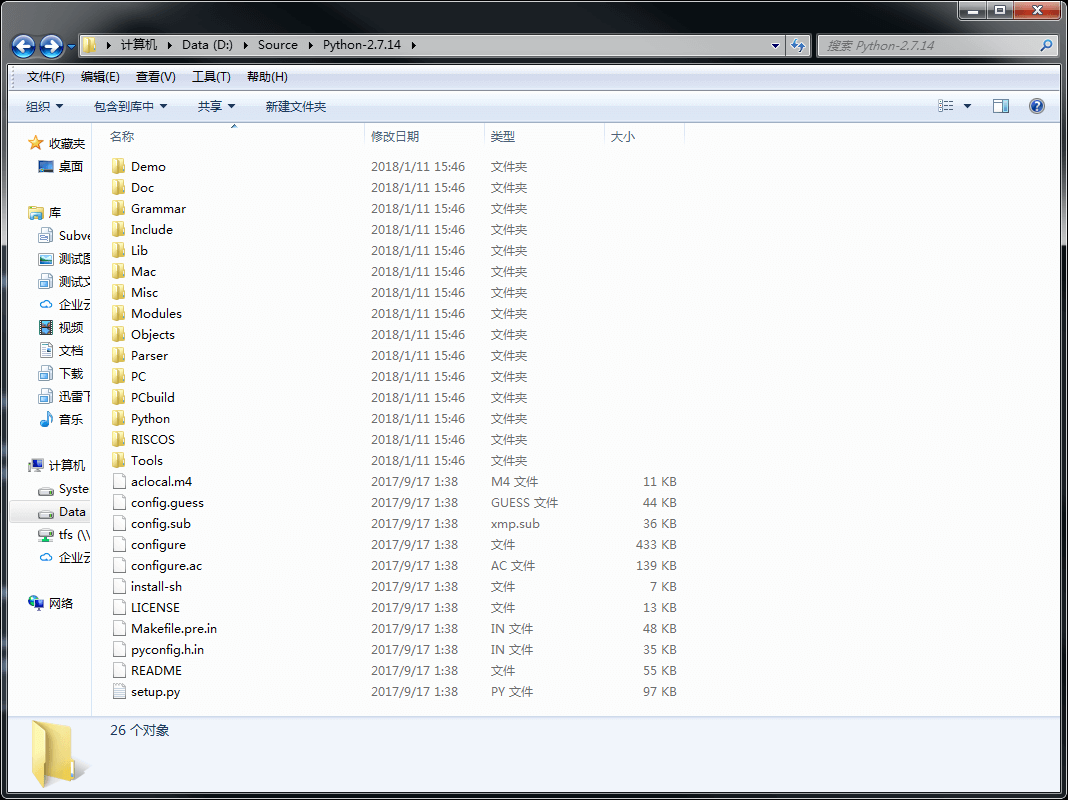
- Demo: Code used for demos, mainly to showcase some Python applications
- Doc: Python’s UserManual, in Latex format
- Grammar: Grammar files. These grammar files are used to analyze Python source code when Python runs
- include: Header files used by Python Include
- Lib: Python’s library files
- Mac: For Mac
- Misc: As the name suggests, files that don’t fit anywhere else end up here
- Modules: Implementations of some of Python’s Built-in Modules
- Objects: Implementations of Python’s basic internal objects, such as class/list and so on
- Parser: Python’s lexical analysis and syntax analysis
- PC: The projects for the older Windows and OS2 Ports, along with some common files used by the Port, live here; both PCBuild and PCBuild8 use the contents of this directory
- PCBuild: The Project files Python uses for Visual Studio 2008/2010
- Python: The main Python program code
- RISCOS: Python’s RISC OS Port
- Tools: The tools needed to Build and Extend Python
3. Compilation Steps
Step one, extract Python-2.7.14
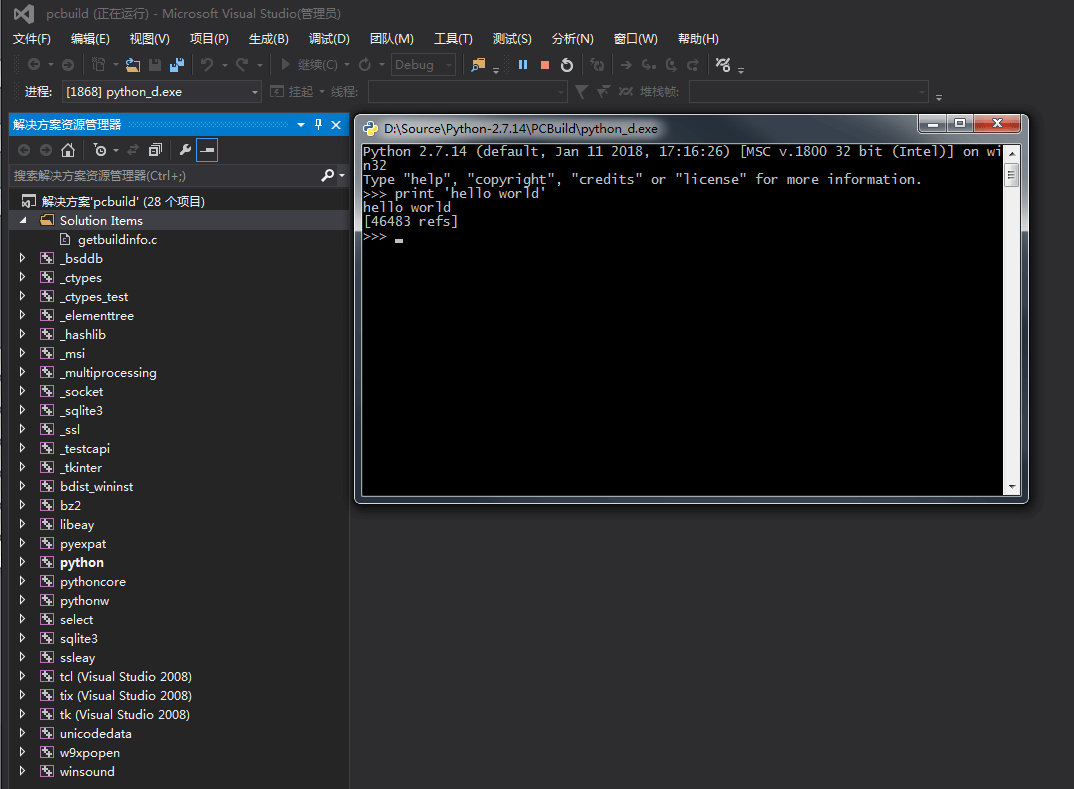
Step two, go into the PCbuild folder and open pcbuild.sln with VS2013
Step three, compile and run. In the end,
python_d.exeandpython27_d.dllare generated under the PCbuild folder; you can double-clickpython_d.exeto enter the python command-line environment.
4. Python’s Overall Architecture
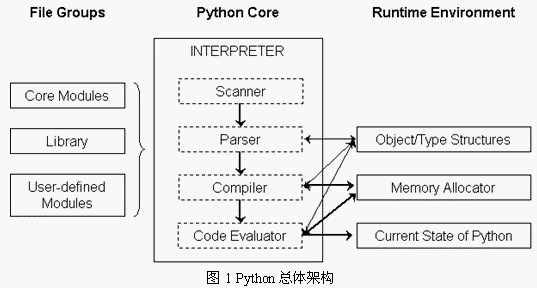
On the left of the diagram are the large number of modules, libraries, and user-defined modules that Python provides. For example, when you run import os, this os is a built-in module of Python, and of course users can also extend Python’s modules through custom modules.
In the middle of the diagram is Python’s core, the interpreter. The Scanner corresponds to lexical analysis, splitting the Python source code input from a file, or the lines of Python code input from the command line, into tokens one by one; the Parser corresponds to the syntax analysis part, performing syntax analysis on the Scanner’s results and building an abstract syntax tree (AST); the Compiler generates a set of instructions, Python byte code, based on the AST that was built, just as the Java compiler and the C# compiler do; finally, the Code Evaluator interprets and executes this byte code. For this reason, the Code Evaluator can also be called the execution engine.
On the right of the diagram is Python’s runtime environment, including the Object/Type structures, the Memory Allocator, and the Current State of Python. The runtime state maintains the interpreter’s actions of switching between different states while executing byte code, and it can be thought of as a huge and complex finite state machine. The memory allocator is fully in charge of requesting memory when objects are created in Python; in practice it is a layer of interface between the Python runtime and C’s malloc. The object/type system, meanwhile, contains the various built-in objects that exist in Python, such as integers, list, and dict.
5. References
- 《Python源码剖析》
