1. Basic Concepts
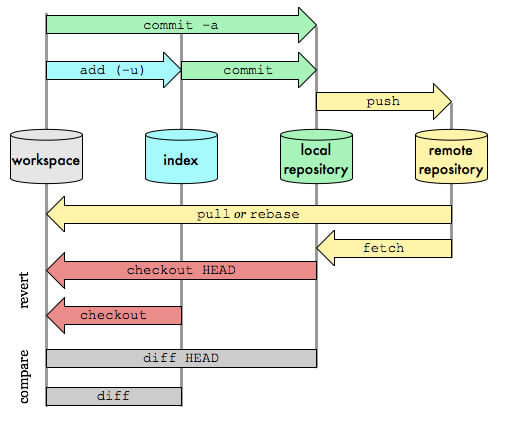
- Workspace: the working area, the project files
- Index: the staging area, also called the pending-commit area; before a commit enters the repo, all updates are placed in the staging area
- Local Repository: the local repo, the version repository kept locally; HEAD points at the current development branch
- Remote Repository: the remote repo, the version repository on a remote server
The basic Git workflow is as follows:
- Modify some files in the working directory
- Snapshot the modified files and save them to the staging area, git add
- Commit the updates, permanently dumping the file snapshots saved in the staging area into the local Git, git commit
- Update the remote, pushing the local Git to the remote, git push
2. Initialization
- Initialize a new repository
1
| $git clone <git-base-url>
|
- View the repository’s remote hosts
3. Branches
* With no arguments, lists only local branches
* The `-a` argument lists both local and remote
* The `-r` argument lists only remote
1
| git checkout <branch_name>
|
*The `-a` argument pulls updates for all branches
- Create a local branch based on the current branch
1
| $git branch <branch_name>
|
- Create a local branch based on a remote branch
1
| $git branch <branch_name> origin/<branch_name>
|
1
| $git checkout <branch_name>
|
- Push a local branch to the remote
1
| $git push origin <branch_name>
|
1
| $git push origin --delete <branch_name>
|
Or push an empty local branch to the remote
1
| $git push origin :<branch_name>
|
1
| $git branch -D <branch_name>
|
4. Versions
 1
 2
 3
 4
 5
 6
 7
 8
 9
10
| # 查看命令历史,常用于帮助找回丢失掉的 commit
git reflog
# 回退到具体某个版本
git reset --hard c7926e6
# 显示当前分支的版本历史
git log
# 显示commit历史,以及每次commit发生变更的文件
git log --stat
# 搜索提交历史,根据关键词
git log -S [keyword]
|
5. Commits
1
| git commit -m "commit msg"
|
1
| $git checkout -- <file_name>
|
- Discard all file modifications
- Update master into your own branch
1
2
| $git checkout <branch_name>
$git merge master
|
- Fetch the latest master from the remote and merge it into your own branch
1
| $git pull origin master
|
This is equivalent to fetching first and then merging
1
2
3
| git fetch origin master:tmp
git diff tmp
git merge tmp
|
 1
 2
 3
 4
 5
 6
 7
 8
 9
10
11
12
| # 查看全部标签
git tag
# 切换标签
git checkout <tag_name>
# 新建标签
git tag v1.0 #新建标签,默认位 HEAD
git tag v1.0 c7926e6 #对指定的 commit id 打标签
git tag -a v1.0 -m 'v1.0 r' #新建带注释标签
# 删除标签
git tag -d <tag_name>
# 删除远程标签
git push origin :refs/tags/<tag_name>
|
7. References
