In a team, any change to the development workflow must be paired with the corresponding automation tooling. Without a low enough cost of use, the change is meaningless, because nobody will actually use it. In the previous post we covered how to use a CDN for further frontend/backend separation; this one is mainly about how to fold that workflow into CI. Backend configuration has already been covered extensively in earlier blog posts. Backend CI is mainly about code checks and pushing code to the SVN repository, so this post does not touch on that part.
1. Version Convention
The frontend version is determined by the package.json file. The package.json file looks like this:
1
2
3
4
5
6
7
8
| {
"name": "my-project-webpack",
"version": "1.1.3",
"description": "",
"main": "index.js",
"dependencies": {
}
}
|
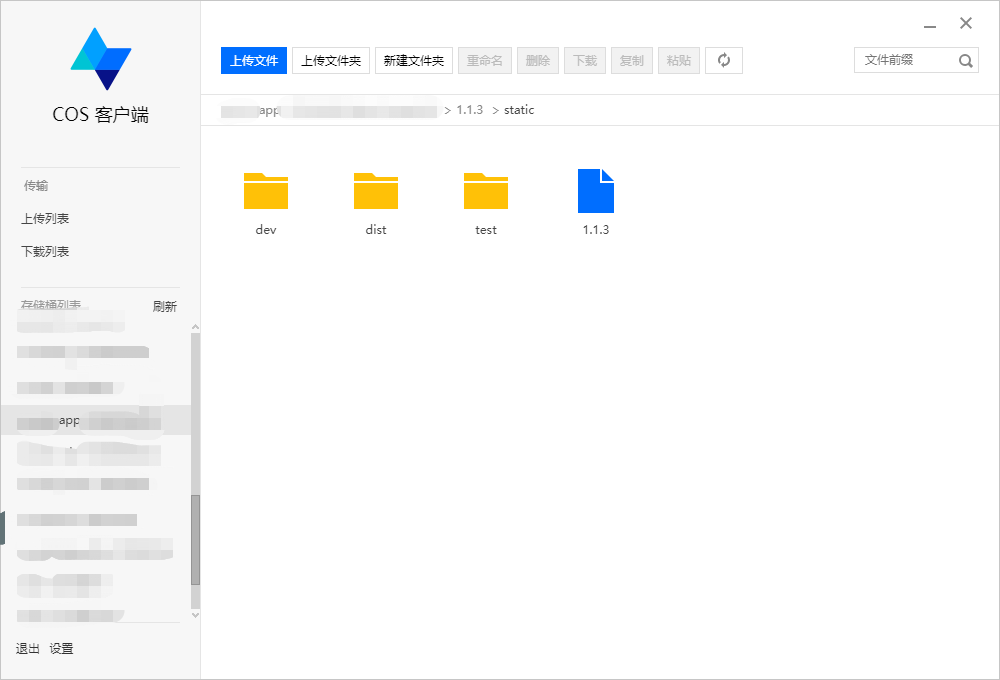
The files output by the frontend build go into the static directory of the current directory:
1
2
3
4
5
6
| # 本地版本
./static/dev/
# 测试环境版本
./static/test/
# 正式环境版本
./static/dist/
|
The frontend static link format is agreed as:
1
| https://cdn.domain.com/1.1.3/static/dev/js/app.js
|
The version number goes directly into the accessed URL, which makes multi-version management easy. It also avoids having to force a CDN refresh after every release to update the cache.
The frontend version is controlled by the frontend, and a formally released version should be an even-numbered version. After a release, the last digit of the version number must be incremented. In addition, every release must record the changes in the GitLab repository’s wiki.
2. Frontend Changes
Because the page had its JS split out and optimized, the page references local JS by default. By modifying the publicPath property, the referenced path can be pointed at the CDN.
 1
 2
 3
 4
 5
 6
 7
 8
 9
10
11
| var package = require("./package.json");
var version = package.version;
baseConfig.devtool = "(none)";
baseConfig.output = {
path: path.resolve(__dirname, "./static/test/"),
publicPath: "https://cdn.domain.com/" + version + "/static/test/",
filename: "js/[name].js",
chunkFilename: "[name].js",
};
|
3. Backend Changes
The backend is Django. The backend changes serve two purposes:
- Adapt to different environments — there are three: local, test, and production.
- Frontend version control.
Adapting to different environments is done mainly through the directory structure. Frontend version control requires reading one config entry from the database; when the frontend is released, the config just needs to be changed.
settings.py, adapting to different environments
1
2
3
4
5
6
7
| APP_CDN_URL = 'https://cdn.domain.com/'
if RUN_MODE == 'DEVELOP':
BUNDLE_NAME = '/static/dev/'
elif RUN_MODE == 'TEST':
BUNDLE_NAME = '/static/test/'
elif RUN_MODE == 'PRODUCT':
BUNDLE_NAME = '/static/dist/'
|
views.py, reading the frontend version config
1
2
3
4
| def index(request,question_id):
V = Config().get_content('V') or '1.1.3'
REMOTE_BUNDLE_URL = '%s%s%s'%(settings.APP_STATIC_URL, V, settings.BUNDLE_NAME)
return render(request, 'index.html', {'BUNDLE_URL': REMOTE_BUNDLE_URL,})
|
index.html, referencing the versioned static files
1
2
3
4
| ...
<script type="text/javascript" src="{{BUNDLE_URL}}js/vendors.js"></script>
<script type="text/javascript" src="{{BUNDLE_URL}}js/app.js"></script>
...
|
4. Frontend GitLab Repository
Three files were added to the frontend repository:
- .gitlab-ci.yml, the CI configuration
- get_version.sh, the script that gets the frontend version
- upload.py, the script that uploads to Tencent Cloud COS
Below is the .gitlab-ci.yml configuration of the frontend code repository
 1
 2
 3
 4
 5
 6
 7
 8
 9
10
11
12
13
14
15
16
17
18
19
20
21
22
23
24
25
26
27
28
29
30
31
| before_script:
- source /data/runner/web/bin/activate
- which node && node --version
- which npm && npm --version
- LANG="zh_CN.utf8"
- export LC_ALL=zh_CN.UTF-8
stages:
- build
build-webpack:
stage: build
cache:
untracked: true
paths:
- ./node_modules
script:
- echo "start build test"
- rm -rf ./static/*
- npm install
- if [[ $(git log -1 --pretty=%B) = *"["*"skipbuild"*"]"* && $CI_COMMIT_REF_NAME = 'master' ]]; then echo "skip build"; else npm run build; fi;
- source get_version.sh
- echo $PACKAGE_VERSION
- touch ./static/$PACKAGE_VERSION
- if [[ $(git log -1 --pretty=%B) = *"["*"deploy"*"]"* && $CI_COMMIT_REF_NAME = 'master' ]]; then python upload.py $DEPLOY_CMD ./static $PACKAGE_VERSION; else echo "not deploy"; fi;
artifacts:
name: "static"
paths:
- ./static
only:
- master
|
get_version.sh, getting the frontend version number from the package.json file
1
2
| PACKAGE_VERSION=$(cat package.json | grep version | head -1 | awk -F: '{ print $2 }' | sed 's/[",]//g' | tr -d '[[:space:]]')
export PACKAGE_VERSION
|
DEPLOY_CMD is an environment variable added on the GitLab Settings Pipelines page, with the value:
1
| AKIXXXXXXXN 93nxxxxxxxxXHZE9 ap-shanghai app-120000000
|
The script that uploads the frontend files to Tencent Cloud COS — from the local ./static/ directory to the cloud /:version/static/ directory.
 1
 2
 3
 4
 5
 6
 7
 8
 9
10
11
12
13
14
15
16
17
18
19
20
21
22
23
24
25
26
27
28
29
30
31
32
33
34
35
36
37
38
39
40
41
42
43
44
45
46
47
48
49
50
51
52
53
54
55
| #!/usr/bin/python
# -*- coding: utf-8 -*-
############################################
# 使用 cos-python-sdk-v5 上传文件夹到腾讯云
# 安装方式
# pip install cos-python-sdk-v5
# 使用方式
# python upload.py AKIXXXXXXXN 93nxxxxxxxxXHZE9 ap-shanghai app-120000000 ./static 1.0.0
############################################
import os
import sys
from qcloud_cos import CosConfig, CosS3Client
def main(argv):
# 校验参数
if len(argv) == 7 :
secret_id = sys.argv[1] # 用户的 secretId
secret_key = sys.argv[2] # 用户的 secretKey
region = sys.argv[3] # 用户的 Region( 'ap-beijing-1')
bucket = sys.argv[4] # 用户的 Bucket
filePath = sys.argv[5] # 上传文件夹路径
version = sys.argv[6] # 上传文件 Version,可以理解为 Prefix
else:
print 'argv error'
return
# 0,获取本地目录文件列表
# 获取文件列表
file_list = []
print 'upload dir: %s' % filePath
for root, dirs, files in os.walk("./static", topdown=False):
file_list.extend([os.path.join(root, name).replace('\\', '/') for name in files])
print 'ready to upload num of files %s,list: %s' % (len(file_list), file_list)
#1,用户配置
token = None # 使用临时密钥需要传入 Token,默认为空,可不填
scheme = 'http' # 指定使用 http/https 协议来访问 COS,默认为 https,可不填
config = CosConfig(Region=region, SecretId=secret_id, SecretKey=secret_key, Token=token, Scheme=scheme, Timeout=300)
# 2. 获取客户端对象
client = CosS3Client(config)
print 'Get client Success'
# 3. 开始上传
result = []
for file in file_list:
response = client.put_object_from_local_file(
Bucket=bucket,
LocalFilePath=file,
Key='/%s%s' % (version, file[1:]),
)
result.append((file, response['ETag']))
print 'upload result: %s, Total: %s, Success:%s' % (result, len(file_list), len(result))
if __name__ == '__main__':
main(sys.argv)
|
5. Final Result
Tencent Cloud COS
Visiting the application home page
1
2
3
4
5
6
7
8
| <script
type="text/javascript"
src="https://cdn.domain.com/1.1.3/static/test/js/vendors.js"
></script>
<script
type="text/javascript"
src="https://cdn.domain.com/1.1.3/static/test/js/app.js"
></script>
|
