No.
1. Background
When building a reliable, stable operations system on top of Kubernetes, destroying and creating virtual machines (VMs) is the norm. VMs provide compute and memory resources, while external storage is exposed to PVCs in the cluster through a StorageClass.
Against this backdrop, how to initialize a VM quickly becomes a new challenge. The usual approach is to build a VM image for a Node, downloading and installing dependencies into the VM ahead of time. When adding a Node, the prebuilt image is used to add the node quickly.
But this approach mainly solves cluster scaling; it does not solve the problem of cold image downloads. Nodes can be added quickly, but services cannot start quickly — they have to wait for the image download to finish.
This article tries to offer a new method: mount /var/lib/docker on external storage so it can be migrated and shared between different hosts. If it works, it would shorten the time it takes for services to migrate after the cluster scales up or down. Here is the diagram:
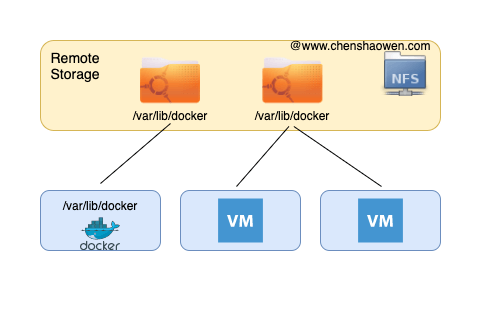
Another idea is to take advantage of the elasticity and zero-ops nature of Serverless, bringing its compute capacity into Kubernetes through Virtual Kubelet. That sidesteps the problem of VM maintenance, and is not discussed here.
2. Setting Up an NFS Server
Reference: NFS Deployment and Mounting
The NFS Server here is set up on dev.chenshaowen.com, and /etc/exports contains:
/data/ *(rw,sync,no_root_squash,no_all_squash)
- On the NFS Server, create the directories used for testing
1
2
3
| mkdir /data/docker
mkdir /data/image
mkdir /data/overlay2
|
- On the VM, install the client tools
They need to be installed on any VM that uses the NFS storage service.
1
| yum install -y nfs-utils
|
- On the VM, test the NFS service
1
2
3
4
| showmount -e dev.chenshaowen.com
Export list for dev.chenshaowen.com:
/data *
|
3. Test 1: Mounting /var/lib/docker Directly
All of the following operations are performed on the VM.
- Mount the remote directory
1
| mount -t nfs dev.chenshaowen.com:/data/docker /root/docker
|
1
| ln -s /root/docker /var/lib/docker
|
1
2
3
4
5
6
7
| docker pull docker.io/alpine
Using default tag: latest
Trying to pull repository docker.io/library/alpine ...
latest: Pulling from docker.io/library/alpine
Digest: sha256:234cb88d3020898631af0ccbbcca9a66ae7306ecd30c9720690858c1b007d2a0
Status: Image is up to date for docker.io/alpine:latest
|
1
2
3
4
| docker images
REPOSITORY TAG IMAGE ID CREATED SIZE
docker.io/alpine latest d4ff818577bc 5 days ago 5.6 MB
|
1
2
3
4
| docker run --rm -it alpine bash
/usr/bin/docker-current: Error response from daemon: error creating overlay mount to /root/docker/overlay2/aa71f5e73c816ff6d58b9116e67b51c5d4fb7490e990940f8b7c2198d20f5bfe-init/merged: invalid argument.
See '/usr/bin/docker-current run --help'.
|
- Clean up the test environment
If it cannot be unmounted, add the -f flag to force it, or use fuser /root/docker to see which processes are using it and kill them.
Mounting /var/lib/docker directly lets you download and list images, but you cannot create containers.
4. Test 2: Mounting /var/lib/docker/image
1
2
| mkdir /root/image
mkdir /var/lib/docker
|
- Mount the remote directory
1
| mount -t nfs dev.chenshaowen.com:/data/image /root/image
|
1
| ln -s /root/image /var/lib/docker/image
|
- Pull an image and create a container
1
2
3
4
5
6
| docker pull nginx
docker images
REPOSITORY TAG IMAGE ID CREATED SIZE
docker.io/nginx latest d1a364dc548d 3 weeks ago 133 MB
|
1
2
| docker run --rm -it nginx bash
root@401c782dcd46:/#
|
1
| rm -rf /var/lib/docker/*
|
Mounting /var/lib/docker/image works normally: you can pull images and create containers. But on another VM, check the disk usage:
 1
 2
 3
 4
 5
 6
 7
 8
 9
10
11
12
13
14
| du -h --max-depth=1 /var/lib/docker
4.0K /var/lib/docker/runtimes
18G /var/lib/docker/overlay2
4.0K /var/lib/docker/swarm
4.0K /var/lib/docker/tmp
24M /var/lib/docker/image
88K /var/lib/docker/buildkit
212K /var/lib/docker/network
4.0K /var/lib/docker/trust
16K /var/lib/docker/plugins
28K /var/lib/docker/volumes
62M /var/lib/docker/containers
18G /var/lib/docker
|
In fact /var/lib/docker/image does not take up much disk — it stores image metadata, while the real data lives in /var/lib/docker/overlay2. When the data in /var/lib/docker/overlay2 is lost, the mounted data is unusable.
At the same time, /var/lib/docker/image cannot be shared by multiple VMs, which defeats the point of speeding anything up.
5. Test 3: Mounting /var/lib/docker/overlay2
- Mount the remote directory
1
| mount -t nfs dev.chenshaowen.com:/data/overlay2 /root/overlay2
|
1
| ln -s /root/overlay2 /var/lib/docker/overlay2
|
1
2
3
4
5
6
7
8
| docker pull alpine
Using default tag: latest
Trying to pull repository docker.io/library/alpine ...
latest: Pulling from docker.io/library/alpine
5843afab3874: Extracting [==================================================>] 2.811 MB/2.811 MB
latest: Pulling from docker.io/library/alpine
5843afab3874: Downloading [===========> ] 527.5 kB/2.277 MB
|
While pulling the image layer, it hangs. Retrying repeatedly gives an error:
1
| failed to register layer: symlink ../cb97a0b3d4bea7e66b3f205092b57707774397b9f917254b154721fc80c1f60c/diff /var/lib/docker/overlay2/l/PVQUL6KR6X3V3ZXM2DDE55KOMJ: no such file or directory
|
1
| rm -rf /var/lib/docker/*
|
Mounting /var/lib/docker/overlay2 makes it impossible to pull images: they can be downloaded into memory, but cannot be saved to the NFS storage.
6. Conclusion
The Docker version used in this test was 20.10.6, and /var/lib/docker cannot be mounted on remote storage for use. The main reason is that the container implementation depends on kernel capabilities (xattrs), which remote storage such as an NFS Server cannot provide. If Device Mapper is used for mapping, mounting from disk is feasible, but it can only be used for migration — not for sharing.
7. References
