1. What Docker Is
Docker was born in early 2013 as a side project inside dotCloud (the former name of Docker Inc.). Its source code is hosted on GitHub, it is written in Go, and it follows the Apache 2.0 open-source license.
The goal of the Docker project is to provide a lightweight operating system virtualization solution. Docker is built on technologies such as Linux Containers (LXC).
Docker adds a further layer of abstraction on top of LXC, so users do not have to worry about container management and can easily create a lightweight, portable, self-sufficient container for any application.
2. Basic Concepts
- Image: a read-only template used when a container runs; each image is made up of a series of layers
- Repository: used to store images; think of it as the code repository of version control
- Container: contains all the environment a given application needs to run; every container is created from an image and is an independent application platform
- Dockerfile: a text file containing all the commands for building an image
- Docker Registry: the official tool, which can be used to build a private image registry
- Docker Hub: the official public Docker Registry
3. Use Cases
- Simplified configuration: the runtime environment and configuration are deployed together with the code, reducing the coupling between hardware requirements and the application environment
- Code pipeline management: moving code from the developer machine to production involves many intermediate environments, and Docker can provide a consistent environment
- Improved efficiency: Docker can make the development environment much closer to production
- Application isolation: Docker keeps different applications running on the same machine isolated from one another
- Service consolidation: Docker can consolidate multiple applications through virtual machines
- Debugging capability: Docker provides many tools for setting checkpoints on containers, comparing container differences, and so on, to assist debugging
- Multi-tenant environments: with Docker you can create isolated environments for multiple instances of each tenant’s application layer
- Fast deployment: Docker deploys by creating containers, compressing the deployment process down to seconds
4. Docker Runtime Structure
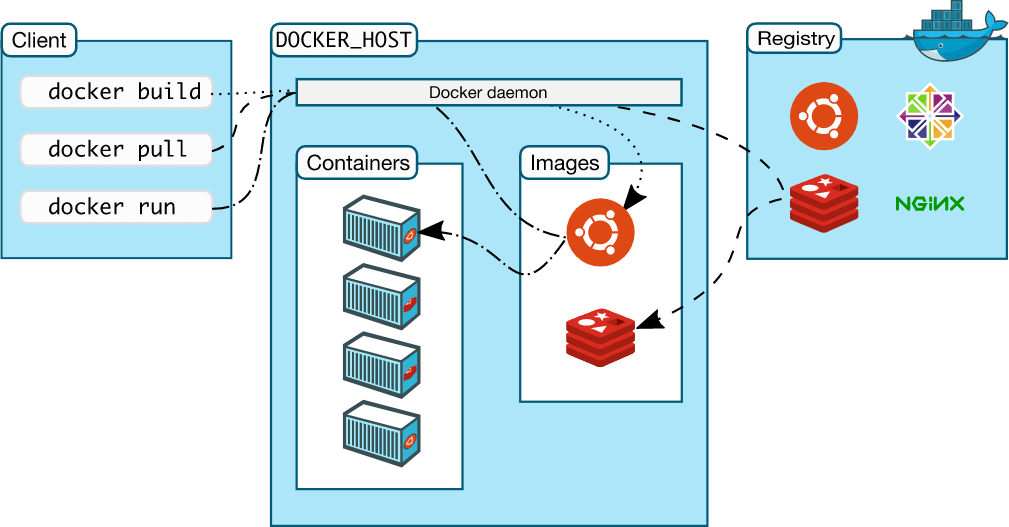
Docker uses a client-server (C/S) architecture and manages and creates Docker containers through a remote API. Docker containers are created from Docker images.
- C/S architecture: the Docker daemon acts as the server, accepting requests from clients and handling them (creating, running, and distributing containers). The client and the server can either run on the same machine or communicate over a socket or RESTful API.
- The Docker daemon usually runs in the background on the host machine, waiting to receive messages from clients. The Docker client, for its part, provides users with a set of executable commands, which they use to interact with the Docker daemon.
5. Docker Core Architecture
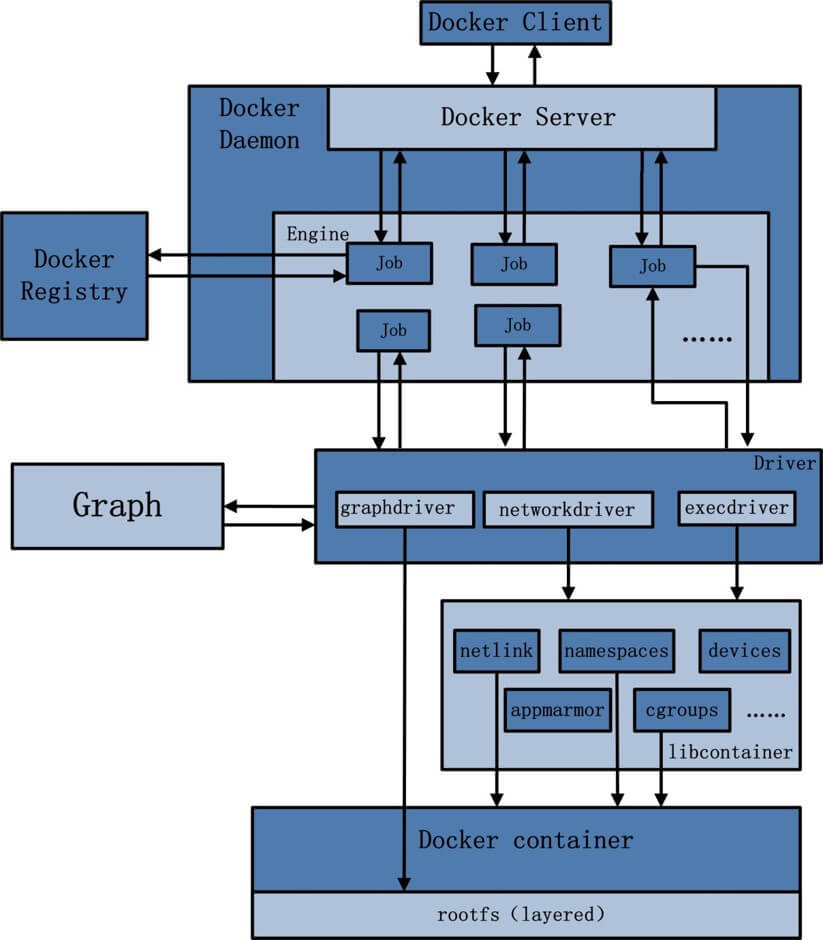
- Docker Client: the terminal through which the user establishes communication with the Docker Daemon
- Docker Daemon
Docker Server, which serves the Docker API; Engine, the execution engine; Job, the smallest unit of work executed inside the Engine
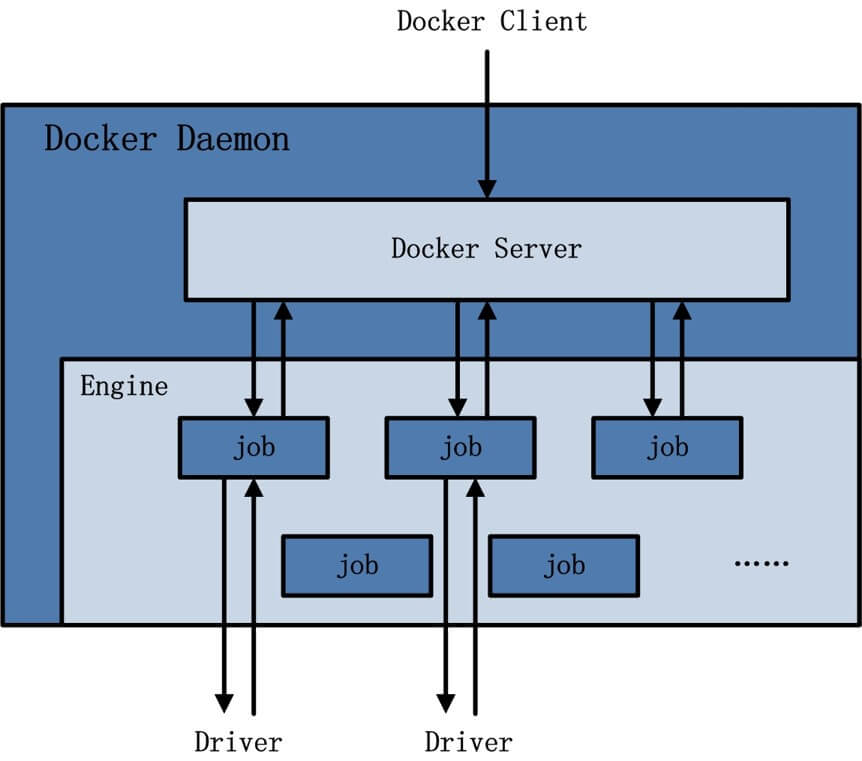
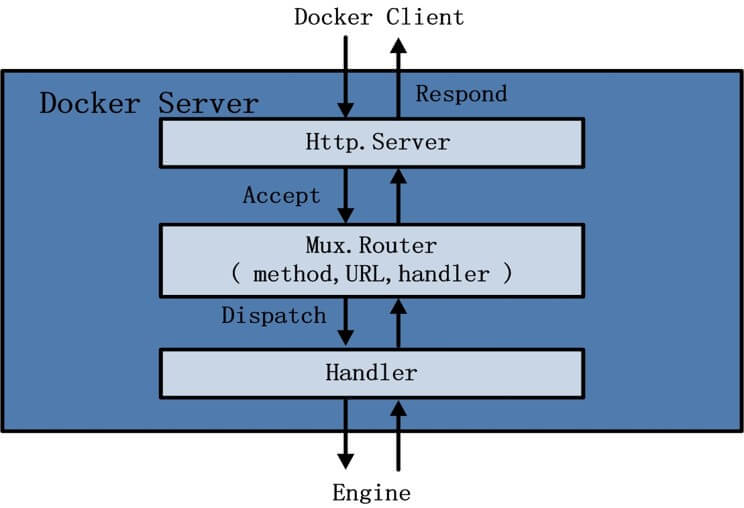
Among these, the Docker Server architecture
- driver
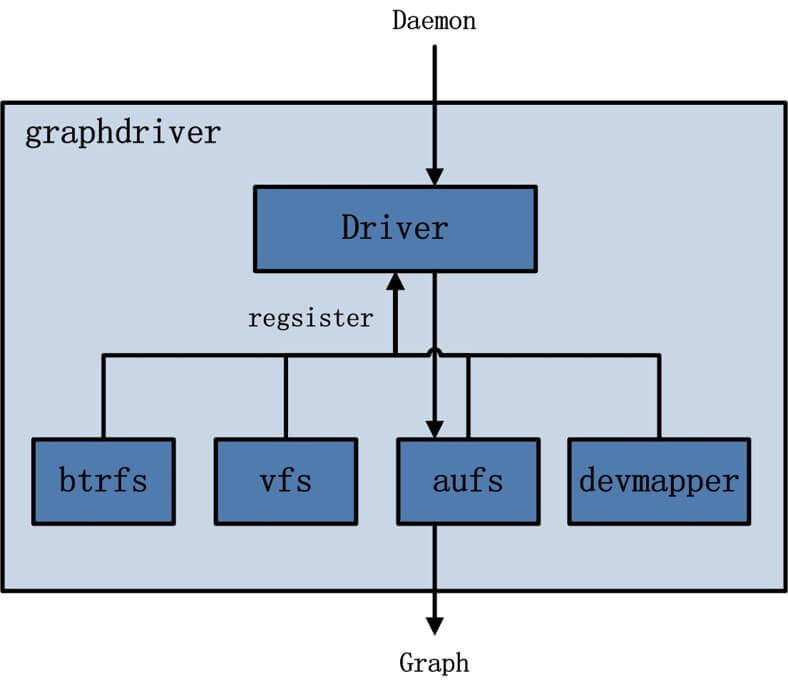
execdriver, which manages container execution; Networkdriver, which manages container networking; Graphdriver, which manages container images
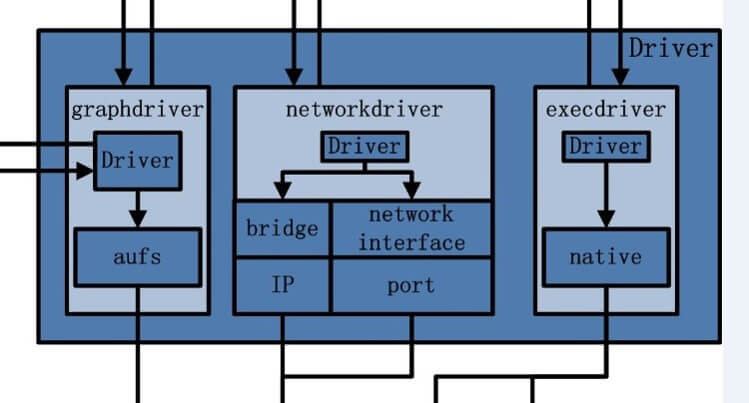
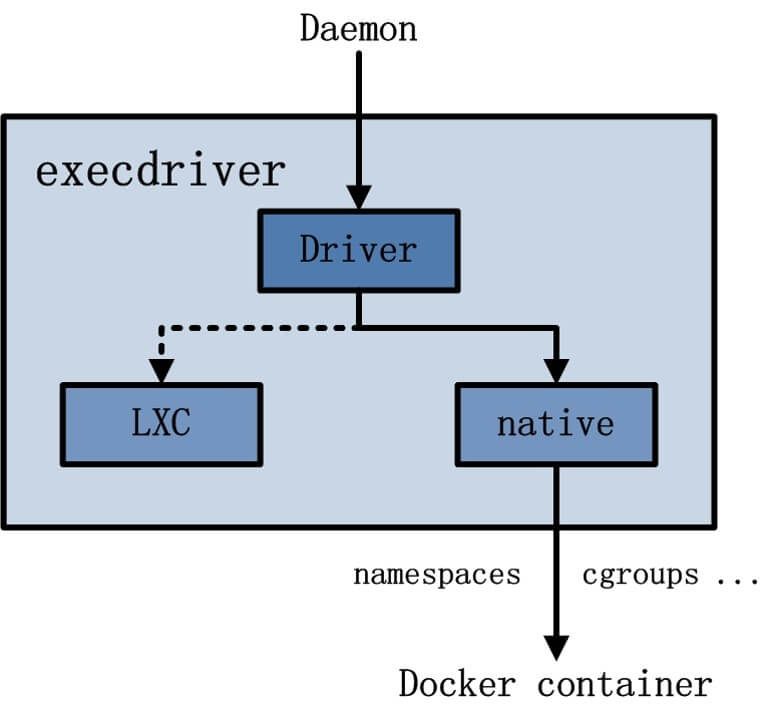
Among these, execdriver: LXC, which early versions used as the tool for creating and managing containers; Native, which is used nowadays to create and manage containers, with native calling into libcontainer
Among these, graphdriver
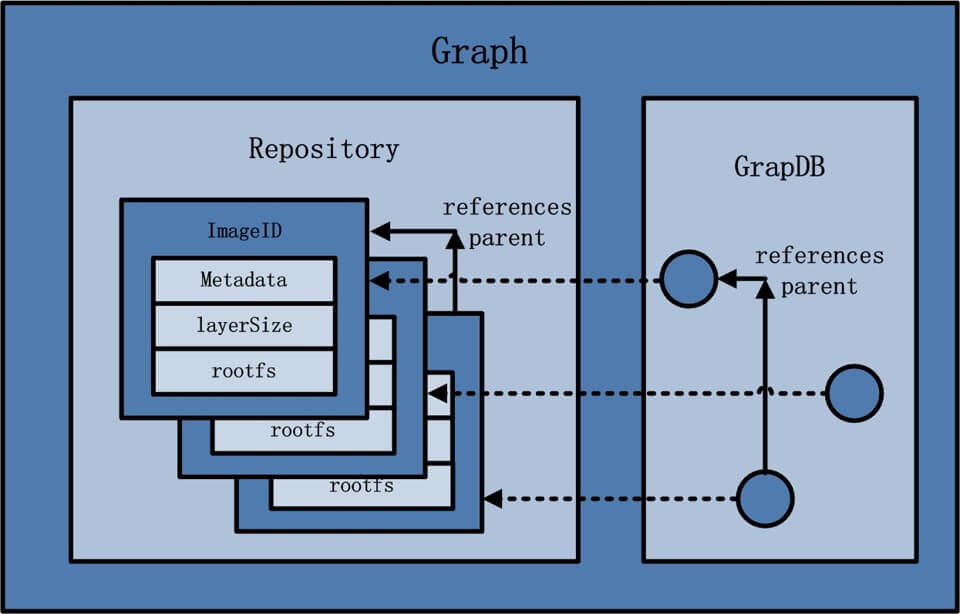
- graph
- libcontainer
Since version 0.9, Docker has used libcontainer in place of LXC; libcontainer covers almost all of Docker’s core technology.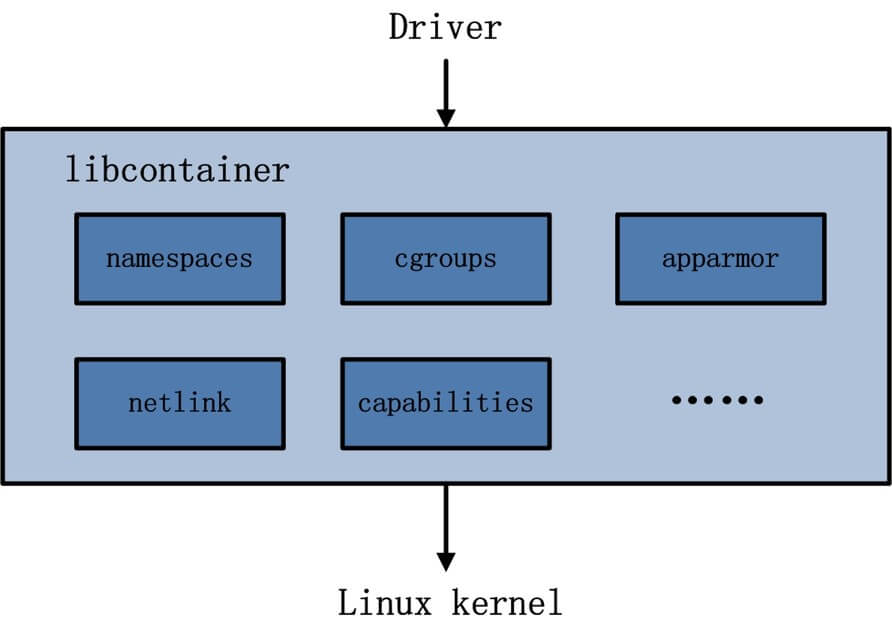
- networkdriver
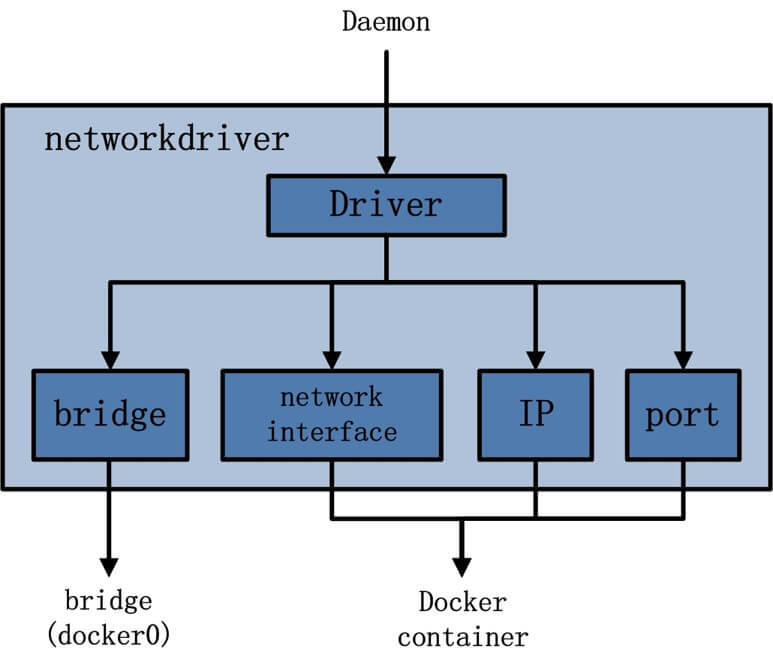
- Docker network modes
Docker Daemon network modes:
bridge
None (disabled)
Docker Container network modes:
bridge mode
Host mode
other container mode
None (disabled) mode
6. Docker Commands
Basic syntax
Docker commands fall into two broad categories: client commands and server commands. The former is the main operating interface; the latter is used to start the Docker daemon.
- Client commands: the basic command format is docker [OPTIONS] COMMAND [arg…]
- Server commands: the basic command format is docker daemon [OPTIONS]
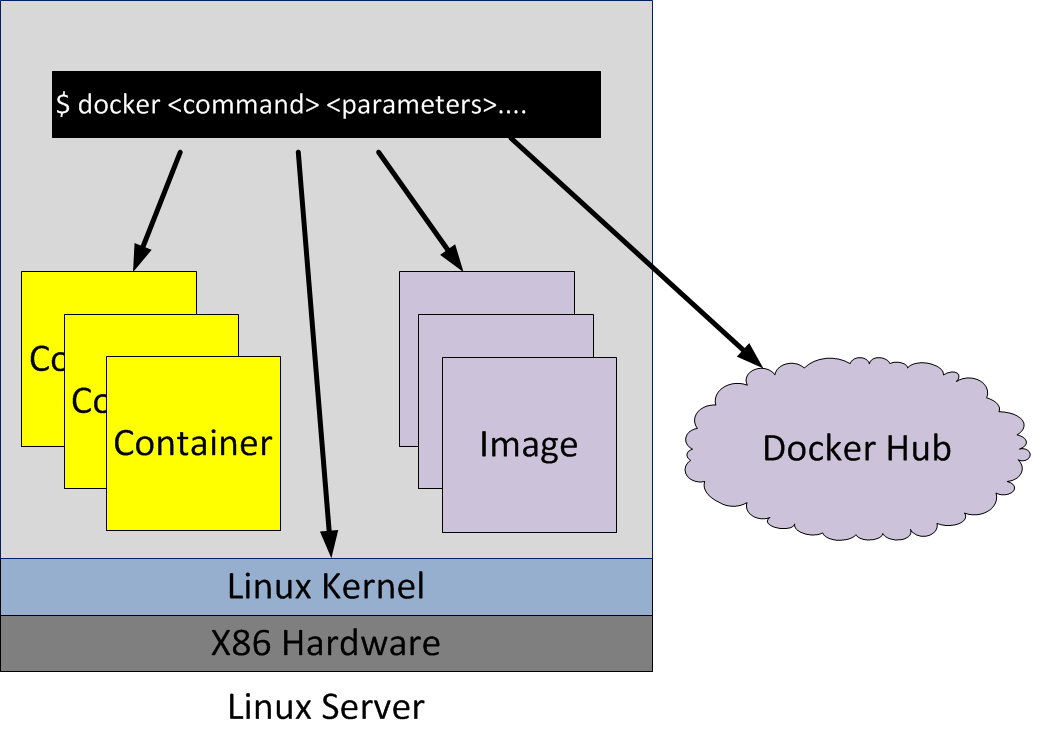
You can view these commands with man docker or docker help.
- Container lifecycle management commands: run, start/stop/restart, kill, rm, pause/unpause, create, exec
- Container operation commands: ps, inspect, top, attach, events, logs, wait, export, port
- Container rootfs commands: commit, cp, diff
- Image registry commands: login, pull, push, search
- Local image management commands: images, rmi, tag, build, history, save, import, -
- info|version commands: info, version
7. Installing Docker
Docker ToolBox (go to download) includes the following Docker tools:
- Docker Machine: includes the docker-machine command
- The engine needed to run Docker commands
- Docker Compose: a container management tool
- Kitematic: a Docker GUI
- Oracle’s VM VirtualBox
In addition, it also provides some Docker command-line shells.
One thing to note: in the Windows environment:
Because the Docker daemon depends on the Linux kernel, it cannot run directly in a Windows environment. You need to use the docker-machine command to create a Docker virtual machine and provide the Docker service through that virtual machine.
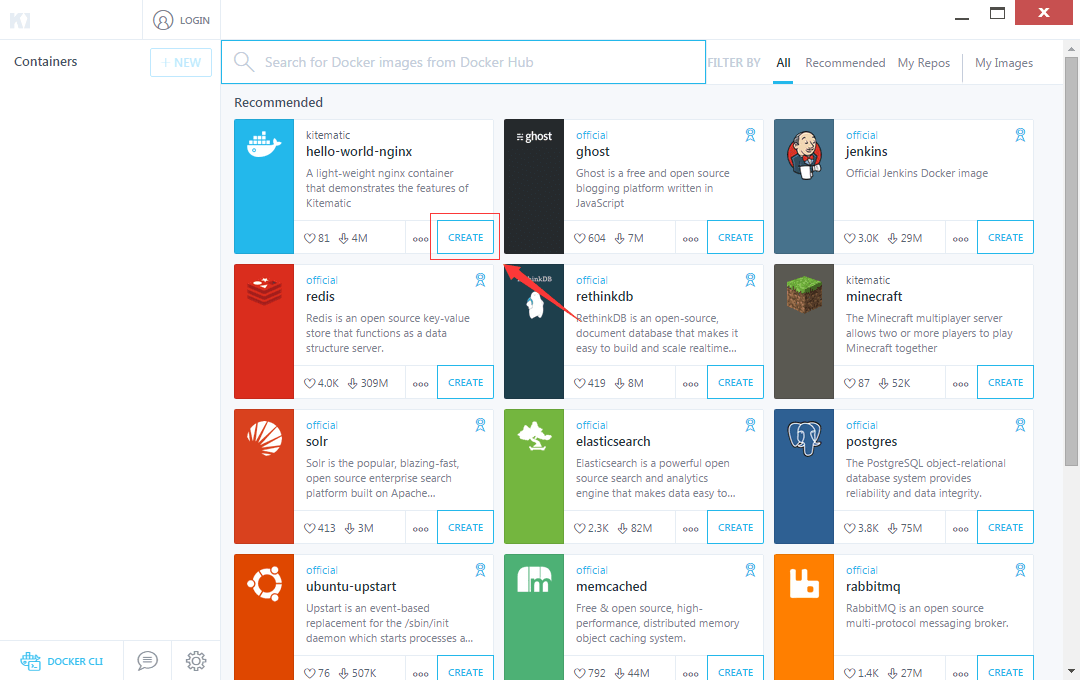
Here we use the GUI management tool provided by Docker ToolBox to create a local Nginx service:
- Download the image and create the container. In the Kitematic UI you can create a container with one click, as indicated by the red arrow in the figure below:
- Access the service. As indicated by the red arrow in the figure below, you can reach the service directly.
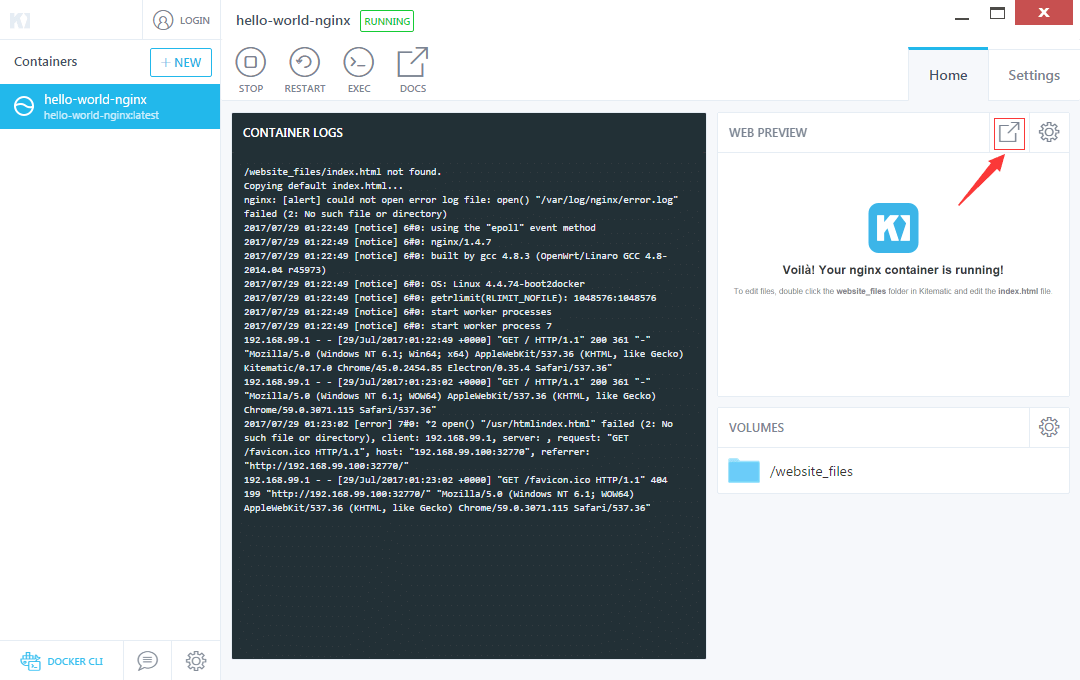
Under the Settings tab next to Home, there are container-related parameters and configuration options (host, port, network, and so on).
8. Kubernetes
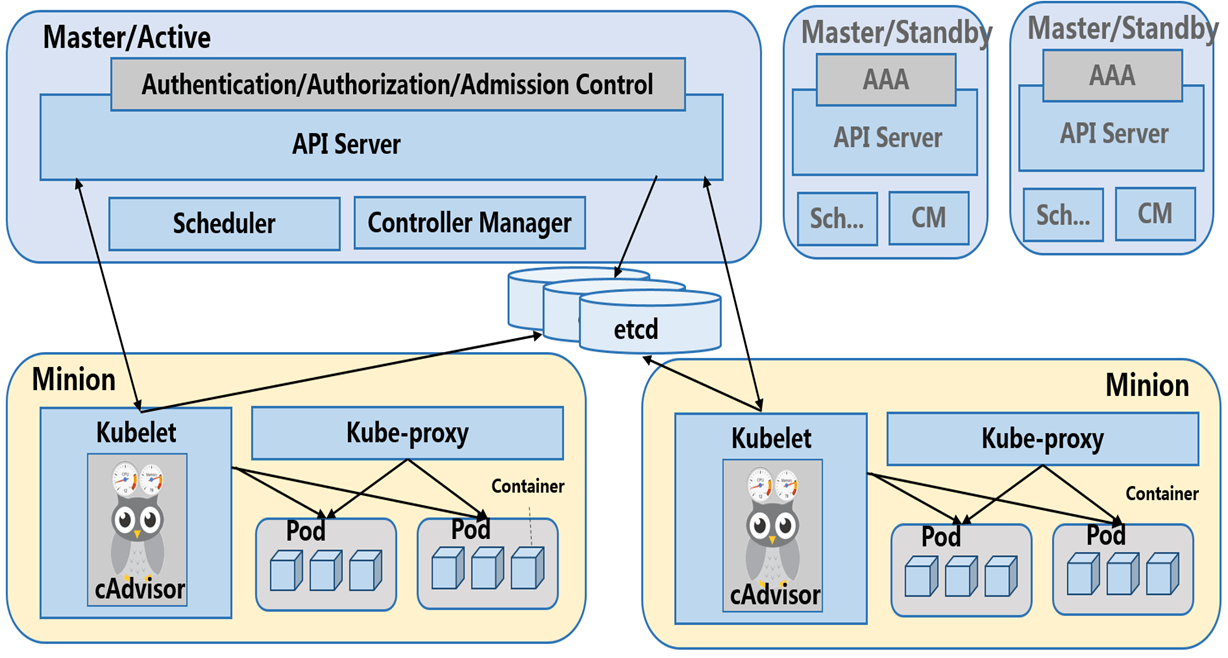
- Introduction: Kubernetes (k8s) is Google’s open-source container cluster management system. Building on Docker technology, it provides a complete set of features for containerized applications — deployment and runtime, resource scheduling, service discovery, and dynamic scaling — improving the convenience of managing large-scale container clusters.
- Advantages: container orchestration, lightweight, open source, elastic scaling, load balancing
9. References
- 1.https://www.kancloud.cn/thinkphp/docker_practice/30894
