This post mainly introduces some basic concepts of Robot Framework and how to write a test case.
1. Basic Elements
1.1 Keywords
Robot Framework keywords are similar to functions. They are divided into system keywords and user-defined keywords.
- System keywords, imported by loading a Library
- User keywords, imported by loading a Resource
1.2 Library
Libraries encapsulate and reuse keywords. Robot Framework libraries include system libraries and user-defined libraries.
- System libraries, such as XML, String, etc.
- User-defined libraries. Some third-party libraries installed separately, such as seleniumlibrary, etc. They can also be Python files you write yourself, such as send_mail.py, etc.
1.3 Test Case
A collection of keywords and test data combined in order, used to test a certain scenario. Several test cases make up a test suite.
1.4 Resource
The overall structure of a resource file is the same as a test case file, except that it cannot contain test cases.
1.5 Test Suite
A test suite is a txt file containing multiple test cases, including the content of four parts.
- Setting
- Variable
- Test Case
- Keyword
1.6 Variable
Variables come in three types:
- Scalars, referenced as:
${SCALAR} - Lists, referenced as,
@{LIST} - Dictionaries, referenced as:
&{DICT}
In addition, environment variables can be referenced directly with %{ENV_VAR}
1.7 Data Types
- String:
${variable},${test} - Numeric:
${80},${1.2} - Boolean:
${true},${false} - Null/None:
${None},${null} - Space, Empty:
${SPACE},${EMPTY}
2. Directory Structure
You can first create the directory structure below locally, then open the project file with RIDE:
| |
If there are few variables and test cases to maintain, just use a single text file.
If you need to maintain a large number of variables and users, then split the files into folders and create files for each module inside the folders for maintenance.
3. Writing Your First Test
3.1 The Structure of a Test Case
- Some initialization operations
- Some test operations on the page to be tested
- Verify whether the page’s behavior matches expectations
3.2 A Simple Test Case
global.txt
| |
For ease of maintenance, define global variables in a separate file.
case/login.txt
| |
This is a simple test case: it opens a login link, enters the username and account password, and finally logs in and redirects.
In fact, Robot Framework supports several description formats such as HTML, TSV, TXT, and reST. Robot Framework uses a different parser for each format.
Take TXT as an example.
The first column is the test case name, meaning this test case is named 登陆.
The second column is either a keyword or a variable. As mentioned above, keywords are first-class citizens in Robot Framework and can be understood as functions. Functions are divided into those with a return value and those without. If a keyword with a return value is used, then several columns starting from the second may be used to receive return values, until a keyword is encountered. If the keyword has no return value, then the second column is the keyword to use. For example, Open Browser and Maximize Browser Window here are both keywords.
The columns following a keyword are passed to the keyword as arguments. For example, id=password, ${password}, and so on here.
3.3 How to Use Keywords
After reading the example above, you have probably realized how important keywords are in Robot Framework. A large number of operations require keywords, and you also need to encapsulate your own keywords.
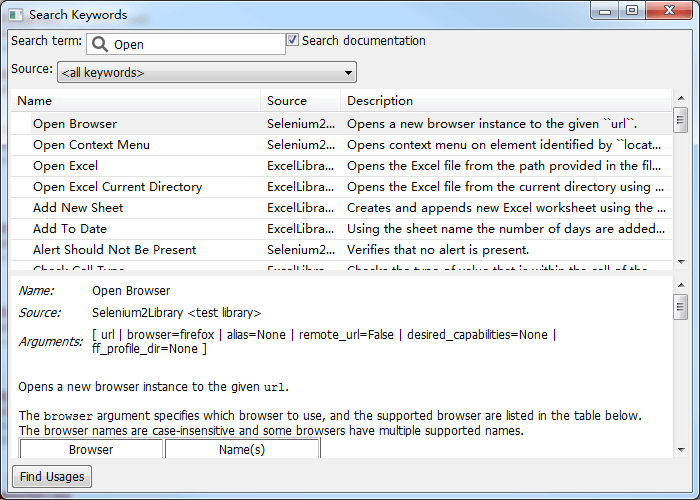
In RIDE, press F5 to see the built-in and library keywords and their help documentation.
In web automated testing, the most commonly used are the keywords from the selenium2library library.