Recently I took part in a project developed collaboratively by several people, and ran into quite a few problems along the way. For example: a frontend commit overwrote backend code, conflicts were left unresolved and turned into rework, someone committed to branch B, or committed straight to the Master branch. This article is a record, and also a reflection on how to manage a project and collaborate on multi-person development at a higher quality.
1. Requirements for Version Management
1.1 Version Tagging
In the production environment, the version must be tagged before every release. On one hand this is to keep a record of release history; on the other, so the version can be rolled back quickly when necessary. For example, a production release was made on March 21, Tag: V20180321, Message: Added XXXX. On March 29, the operations staff asked to take a redirect link offline immediately. But in the period since that last production release, developers had already committed new feature code, and may even have merged it into the main repository. At this point the developer can pull the code for Tag: V20180321, make the change, and then tag it again as V20180321-remove-xxx, after which it can be tested and released.
1.2 Branch Management
When several people develop together, to reduce interference between developers, it is strongly recommended that each person create branches along functional lines and update code that way — one feature, one branch. In the process of planning and assigning project work, different features and modules are usually divided among different people. In that case it is enough to agree in advance on the parts where modules couple, such as interfaces and global variables, to achieve the original goal of collaborative development: many people working in parallel and a shorter development cycle.
1.3 Change Log
Recording file changes is the most basic requirement of version management. The change log is the most raw iteration data; by consulting it you can tie features to specific lines of code, which makes code auditing easier and also serves as a comment for other developers.
2. Why Git, and Not SVN
Its advantages in branch management are what made us choose Git and give up SVN.
With Git you can easily use many independent branches. At the same time these branches are very easy to create, update, delete, and merge.
Another point is that Git is fast. Judging by all kinds of stress-test data, compared with SVN, Git is extremely efficient at file compression and file storage.
3. Git Development Workflow
A quick introduction to the project team’s background: the developers included three frontend and two backend engineers; project S is a SaaS project developed on top of a PaaS platform, which provides an SVN repository for code management. The frontend used Webpack + Vue.js, the backend used Django, and the frontend and backend were developed in a separated mode.
Project S is a project that iterates frequently; this was its fifth round. In the earlier rounds, development was mainly done by one frontend and one backend engineer working together. In the fifth round, because a frontend engineer left, two new frontend engineers plus a frontend mentor joined the project team. The two backend engineers also had other projects and were not 100% committed.
In this situation the frontend was unfamiliar with the project and the backend could not be fully committed. Without taking certain measures, the project was bound to be delayed, and might even pollute the earlier code.
So at the start of the new iteration I migrated the repository to Git. At the same time, I used GitLab CI to push code to the SVN release repository, to better support collaborative multi-person development.
Considering the short iteration cycle of the project, I chose the Github Flow working model. Below is the development workflow:
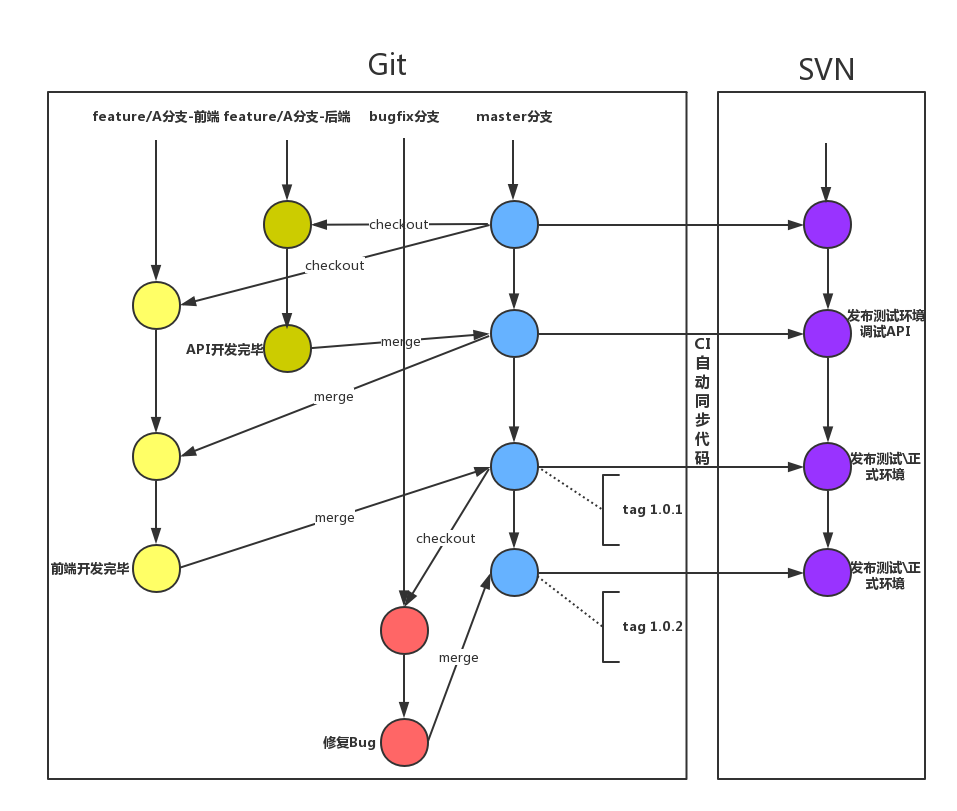
Units are divided by feature; each feature gets a new branch, which is ultimately merged into the Master branch. Because there are so many small feature points, creating branches frequently would lead to too many branches; and if branches were deleted, versions could not be traced. So we agreed that during this round of iteration, each person would keep tracking one branch of their own. Before starting a new feature, you need to merge Master into your own branch to keep your local version up to date.
4. The MR/PR Process
Collaborative multi-person development is implemented mainly through multiple branches. The hard part of multi-branch management is merging branches. I once heard an agile development expert from inside the company share that in the team he led, there were cases where merging code took longer than writing it. Then, by decoupling and optimizing the process and combining it with CI tools, they finally managed to release a version every two weeks, and by adding A/B releases on top of that, they achieved the remarkable effect of one version per week and rapid iteration.
Put simply, Github Flow is about creating a new branch for every new feature, BUG fix, and so on. After the code is committed, you open a Merge Request (MR for short) or a Pull Request (PR for short). Other project members then discuss it, and the code is revised and committed repeatedly. Once everyone agrees, a member with Merge permission merges it into the Master branch.
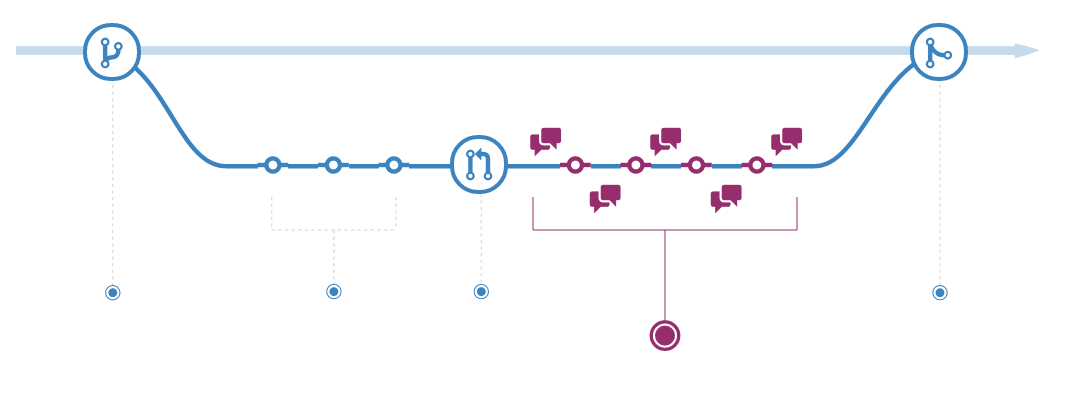
The MR/PR process is the key to ensuring modules couple correctly and code is high quality. The reason problems such as frontend code overwriting backend code, or conflicts being left unresolved and turning into rework, occur is precisely the absence of an MR/PR process.
So a person in charge was designated for both frontend and backend, with Master permission, responsible for reviewing other members’ code and handling the MR/PRs other members opened. The other members exist in the project with the Developer role. Reviewing code is a way to learn quickly and improve code quality; if a habit of reviewing each other’s work can form inside the project, the payoff for both the project and yourself will be substantial.
