Automated testing in Django can be done with doctests or unit tests. The logic of automated testing is to pass test data into the function under test, then use whether the output matches the expected result as the criterion for whether the test passes. There are a few key points here: (1) you need test data, (2) you need to identify the function under test, and (3) you need to give the expected result.
1. Test-Driven Development
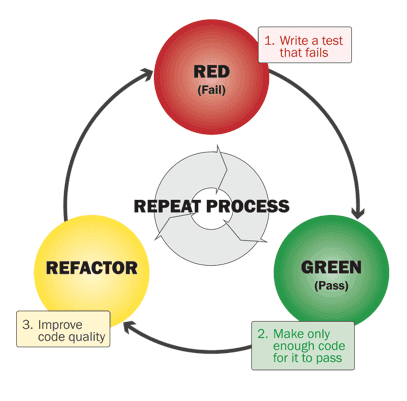
Test-driven development is an iterative development cycle: write the automated test code first, then fill in the functionality.
- Step one, write the test first
- Step two, look at where the test fails
- Step three, write enough code to make the test pass
- Step four, test again
- Step five, refactor the code
- Step six, repeat the above
2. doctests
doctests is a testing module built into Python.
It consists of an ordinary part and an executable part.
- The ordinary part is the comment section
- The executable part is distinguished by the ‘»>’ (python shell prompt) or ‘…’ prompt.
doctest searches the docstrings of each module, class, and function, running each executable section as a single test example. It then compares the actual running value against the expected value as one run result.
myfunction.py
| |
| |
The -v parameter turns on verbose mode so you can see the details; without -v, there is no output at all when the test succeeds. If the test fails, an error report is printed.
3. unit tests
Django’s unit tests are implemented with classes.
When running tests, the test runner looks for unit test case classes (inheriting from TestCase) in test*.py files in the directory, and executes the functions starting with test inside the test class.
Django ships with some test helper classes, such as Test Client, TestCase, and Email Service. With Client you can conveniently issue a get or post request and get the response. TestCase is a wrapper around unittest.TestCase that saves a lot of repetitive code and adds a self.client. Email Service provides convenient methods for sending email.
3.1 How to Write Unit Tests
Testing the Model part
| |
Testing the View part
| |
3.2 Running Unit Tests
| |
Django automatically creates test data in the Model and clears it after the test. If you want to keep the test data, pass the –keepdb parameter when running the unit tests.
