1. Objects in Kubernetes
Kubernetes objects are persistent entities in the system, used to represent the state of the cluster. Users interact with Kubernetes by operating on objects, telling the system the workload they expect.
Objects are manipulated through the Kubernetes API. Every Kubernetes object contains two nested object fields, Spec and Status. Spec describes the desired state of the object, and Status describes the actual state of the object. The Kubernetes API operates on the Spec field, and the system compares Spec against Status and takes certain measures so that Spec and Status stay consistent. This is the declarative API: users only need to tell the system the desired state, and the system brings it about.
In Kubernetes, the API is a very core part. Every operation a user performs on the cluster is achieved by calling the API to manipulate objects.
2. What Apiserver Is
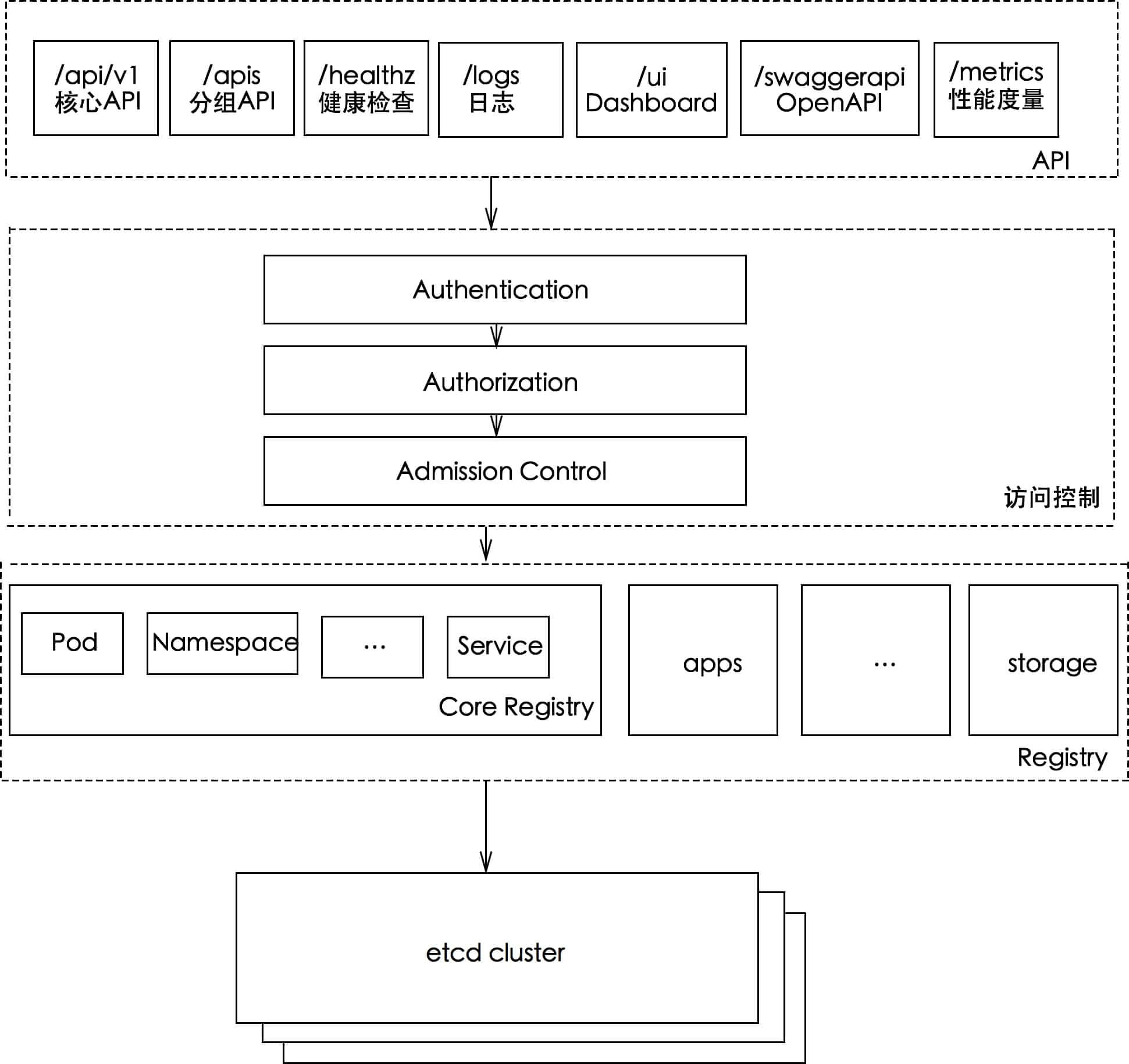
apiserver provides create, read, update, and delete operations as well as Watch API interfaces for all kinds of resource objects such as Pod, Service, Deployment, and CRD, and it is the operational entry point for the entire cluster. The specific functions apiserver provides are:
- The cluster’s RESTful API interfaces for management
- The hub of cluster communication; all other modules interact through apiserver, and only apiserver can operate etcd
- Cluster security management mechanisms
- The entry point for resource quota control
kube-apiserver uses the HTTP protocol and the JSON data format for its API. As shown in the figure below, the URL endpoint format is mainly made up of three parts:
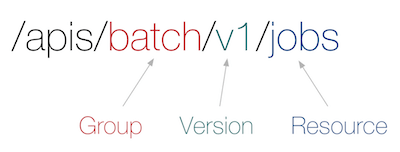
For example, /apis/batch/v1/namespaces/$NAMESPACE/job .
Group, a set of logically related Kinds.
Version, each Group may have multiple versions. For example, v1alpha1, then promoted to v1beta1, and finally stabilized as version v1.
Resource, the representation of the entity that HTTP operates on; it can be a single resource,
../namespaces/default, or a collection of resources,../jobs.
Group, Version, and Resource (GVR) together uniquely determine an HTTP resource endpoint.
3. How Apiserver Works
apiserver provides Kubernetes’ RESTful API and implements security verification functions such as authentication, authorization, and admission control, while also being responsible for storing cluster state.
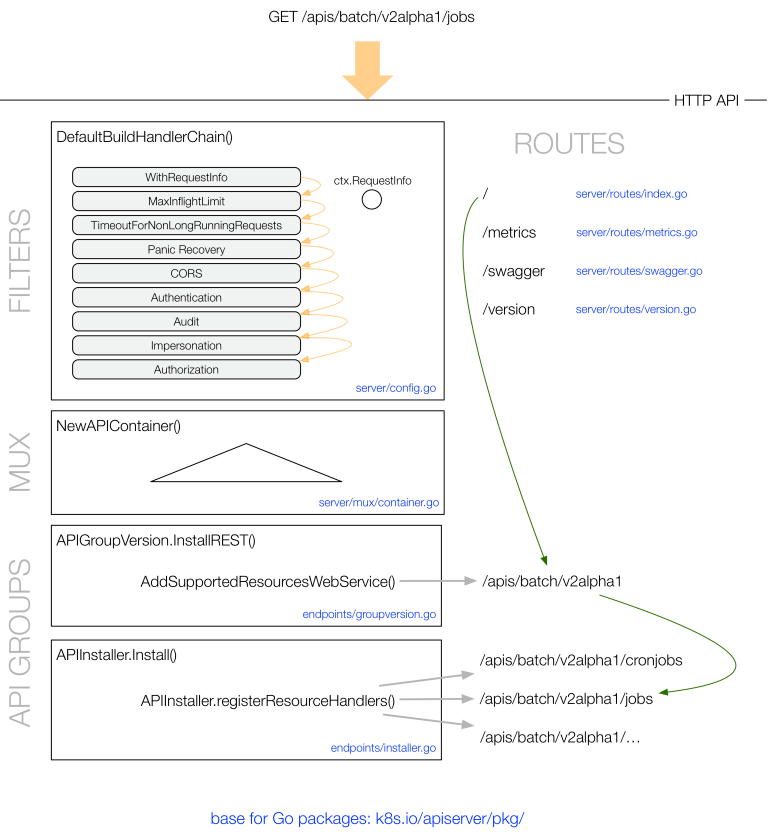
Taking /apis/batch/v2alpha1/jobs as an example, the handling of a GET request is shown in the figure below:
4. Using the Kubernetes API
apiserver provides APIs over both https and http. The http API is an insecure interface with no authentication or authorization mechanism; it is not recommended for production environments and only allows local access. The https and http interfaces provide the same RESTful API format.
kubectl is in fact a Kubernetes API client. Users configure object information in yaml files, and when kubectl issues an API request it converts that information into JSON and then calls the apiserver interface.
Besides using kubectl directly, here are two ways to use and debug the Kubernetes API:
4.1 Local proxy
Run the command and keep the session open:
| |
The default port is 8001, but you can also specify the service port through an argument and run it in the background. For example: kubectl proxy --port=8001 & .
proxy acts as a reverse proxy connecting to the remote minikube, providing services locally. You can access http://127.0.0.1:8001 directly from the local machine to operate on the cluster.
Start another session:
| |
4.2 Direct access
Since the Kubernetes cluster has already exposed an https access entry point, we can access apiserver directly.
This approach is the same as how kubectl accesses it, and requires specifying some configuration.
The host, port, certificate, and other configuration can be viewed with the kubectl command:
| |
Access it using curl
| |
In a project, you can use a packaged client to call the Kubernetes API. https://github.com/kubernetes-client already provides Clients for many languages: Go, Python, Javascript, Java, Perl, and more. For other languages supported by OpenAPI, you can generate the corresponding Client with the gen tool.
