1. Decoupling the Engine to Unlock Pipeline Capabilities
When designing a system, we often face a dilemma. Do we contain the complexity and offer a single, easy-to-use capability to the outside; or do we release the complexity and return flexibility to the user? This is a real test of product ability.
When designing a CICD system, we could simply throw concepts like Jenkinsfile and PipelineRun directly at users, letting them learn the relevant domain knowledge first and then use the product. Of course, we could also keep abstracting and build a model between the person and the system, achieving the conversion of intent into instructions. We want a more usable product, so we chose to hide the underlying concepts and continue abstracting and modeling.
From Jenkins and GitLab CI to GitHub Actions and Tekton, new infrastructure always brings a variety of new building blocks. We want to reduce the cost of switching, to be able to move between engines. Technology keeps changing, but we want to stay consistent for the user.
Although pipeline-related technology evolves quickly, it is ultimately people who carry it out. Human knowledge is inherited: however technology changes, the community that builds pipeline engines is relatively stable and overlapping. This makes it possible to decouple the engine and design a universal pipeline.
2. The Pipeline Data Model
Similar concepts can be found across many CICD engines.
- Jenkins
A pipeline contains many Stages, and the steps within a Stage contain multiple scripts executed serially.
| |
- GitLab CI
The pipeline contains two serial Stages, build and test, and each Stage contains several Jobs executed in parallel.
| |
- GitHub Actions
A pipeline is defined by jobs. A pipeline has many possible jobs (constituted by the build job in the example), and each job contains many serial steps.
| |
Based on the examples above, we abstract the Pipeline.
| |
As shown in the figure below, a pipeline contains several Stages, which can be parallel or serial. A Stage contains several Steps that execute scripts serially. In Tekton, a Stage corresponds to a Task.
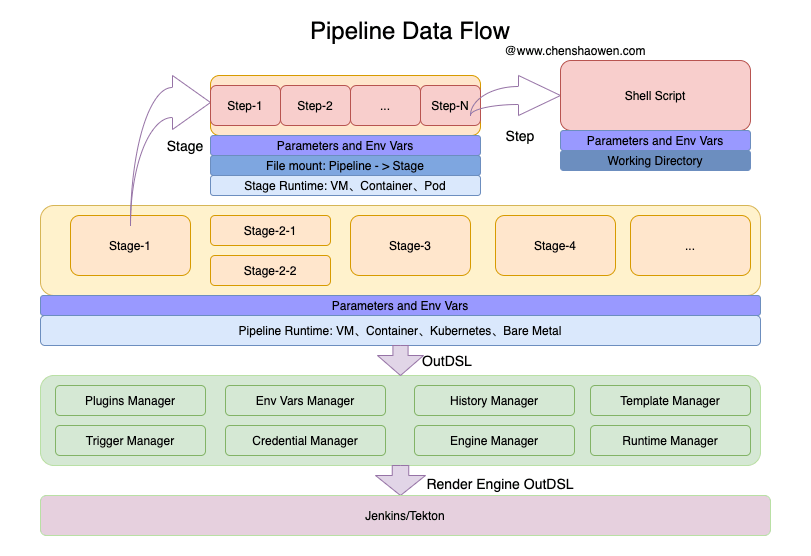
The runtime of a pipeline can be a Kubernetes cluster, a physical machine, a Container environment, and so on.
The runtime of a Stage may be a Pod, a physical machine, a Container environment, and so on.
A Step has a workspace, and then executes a Shell Script.
A pipeline does not need a complex definition; even a few simple scripts can orchestrate complex logic. But abstracting and modeling the pipeline is good for plugin (Step) extensibility and for the development and maintenance of the pipeline product itself.
A pipeline goes through a series of Managers, which associate it with a specific runtime, execution engine, credentials, and so on. Finally it renders the pipeline description that the engine accepts, such as Jenkins’s Jenkinsfile or Tekton’s Yaml.
3. The Code-Level Data Model
The main fields of the core data structures are given below:
| |
At the code level, two things need attention:
- Template and instance. A template is a framework or fragment built into the system that relates to the engine, such as Step, Stage, Pipeline; an instance is a template or fragment after personalized parameters are filled in, such as PipelienStep, PipelineStage, PipelineRun.
- Scope. Parameters have a field Scope, used to indicate the range in which the parameter is visible. In fact, it is the Step that really uses the parameters, but after assembly the parameters in the Stage scope are promoted into the Stage. Likewise, parameters in the Pipeline scope are promoted into the Pipeline. Parameters serve different purposes at different levels: extracted from the inside out, injected from the outside in.
4. Data and Interaction at Pipeline Runtime
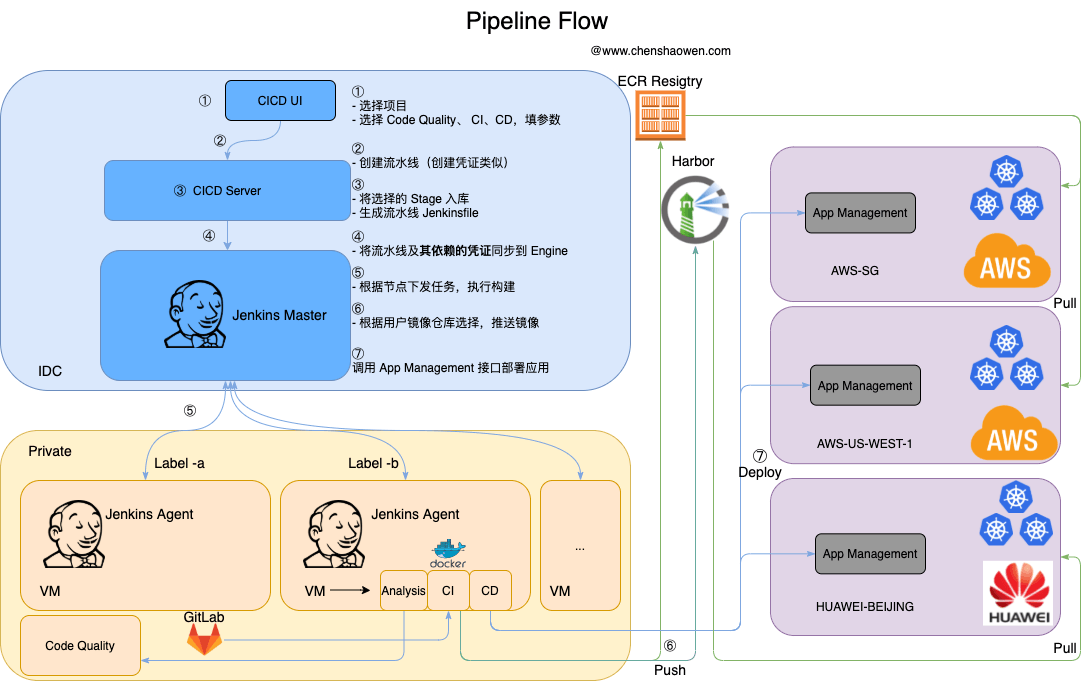
The above is the execution flow of a pipeline; you can follow each step, so it is not repeated here. Below we describe the pipeline’s operation mainly from the perspective of different roles.
4.1 Built-in Step Plugin Templates
First, some commonly used plugin Scripts need to be built into the system.
For example, Jenkins’s Git Clone plugin
| |
Building and pushing an image with Jenkins.
| |
Running a script with Jenkins.
| |
It could of course be a plugin fragment from another engine, but it is mainly a script fragment plus parameter injection, so we will not list more.
4.2 Creating a Pipeline: The User’s Perspective
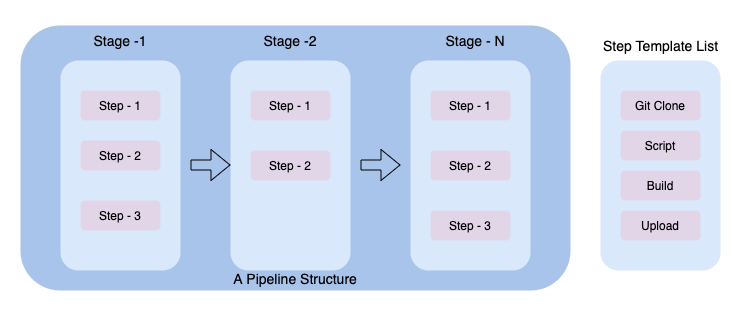
As shown in the figure above, the user first gets a list of Step templates based on the engine they choose. Then, through orchestration, they assemble the Steps into a pipeline.
Here Step-1, 2, 3 represent instances of selecting a template Step and initializing its parameters. The assembled Pipeline data structure is then stored in the backend.
If creation is done from a template, then it is only necessary to initialize the Pipeline data structure for the user in advance.
4.3 Creating a Pipeline: The Developer’s Perspective
- Frontend development
After requesting the Step template list, assemble the Pipeline structure from the instantiation parameters entered by the user.
- Backend development
After saving the user’s Pipeline data, render the Pipeline into the pipeline description the engine needs, based on the Step template information. For example, generate a Jenkinsfile and sync it to Jenkins to create the pipeline.
4.4 Runtime: Data Flow and Interaction
- Executing a pipeline
The frontend calls the backend API to get the Pipeline definition and pops up a dialog for the Pipeline-level parameters, letting the user enter the relevant values. After clicking confirm, a PipelineRun object is created.
Based on the PipelineRun object, the backend triggers the engine’s execution API, passing the customized parameters from the PipelineRun into the pipeline execution.
- Viewing a pipeline
The PipelineRun is the pipeline’s execution history; the pipeline status needs to be queried from the engine and written into the PipelineRun object.
- Re-run, pause, resume, approve
The PipelineRun records the full record of a given execution, including the parameters and the Pipeline definition. Therefore, as long as the engine supports the above features, they can all be implemented.
