1. What Documentation as Tooling Means
“Documentation as tooling, tooling as a product” is a slogan I have repeated many times in my previous blog posts.
A good document is no match for a tool that is pleasant to use. A script or a single command is more direct than reading documentation and can solve the problem faster. At the same time, a lot of documentation leaves readers dizzy with knowledge; when they are in an urgent window to solve a problem and cannot fill in their knowledge system in time, misunderstandings form easily.
Knowledge with a domain barrier like this needs a bit of design folded in to transform it before users can make better use of it. That is the meaning of documentation as tooling.
From documentation to tooling, from tooling to product, the marks of refinement become ever more visible. It is a fascinating process: constantly stripping away redundancy and unnecessary things so that users can focus more on solving the problem.
2. The Ops Tool
With these ideas in mind, I had long wanted to package some of my everyday work operations as tools, so that those operations could be reused more effectively.
More than half a year ago, I started a new project called ops, mainly to help me carry out certain operations in my work.
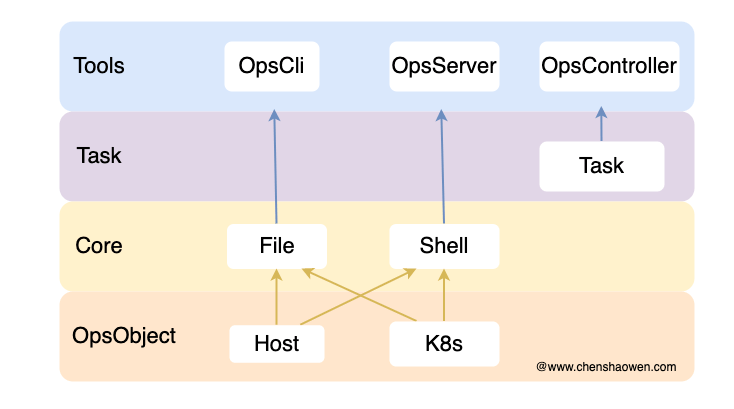
As shown above, this is the vision for the project. The design philosophy is that the core of an operations tool lies in text distribution and script execution; implementing these two capabilities is enough to satisfy the functional needs of operations.
At present, the targets I operate on are Host machines and Kubernetes clusters, and rarely containers directly. So at the OpsObject layer I implemented the Host and Cluster objects, corresponding to hosts and Kubernetes clusters respectively.
On top of that, I implemented file distribution and script execution for hosts, and file distribution and script execution for Kubernetes clusters — that is, the Core capability layer.
Thanks to the capabilities of the Core layer, I can already carry out some simple operations tasks, such as adding hosts in bulk, or installing and changing Prometheus in bulk.
But that is not enough. Many operations cannot be completed in a single step, so some flow control is needed. For example, before backing up a cluster you need to install Velero first, and before installing Velero you need to install Helm, and so on. So I introduced a new object, Task, to handle orchestration, which in effect makes it very much like Ansible.
At the Tools layer I provide three entry points: opscli, opsserver, and opscontroller. So far I have mainly completed two of them, opscli and opscontroller.
3. opscli
opscli is a static binary that supports Linux and macOS, and can be downloaded and used directly with the curl command.
3.1 Installation
If your network connection to GitHub is good, you can install with the following command:
| |
If your network connection to GitHub is poor, you can install with the following command:
| |
3.2 Configuring Autocompletion
- If you use bash
| |
- If you use zsh
| |
3.3 Usage
- View help
| |
- Against hosts, execute commands remotely
| |
Here -i can point to a single IP, or to a file containing multiple IPs, one per line. --content points to the command to execute, and it can also be a script file.
- Against a cluster, execute commands remotely
| |
Here -i points to a kubeconfig file, and --all means the command is executed on every node in the cluster. Without --all, the command runs only on the master node; --nodename lets you specify the node the command targets.
There is also a special parameter, --incluster, which means the command will run in one of the cluster’s Pods. This is very useful for troubleshooting from inside a cluster.
- Against hosts, file distribution
File distribution is a mapping process: two targets, local and remote, plus the direction of the data flow.
| |
Here --direction indicates the direction of the data flow: download means pulling from remote to local, and upload means pushing from local to remote.
- Against a cluster, file distribution
| |
Here --nodename indicates the target node.
In fact, file distribution also supports source files coming from images and S3; I will not enumerate them all here.
- Using tasks
| |
Under the ~/.ops/tasks/ directory there are many task yaml files that you can use directly.
| |
For a cluster, you only need to point -i at a kubeconfig file and then add --all or specify --nodename.
4 opsserver
This part is still under development. It is mainly meant to provide an HTTP API for other systems and scripts to call.
5 opscontroller
5.1 Installation
- Install Helm
| |
- Add the Helm repository
| |
- Install ops-controller
| |
- Check the installation result
| |
By default, opscontroller only handles CRD resource objects in the ops-system namespace.
If you need to change this, you can modify the value of ACTIVE_NAMESPACE in the environment to name a single namespace; if it is empty, all namespaces are handled.
5.2 Usage
- Create a host object
| |
| |
The controller periodically checks host status and updates it into the host object.
- Create a cluster object
| |
| |
The controller periodically checks cluster status and updates it into the cluster object.
- Tasks can also be created through
opscli, but I prefer creating them directly with yaml
The controller mainly executes the tasks in task objects on a schedule — cleaning up clusters, providing alerts, and so on.
| |
TYPEREF points to the object type and NAMEREF points to the object name. The above is my production configuration, and below is an alert notification that was sent.
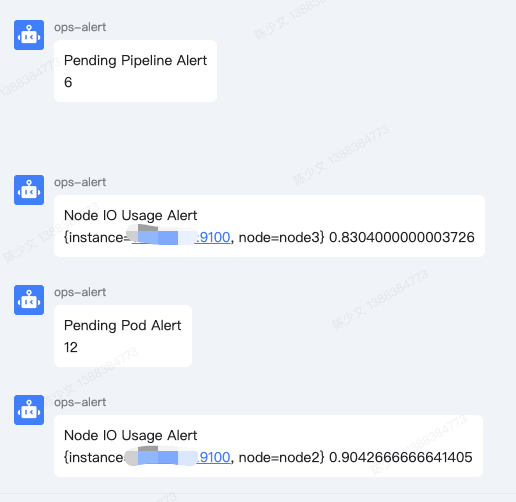
The alert is shown above. It mainly supports two modes: one is a promql query, the other is an http request.
The scheduled task clear-docker cleans up build leftovers on every node of the cluster, and clear-opstask cleans up the Pods left behind when a cluster Ops execution fails.
6. Summary
This project is mainly meant to make it easier for me to operate hosts and manage clusters, and it also provides periodic task and alerting capabilities. It is still under development and will continue to be improved.
Extracting a project out of your work is not an easy thing; you have to find the point of fit between the project and the work. Many work projects are tightly coupled with the business and cannot be extracted; and if a project is detached from work, with no real business scenarios to refine it, it is hard for it to have much value either.
At first opscli had many subcommands to cover various scenarios, but later I reimplemented them through task objects. The benefit of this is that task objects can be stored and configured separately as company-sensitive data, while the implementation part can be opened up without worrying about leaking sensitive information.
Of course, Ansible implements similar functionality too, and one of a programmer’s pleasures is endlessly reinventing the wheel. In the process of reinventing the wheel, I also relearned CRD development, learned Helm Chart development, and published it to https://artifacthub.io/.
