1. The Challenge of a Cross-Region Harbor
If all you need is to store image data in a simple way, Registry is an excellent choice as an image repository. Registry not only supports multiple storage backends, but can also be configured with HTTPS certificates and access credentials. Worth noting: Harbor also uses Registry to store image data.
If a team needs role management, storage control, LDAP authentication integration, and similar features, it can use Harbor. A single 4C8GB machine, plus external high-availability PGSQL and object storage, is enough to support dozens of Kubernetes clusters and hundreds of VM nodes, and to connect the CI and CD image delivery pipeline.
By throwing memory, CPU, and other resources at it, a single-instance Harbor can also support hundreds of clusters and thousands of nodes. Another important optimization: when the backend uses object storage such as OBS, uploading and downloading image layer data goes directly to the object storage bucket, so it does not put an excessive traffic burden on Harbor. Thanks to the global acceleration of object storage, upstream and downstream speeds easily reach 200+ Mbps, or even 1 Gbps of bandwidth.
But that is as far as it goes. Harbor is only suited to a single region and cannot satisfy image management in a cross-region scenario. As shown below, when a service needs to be deployed in multiple regions that are interconnected over the public internet, once a region’s network is restricted by the country it is in or becomes unstable, Harbor is helpless in this situation.
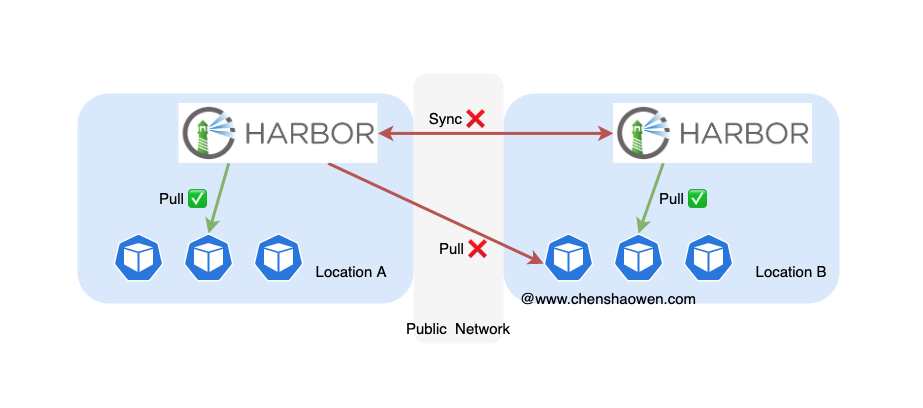
At the same time, Harbor’s inefficient task queue robs the multi-Harbor synchronization approach of any practical value. After one region pushes, another region may have to wait a dozen hours before synchronization completes and the application is allowed to update. That is intolerable. See: Some problems with Harbor.
In a multi-region scenario, a single-instance Harbor cannot support the image traffic demands of the whole deployment. On one hand, cross-region networks are not stable enough and traffic costs are high; on the other hand, it comes down to scalability — IT infrastructure does not support endlessly adding regions, and having all workloads pull from the same Harbor is unreliable.
2. Why Not Adopt Distribution Schemes Such as Dragonfly
2.1 Introduction to Dragonfly
Dragonfly is the image distribution tool many people recommend, but I did not find a case that fits the scenario.
Dragonfly’s documentation structure is not particularly clear. As I understand it, Dragonfly can be divided into two parts:
- Dfdaemon
Dfdaemon is similar to the Mirror feature of the official Docker Registry, used to proxy image layer traffic. This part can be used on its own and does not depend on other components.
- The distribution network
The distribution network is Dragonfly’s core feature. In V1 the component is Supernode; in V2 the components are Scheduler, Manager, and so on. Much like using a P2P tool to download large files, Dragonfly builds an internal network dedicated to image acceleration. And the download client of this distribution network is Dfclient, also called Dfdaemon.
2.2 The Principle Behind Using a Mirror to Accelerate Images
Dragonfly V1 and the vast majority of articles online accelerate image downloads by configuring a Mirror. Before discussing Dragonfly’s problems, let’s first explain how the Docker Mirror acceleration works.
Looking at the source code, we get the following snippet:
| |
Here DefaultNamespace = "docker.io" and IndexHostname = "index.docker.io", which means the Mirror actually only takes effect for images officially provided by Docker.
This characteristic is also stated explicitly in the official Docker documentation: It's currently not possible to mirror another private registry. Only the central Hub can be mirrored. See: https://docs.docker.com/registry/recipes/mirror/ .
In https://github.com/distribution/distribution/issues/1483, the developers gave further explanation of this characteristic. The reason a private registry cannot use a Mirror is that a private registry source would cause local namespace conflicts and confusion in image management; therefore it is limited to mirroring the single official docker.io registry and cannot accelerate private registries.
2.3 Configuring a Proxy Is Required to Use Dragonfly V2 for Accelerating Private Images
- The dilemma of acceleration
Since the Mirror can only accelerate official Docker images, this does not fit the private image repository scenario. What is confusing is why so many articles online accelerate via the Mirror approach and yet still claim it works with a private Harbor repository.
If only the official Docker image layer data is accelerated, the acceleration benefit is greatly reduced. Because of multi-stage builds, the business runtime uses an alpine base image from docker.io, usually only a few MB to a few tens of MB. But the business-related dependency packages, binaries, images, JS, CSS, Jar, and WASM packages account for a large proportion of the entire image data.
- The correct way to accelerate is to configure a proxy
In the official Dragonfly V2 documentation, acceleration schemes are given for different runtimes, but for private repositories it is not done by configuring a Mirror — instead it is done by configuring HTTP_PROXY and HTTPS_PROXY for Docker.
Unless HTTPS_PROXY was already configured when Containerd was installed, I don’t think anyone would be willing to risk modifying it directly in production. Not to mention that the Live Restore feature may not even be enabled, and that feature also has requirements on the Containerd version.
3. Actually, Private Images Can Also Be Accelerated via a Mirror
I said earlier that private images cannot be accelerated by configuring a Mirror. But after some thought, I still found a feasible approach. It was never actually adopted, but I’ll write it down for everyone’s reference.
3.1 The Idea
Whether it is docker.io or a private image repository set up with Harbor, they all follow the same set of interface specifications. This gives us the possibility of switching traffic for a private image repository to the docker.io domain by modifying DNS records.
3.2 Concrete Steps
Assume the intranet image repository is named private.chenshaowen.com with IP address 1.2.3.4.
Step one: in the intranet where the business runs, add a DNS record pointing docker.io to 1.2.3.4
Step two: switch the image service to point at docker.io.
The full image name is private.chenshaowen.com/project/biz:v1. In fact, if equivalent domains have been added, we can also pull using private-peer-a.chenshaowen.com/project/biz:v1 or private-peer-b.chenshaowen.com/project/biz:v1. The domain in the image format merely indicates the service; the service’s domain can be changed freely, requiring only re-authentication and re-authorization, and it will not affect pushing and pulling of images.
Since both private.chenshaowen.com and docker.io point to 1.2.3.4, we can use docker.io/project/biz:v1 in place of private.chenshaowen.com/project/biz:v1.
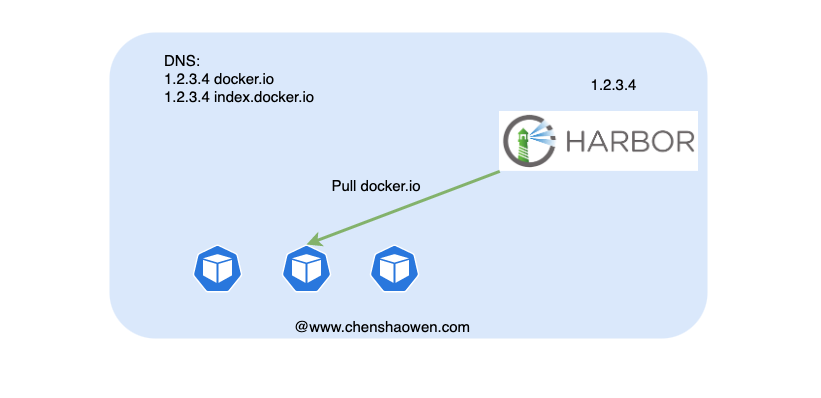
As shown in the figure above, when deploying the business application, although a docker.io image is used, the image data is actually requested from the private repository. But this does not produce any acceleration effect, so services such as Dragonfly are needed for accelerated distribution to take effect.
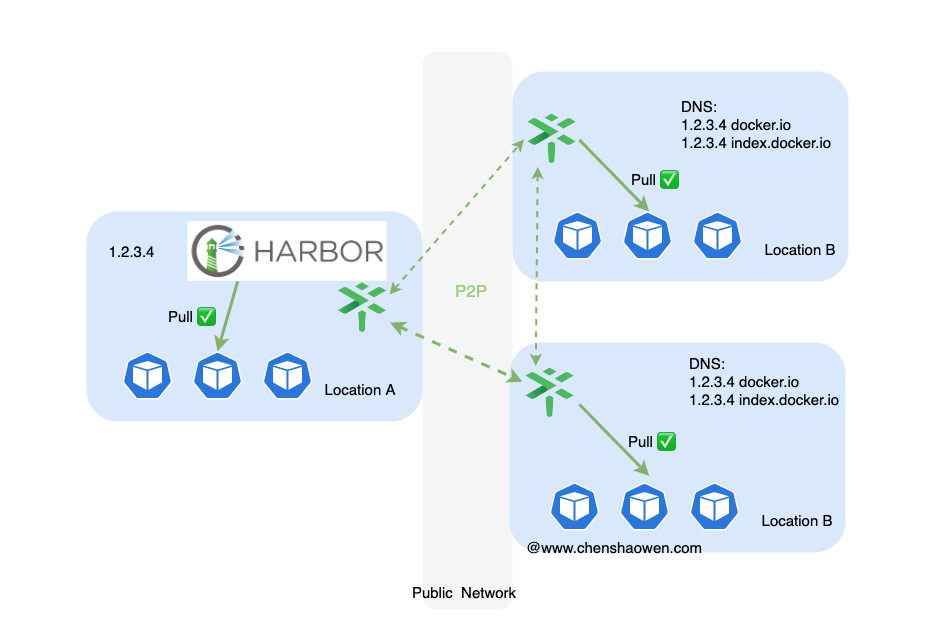
3.3 The Insecure Registry Problem
Since there is no HTTPS certificate for docker.io, on the intranet we cannot seamlessly switch simply by modifying the DNS record for docker.io. Two ideas are offered here, without elaborating in detail:
- Add
docker.ioto theInsecure Registrylist - Add a root certificate to the host, then use the root certificate to self-sign an HTTPS certificate for the
docker.iodomain.
3.4 Should docker.io Be Hijacked to Accelerate Image Pulls
It depends on whether the conditions for implementation exist.
If you have strong control over the infrastructure, including root certificates and container configuration, it is still worth considering. The reason is that the image service is also a foundational service, and hijacking docker.io can also strengthen control over the infrastructure and help provide value-added services around images.
Otherwise, breaking developers’ and operators’ understanding of docker.io just to accelerate images is not worth the cost.
This also leads into the exploration of other schemes below.
4. Using Registry for Image Distribution
4.1 A Little-Known Feature of Registry
An ordinary programmer may only know that Registry can serve as an image repository. In fact, Registry has three uses:
- Image repository
- Mirror to accelerate images on
docker.io - Proxy to forward image pull requests; similar to a Mirror, but used in a completely different way.
Here is a brief introduction to the Proxy feature:
The way to set it up is the same as for a Mirror. See: How to run a private registry mirror
But when using it, instead of configuring "registry-mirrors": ["http://registry_ip:5000"], you configure "insecure-registries": ["http://registry_ip:5000"].
At this point, we can pull the docker.io/shaowenchen/docker-robotframework:latest image with docker pull registry_ip:5000/shaowenchen/docker-robotframework:latest.
Through my testing, here are a few key points:
- If an image on
docker.iois updated, pulling from Registry also gets the latest image - Being unable to connect to
docker.iodoes not prevent Registry from serving pulls of already cached images - It supports pulling private images on
docker.io - It supports authentication and authorization for pulling from
registry_ip:5000 - Images are cached locally, so repeated pulls are accelerated
4.2 Image Acceleration Architecture
The business services are distributed across many regions such as China, Singapore, Japan, and India, but R&D is in China. Our image management plane is on Harbor in China, and toward the other regions the main job is distributing images.
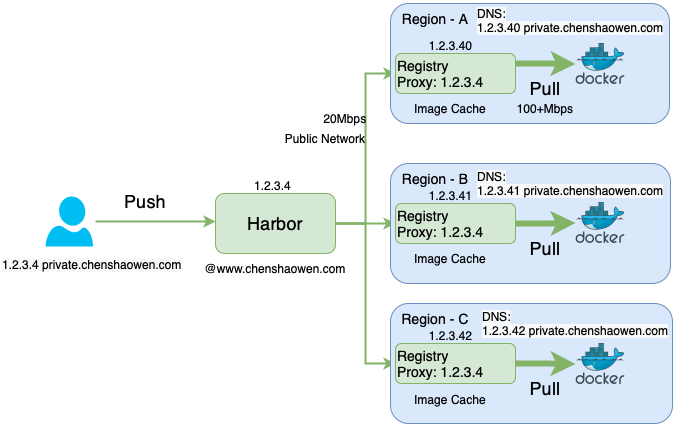
As shown in the figure above, the core components consist of two parts:
- Harbor, deployed in China. Developers use the CICD platform to push images to Harbor for unified management
- Registry, which needs to be deployed in every region where a business service resides. When Kubernetes runs the first Pod replica, Registry pulls the image from Harbor in China over the public internet and caches it in the Registry of the current region. When it runs the second replica, the image is pulled directly from Registry over the region’s internal VPC network, achieving acceleration.
4.3 About DNS Configuration
If the DNS records of each region can be modified directly, that is of course best; otherwise it has to be done by adding records to /etc/hosts.
- In the R&D environment, the image repository points to Harbor
- In the deployment environment, the image repository points to Registry
4.4 About Credentials
Since Registry cannot proxy authentication, there will be two sets of credential systems here.
- In the R&D environment, Harbor credentials are used and can be customized by role
- In the deployment environment, Registry credentials are used; pull-only globally, with no push
4.5 Quickly Adding a Registry Proxy
Here are some configurations for everyone to test with.
- Generate credentials
| |
- Create the configuration file
Here local disk storage is used as an example, but an object storage backend provides faster network access, especially in cross-region scenarios.
| |
| |
- Run the proxy
| |
5. Summary
This article is mainly about how multi-region businesses can manage and distribute images in a weakly connected environment.
It rules out the multi-Harbor synchronization scheme and rules out the Dragonfly distribution scheme. In the end, with the help of the little-known Registry proxy mode, combined with DNS resolution, it solves the image distribution problem.
If distribution is not a problem, then a single Harbor management plane is enough.
Although the proxy implemented with Registry satisfies the current requirements, it cannot forward authentication, does not support multi-backend multi-point transfer, and cannot be cascaded into a network — so there is still considerable room for optimization.
Another benefit is horizontal scalability: an image service can be provided quickly in a new region, supporting rapid regional expansion of the business.
