1. Direct IO
Direct IO bypasses the operating system’s page cache and interacts with hardware devices directly.
Characteristics of Direct IO:
- Lots of new data, so no caching is needed
- Low memory footprint
- Sequential reads and writes of large files
For synchronous read operations above a threshold (1MB by default), the 3FS client converts them into AIO operations (opening the file in Direct IO mode) to improve read performance.
When using Direct IO, block size alignment becomes a concern.
2. RDMA
RDMA (Remote Direct Memory Access) is a data transfer technology that lets data move directly between different computers without CPU intervention.
Characteristics of RDMA:
- Low CPU utilization
- High throughput and low latency
- Ability to scale up the storage system
After performance testing, 3FS found that RDMA Read performs best when reading 64KB of data per operation, so it merges small requests and splits large ones.
3. CRAQ
CRAQ is the core design of 3FS: a chained structure used to handle read and write requests, whose full name is Chain Replication with Apportioned Queries.
The data write flow:
- The client sends a write request to the head
- The write propagates along the chain; as it passes a replica, that replica creates a new dirty copy of the object
- When the tail receives the write request, it creates a new clean copy of the object and acknowledges back along the chain in reverse
- Each replica that receives the acknowledgment marks the latest object version as clean and deletes all previous copies of that object
The data read flow:
Unlike standard chain replication, all reads go to the Tail Target. CRAQ can read data from any storage target.
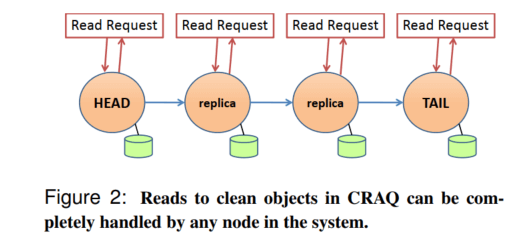
But the following case of reading a dirty copy can occur:
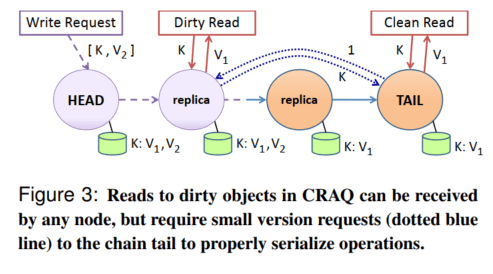
When a dirty copy is read, the client queries the tail node for the version, finds a clean copy, and returns it to the client.
4. Related Components
- MGMTD cluster manager
The metadata and storage services send heartbeats to the cluster manager.
If multiple MGMTDs are deployed, one of them is elected as the primary MGMTD; when the primary MGMTD fails, another MGMTD is promoted to primary.
- Meta metadata service
Meta is stateless, and metadata is stored in FoundationDB. Operations on file metadata (opening or creating files and directories) are all sent to the metadata service that implements file system semantics.
- Storage service
The Storage service manages local SSDs and exposes a storage block interface externally. Storage blocks implement the CRAQ protocol for handling read and write requests.
- Client
There are two ways to use it: one is the Fuse client, the other is to use the 3FS USRBIO interface directly.
The FUSE client transfers data between the kernel and user space, which consumes memory bandwidth and increases end-to-end latency; at the same time, under high concurrency the FUSE client suffers from lock contention, which limits performance scaling.
If you have the ability to modify the application side, you can submit IO requests directly to the I/O queue of the FUSE process via the USRBIO API, avoiding the kernel-to-user-space data transfer that an ordinary FUSE client performs.
5. Target Placement
Target and Chain are the key objects that maintain 3FS. Suppose there are 6 nodes: A, B, C, D, E, F, each with 1 SSD, and 5 storage targets are created on each SSD: 1, 2, …, 5. Then there are 30 targets in total: A1, A2, A3, …, F5. If each chunk has 3 replicas, the chains are built as follows.
| Chain | Version | Target 1 (head) | Target 2 | Target 3 (tail) |
|---|---|---|---|---|
| 1 | 1 | A1 | B1 | C1 |
| 2 | 1 | D1 | E1 | F1 |
| 3 | 1 | A2 | B2 | C2 |
| 4 | 1 | D2 | E2 | F2 |
| 5 | 1 | A3 | B3 | C3 |
| 6 | 1 | D3 | E3 | F3 |
| 7 | 1 | A4 | B4 | C4 |
| 8 | 1 | D4 | E4 | F4 |
| 9 | 1 | A5 | B5 | C5 |
| 10 | 1 | D5 | E5 | F5 |
Each Chain has a version number, which increments when the data on its Targets changes.
A Chain is the storage chain for one file, and different Chains can be used to store different types of files.
6. Storage Block Allocation
On each SSD, there are a fixed number of data files plus one RocksDB database.
Data file sizes grow in powers of 2, from 64KB to 64MB, for a total of 11 different sizes. Each allocation picks the closest size. The allocator builds a resource pool of 256 files for each size; when a pool is full, it creates another 256 files.
