In the SaaS development I work on, there is a fairly high demand for development efficiency. From project initiation, prototype design and evaluation, requirements confirmation, frontend design, and backend development through to final acceptance, we complete one iteration in just a few weeks. Guided by agile development, we began rolling out a frontend-backend separation model. The frontend focuses on pages and interaction, and the backend focuses on API interfaces. The backend provides APIs, which involve a whole series of concerns such as authentication, parameter validation, exception handling, and pagination. At the same time, these features share commonality across projects, so finding a suitable API scaffold became urgent. I previously looked into Django Restful APIs with Tastypie. Compared with Tastypie’s simplicity and quick onboarding, Django REST Framework (DRF) requires more configuration but is more powerful and can be used for rapid API development.
1. Feature Overview
- Supports OAuth authentication
- Supports serialization of ORM and non-ORM data sources
- Rich customization hierarchy: function views, class views, view sets
- Built-in Mixins for rapid assembly
2. Basic Concepts
- Serializer
Serialization is the conversion of Python data structures into other data formats, for example mapping a Django Model to JSON.
Serialization provides data validation and rendering. It works in a way similar to Django Form, performing field validation based on Fields. The serialized data is stored in serializer.data, and you can use SomeRenderer().render(serializer.data) to serialize it into a string object to return as the Response body.
- ViewSet
DRF provides API interfaces through Views. One View can correspond to multiple Renderers, providing different output formats (HTML/XML/JSON) for different rendering conditions.
A ViewSet is a wrapper around a View. One ViewSet can provide different interfaces for the same URL based on the request method. In particular, ModelViewSet automatically generates REST interfaces and URLs from the Model definition, making it possible to quickly generate a whole set of APIs for a website.
- Request object.
DRF uses the Requests object to extend the native HttpRequest and provides more flexible request handling. The core attribute of the Requests object is request.data, which can handle arbitrary data and accepts POST, PUT, and PATCH methods.
3. DRF Processing Flow
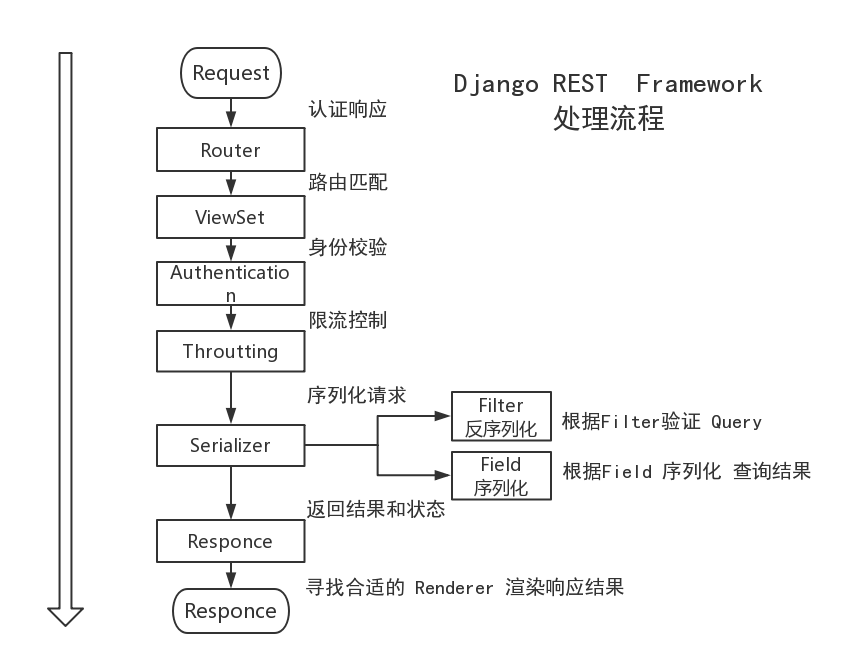
4. Using DRF
Using DRF mainly consists of three steps: define resources - implement HTTP methods - configure URLs.
4.1 Installation and Configuration
| |
In settings.py, add to INSTALLED_APPS:
| |
4.2 Defining Resources and Implementing Serialization
models.py
| |
serializers.py
| |
4.3 Inheriting View and Overriding HTTP Methods
views.py
| |
FruitViewSet directly inherits from ModelViewSet, and ModelViewSet inherits the HTTP methods of a series of Mixins classes. If you need custom HTTP methods, you can inherit from the APIView class or the Mixins classes, or you can fully customize them.
4.4 Configuring URLs
urls.py
| |
With this configuration, a basic API interface is complete. Visiting http://localhost:8000/api/v1/ displays:
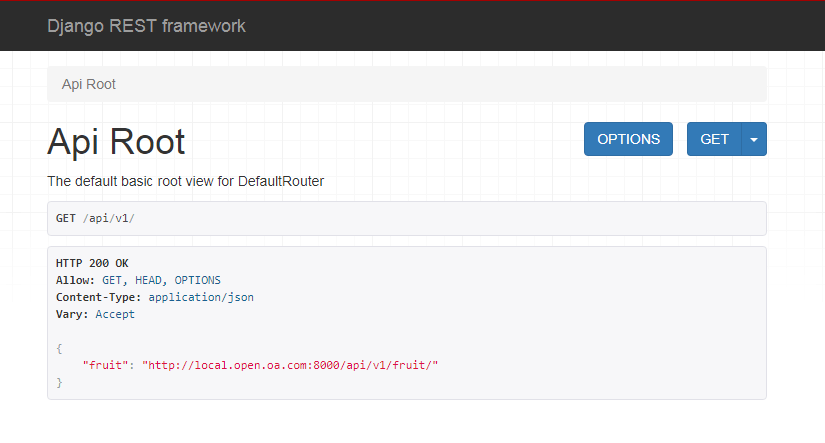
4.5 Permissions
| |
4.6 Pagination Control
| |
You can also determine the maximum page size dynamically:
| |
4.7 Handling Foreign Keys
| |
4.8 Rate Limiting
| |
Limiting the frequency of API queries can be done per user, precise down to per day, per hour, or per minute.
4.9 Mixins
Django-rest-framework provides us with many ready-made mixins that can be used to quickly compose interfaces.
- GenericAPIView provides the core functionality of a view
- ListModelMixin provides the .list() method
- CreateModelMixin provides the .create() method
In a View function, you can use them like this:
| |
5. References
- http://www.django-rest-framework.org/
- http://www.django-rest-framework.org/api-guide/throttling/#throttling
- https://darkcooking.gitbooks.io/django-rest-framework-cn/content/
- https://blog.windrunner.me/python/web/django-rest-framework.html
- http://www.atjiang.com/django-rest-tut5-relationships-and-hyperlinked-apis/
- http://sillygod-blog.logdown.com/posts/663369
- https://segmentfault.com/a/1190000004401112
