
If you already use GitHub Actions, this article will show you more interesting and useful ways to use it. By the time I finished writing, I had added several more workflows to my repositories.
1. Passing Parameters When a Workflow Runs
When a workflow runs, you can allow parameters to be entered on the GitHub Actions page to control the execution logic. Logic that used to require manual handling can be parameterized and executed through GitHub Actions, which is well suited to continuous deployment scenarios.
| |
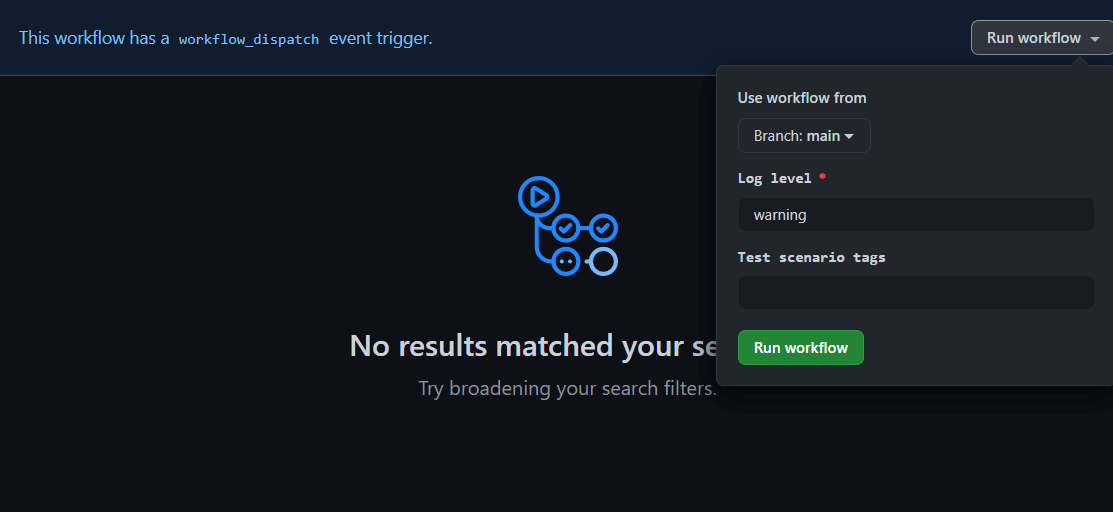
When the workflow above runs, the following dialog pops up.
2. Orchestrating Jobs to Control Execution Order
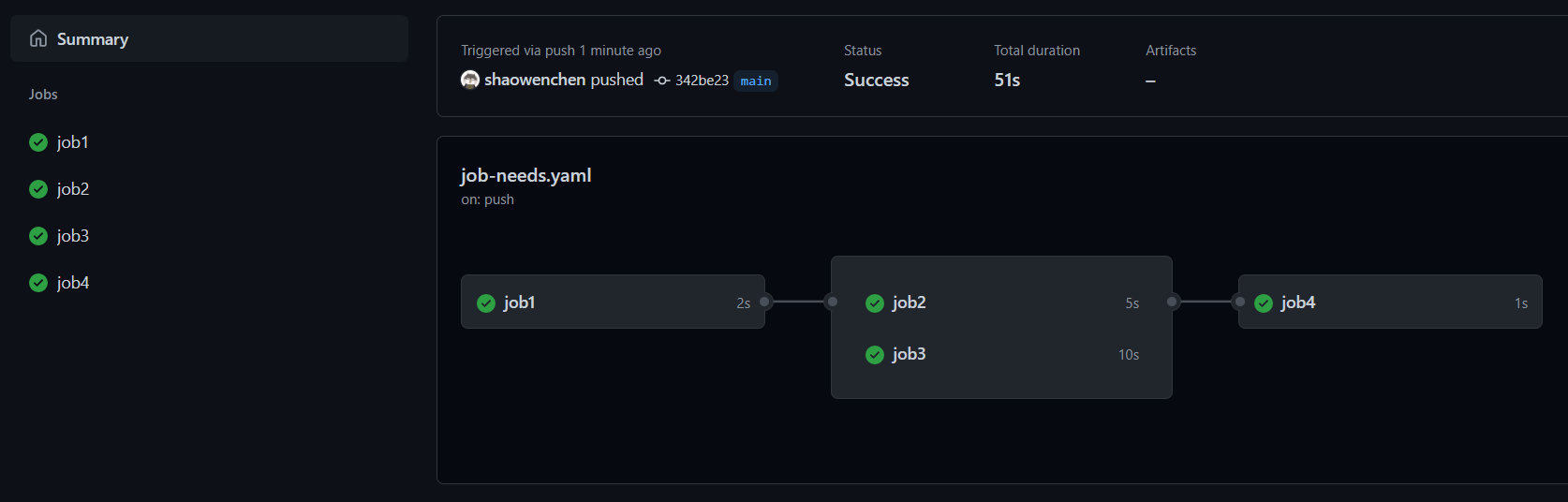
A workflow is made up of many jobs. With the needs parameter, we can manage the dependencies between those jobs and control the execution flow.
| |
When the workflow above runs, job2 and job3 wait for job1 to succeed before executing, and job4 waits for both job2 and job3 to succeed before executing.
3. For Project Management
Kubernetes uses Prow for ChatOps to coordinate orderly collaboration across the community. But not every team is willing to set up and maintain a Prow bot system. The core of ChatOps is event-driven, and that can be implemented in GitHub with Actions too.
Here are a few project-management-related actions.
- Add labels based on the directories that changed
| |
Add a rule in the .github/workflows/labeler.yml config file to automatically add the docs_label label to Pull Requests (hereafter PRs) that modify the docs directory:
| |
- Add Issues to Projects based on labels
Using srggrs/assign-one-project-github-action, we can add newly created Issues or PRs to a specified Project.
| |
You can also add Issues or PRs with a given label to a specific Column of a specified Project.
| |
- Clean up Issues that no one has followed up on for a long time
If an Issue has had no updates for 30 days, the workflow below waits another 5 days and then closes it.
| |
Project management on GitHub revolves mainly around Issues, Projects, Labels, and Pull Requests. You can search the GitHub Actions Marketplace for the relevant Action to use.
4. Online Debugging
While working with GitHub Actions, if you ever need to log in to the Runner to debug commands, this next tip will definitely interest you.
| |
All you need to do is apply for a token on the Ngrok website and you can log in to the Runner remotely over ssh. Of course, you can also expose services on the Runner and get an external access link, valid for up to 6 hours.
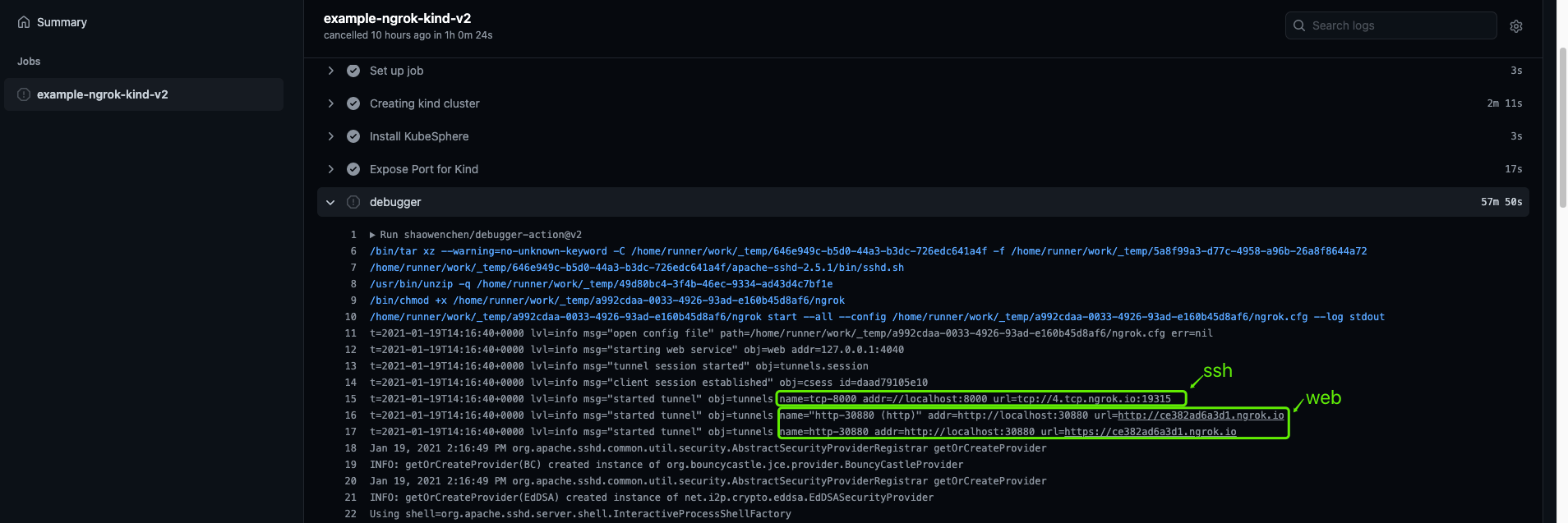
In the execution log we can find the ssh login link and log in to the Runner with root/root. If web port mapping is configured, you can also see the corresponding service links.
5. Setting Up Caches
Caching effectively speeds up builds, reduces network requests, and reuses intermediate artifacts. This is very useful for Java, Nodejs, Python and similar projects.
| |
6. Detecting Broken Links in a Project
Once a project has been maintained for a long time, the most painful part is the documentation. Engineering and testing track code and features, while documentation often goes unupdated by anyone. Poorly maintained docs drive away potential contributors. The following Action detects broken links in documentation.
| |
gaurav-nelson/github-action-markdown-link-check supports custom configuration, is very flexible and easy to use, and is practically a must-have Action.
Below is an example of .github/workflows/checklink_config.json:
| |
Finally, the GitHub Actions log page outputs a check result like this:
| |
7. Batch Job Execution, Running Tasks Across Every Combination of Parameters
In data-driven testing scenarios, the flow of a test can be controlled through input parameters. In GitHub Actions, we can likewise parameterize and batch-execute or orchestrate a flow.
GitHub Actions takes every parameter in the matrix and permutes them, producing a new run instance for each combination.
| |
When the workflow above runs, it executes 6 jobs.
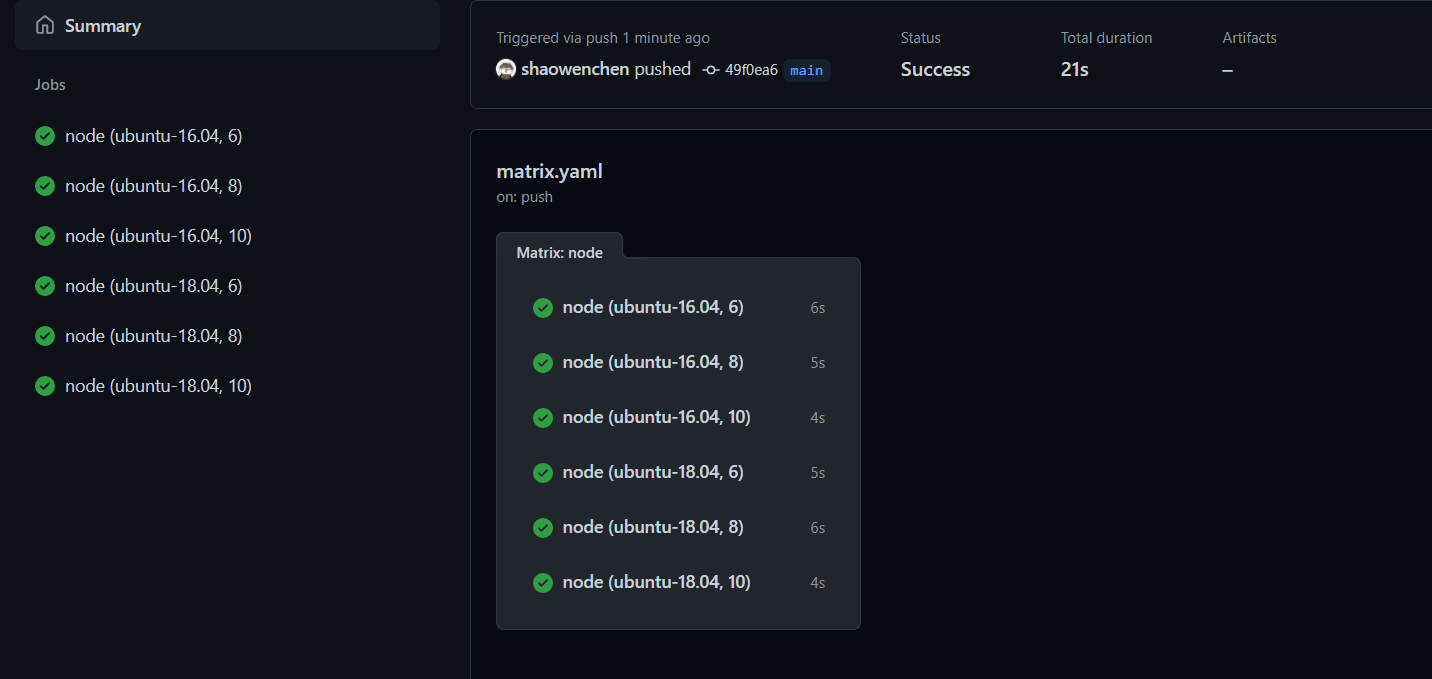
Whether you use it for compatibility testing or for batch job execution, it works very well.
8. Copying an Action’s Badge into Your Documentation
Normally we use GitHub Actions to run code analysis, execute tests, compile, package, build, push images, and so on for a project. These actions are critical to keeping the project stable.
But not everyone pays attention to the details of how Actions run. We can put the final, real-time status of these processes somewhere prominent to remind users and developers. If the main branch build fails, it reminds users to be cautious and reminds engineers to fix the problem soon.
On the GitHub Actions page, click Create status badge.
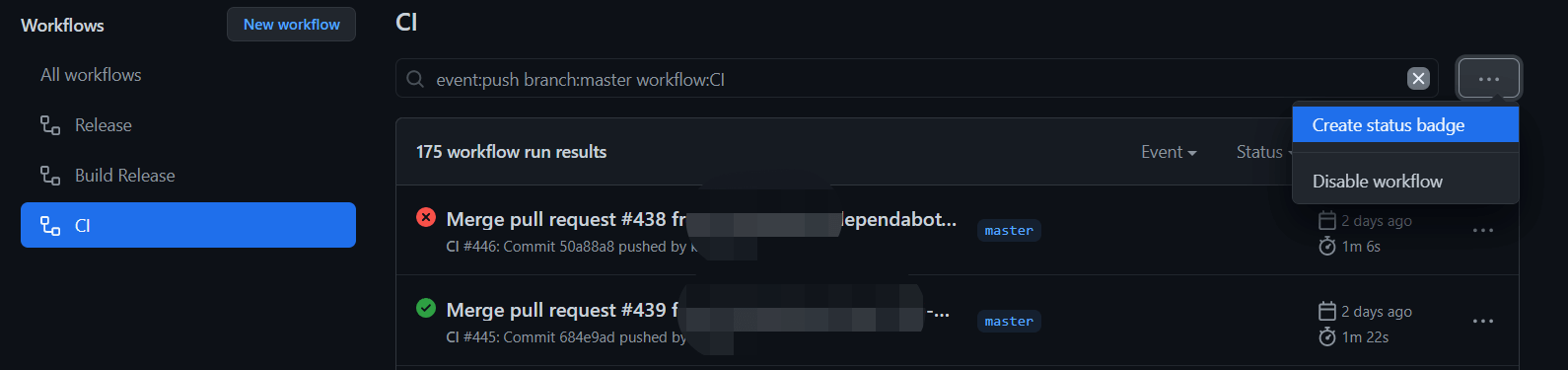
Add the URL link from the dialog to your Readme, and you can see the workflow’s execution result in real time and at a glance.

9. Precisely Hooking Events on GitHub
A workflow defines its trigger conditions through the on keyword. There are mainly three kinds of trigger events:
- Manual trigger
| |
- Scheduled trigger
Trigger the workflows every 15 minutes.
| |
- Webhook trigger
Our operations on GitHub, such as creating Issues or adding a Deployment, are all available as events through the API. With these events we can precisely customize a workflow’s behavior. Usually we trigger on push or pull requests; here are a few less common examples:
Trigger when someone forks the repository
| |
Trigger when someone stars the repository
| |
Trigger when a new Issue is created
| |
10. Writing an Action Is Easy
If you cannot find a suitable Action in the Marketplace, writing your own is a good option too.
In fact, writing an Action is not as hard as you might think. An Action is just a piece of logic: it receives input parameters, executes some logic, and then outputs parameters. There are three types of Action:
- Docker container, for Linux systems
Provide the Action’s logic through a Docker container. For example:
Dockerfile
| |
entrypoint.sh
| |
With the dron-scp image, we quickly built an Action that provides scp file copying.
- JavaScript, for Linux, macOS, and Windows systems
Handle the Action logic by running JavaScript. The official project provides JavaScript and TypeScript Action templates. When creating a project, use the template, then write the logic and publish your own Action.
GitHub Actions provides toolkits that support this kind of extension — executing commands, operating on GitHub, and so on can all be done by referencing a package and calling the relevant functions directly. Here are a few of them:
@actions/exec, run commands
@actions/core, inputs, outputs, logging, secrets
@actions/io, file operations
- Composite run steps, for Linux, macOS, and Windows systems
This type lets you use a series of shell operations as a single Action.
| |
